Blocked, Deactivated or Deleted? What "User Not Found" on Instagram Really Means
Blocked vs deactivated on Instagram: the logged-out profile check, the Deactivated accounts row, DM clues, and why a missing follower is rarely an unfollow.
Someone you follow has vanished. Their name is gone from your list, their profile says "User not found", or it loads but shows no posts. Instagram will not tell you which of three very different things just happened: they blocked you, they deactivated their account, or the account was deleted or suspended. The screens overlap on purpose, but there are reliable ways to tell them apart.
The short version: open their profile in a private browser window where you are not logged in. If it loads normally there but not for you, you are blocked. If it is missing everywhere, the account is deactivated, deleted or suspended, and the "Deactivated accounts" row at the top of your following list can confirm the first of those. Everything else, from DM behaviour to tagged photos, is a supporting clue. This guide walks through each check, in order of reliability.
Why Instagram shows the same screen for different things
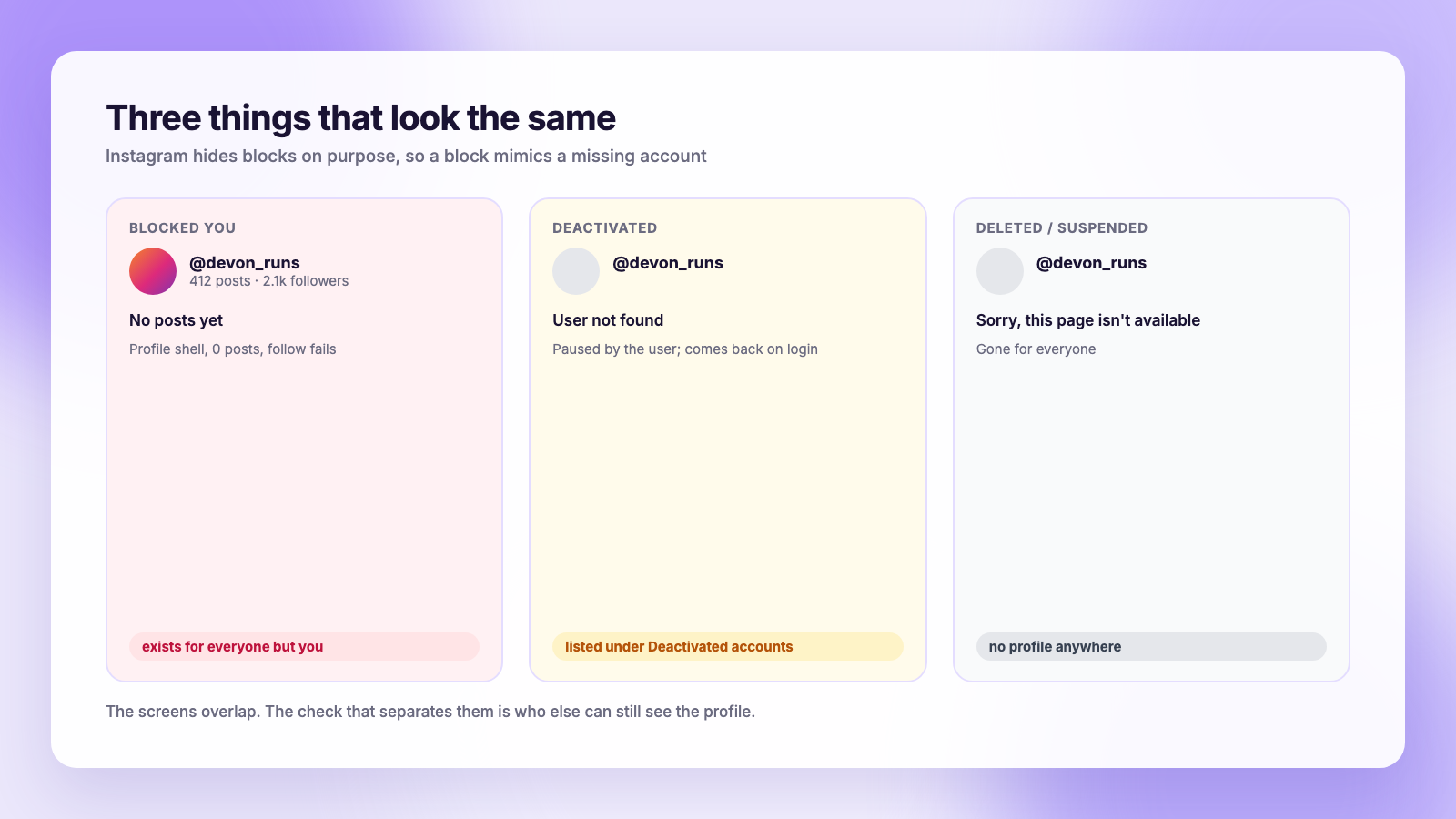
Instagram deliberately avoids telling people they have been blocked. A block is meant to be quiet. So when you look up someone who blocked you, Instagram serves roughly what you would see for an account that no longer exists: a profile that will not load, or one that loads with a zero post count and nothing underneath.
Deactivation is the user's own pause button. The account disappears from search, from follower lists and from DMs, but Instagram keeps the data so it can come back the moment the person logs in. Deletion is permanent. Suspension is Instagram's doing, and the account may or may not return after an appeal.
All four produce a missing profile. The difference is who can still see it, which is the basis of the first check.
Check 1: View the profile while logged out
This is the most reliable test, and it was the top-voted answer in a 261-point r/Instagram thread in May 2026 for good reason.
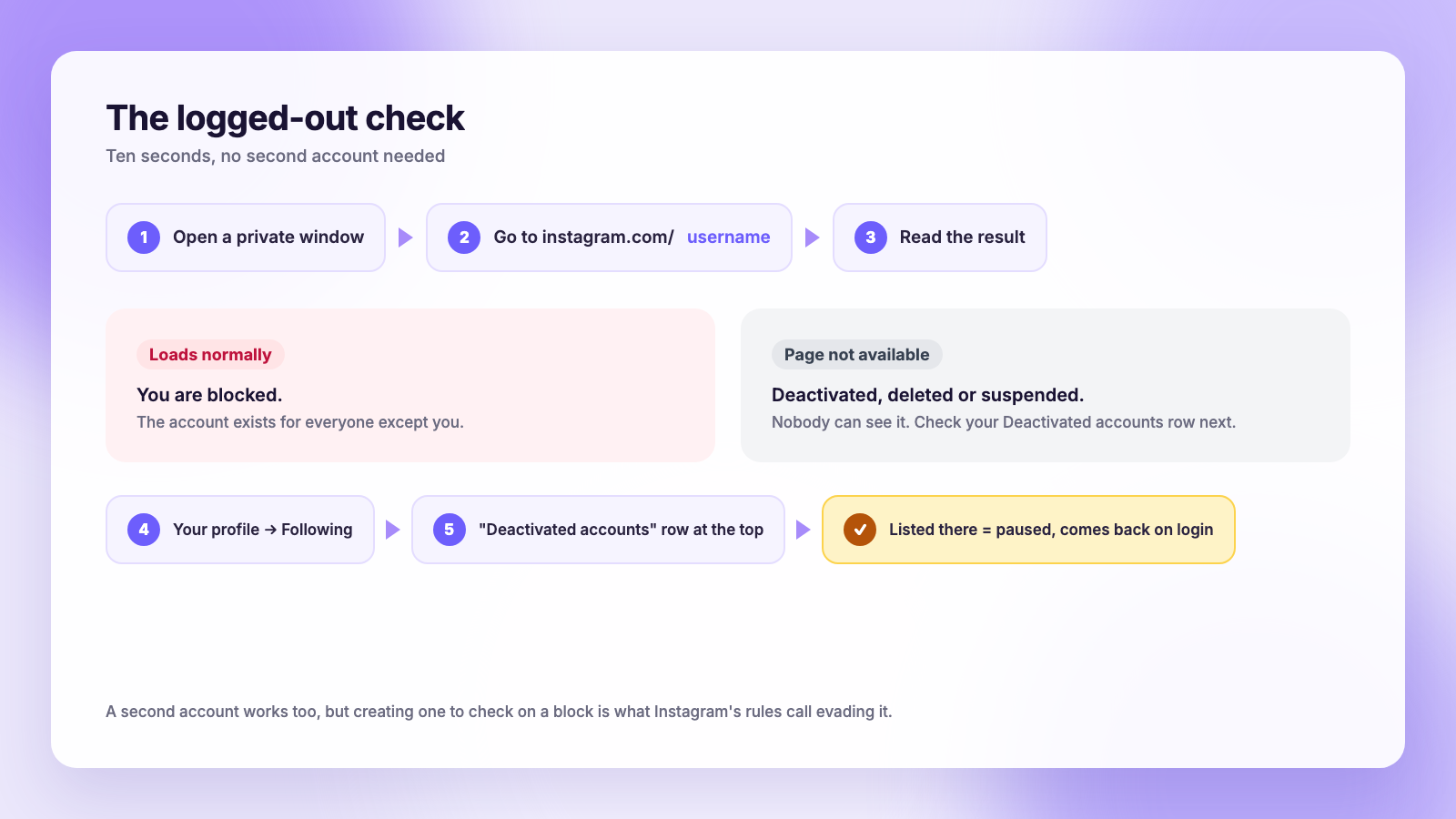
- Open a private or incognito window in any browser, or use a computer where you are not signed in to Instagram.
- Go to
instagram.com/followed by their username. - Read the result.
- The profile loads and looks normal: they blocked you. The account exists for everyone except you.
- "Sorry, this page isn't available": the account is deactivated, deleted or suspended. Nobody can see it, not just you.
A second account works the same way as a logged-out window. If you can see them from a friend's phone but not your own, that is a block. Be careful with this one: creating a throwaway account to check on someone who blocked you is exactly the behaviour Instagram's rules describe as evading a block.
Check 2: The "Deactivated accounts" row
Instagram added a quiet feature that answers the deactivation question directly. Open your own profile, tap Following, and look at the very top of the list. If any account you follow has deactivated, there is a row labelled something like "Deactivated accounts" with a count. Tap it to see who.
If the person you are looking for is in that row, they deactivated. They did not block you, and the account is not deleted. If they are not in that row and you cannot see them logged out either, the account is gone for good or suspended.
Several people in the same Reddit thread pointed to this row as the thing that finally settled their question. Note that it only lists accounts you follow. If you did not follow them, use check 1.
Check 3: What the profile page shows when you are logged in
Less reliable, because Instagram has changed this screen over time and people report both variants for the same situation, but still a clue:
| What you see (logged in) | Most likely | Confirm with |
|---|---|---|
| Profile loads, "No posts yet", counts show 0 or hide | Blocked | Check 1 |
| "User not found" | Deactivated or deleted | Check 2, then check 1 |
| "Sorry, this page isn't available" | Deactivated, deleted or suspended | Check 1 |
| Profile loads normally but you cannot follow | Blocked, or you were removed and they are private | Try following once |
| Profile loads, their stories never appear | Hidden from stories, or muted by you | Settings, not a block |
Deactivated accounts most often produce "User not found". Blocks most often produce a shell profile with zero posts. But people have confirmed blocks that showed "User not found" too, so treat this screen as a hint, never a verdict.
Check 4: DMs, tags and old comments
Blocks leave fingerprints in the parts of the app that already contain both of you.
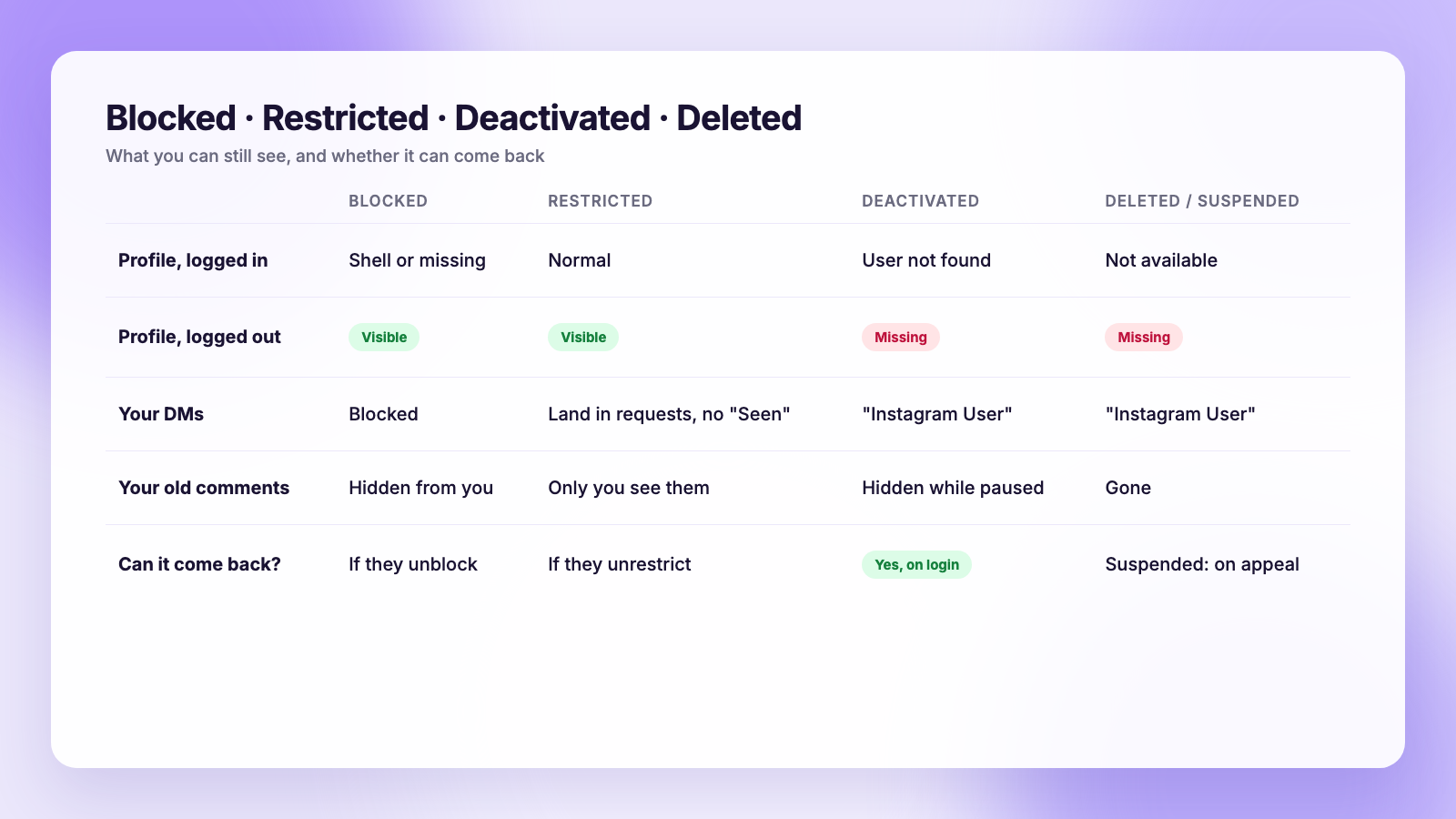
- Direct messages. Open your old conversation. If you are blocked, their name and profile picture may still show but the thread stops accepting messages, and tapping their name leads to an empty profile. If the account is deactivated or deleted, the thread usually shows "Instagram User" in place of the name.
- Tagged photos and comments. Comments and tags from an account that blocked you disappear from your view but remain for everyone else. Comments from a deleted account disappear for everyone. Comments from a deactivated account disappear while the account is paused and return when it reactivates.
- Mutual follows. If you both followed each other and one of you vanishes from the other's list, that happens with all four cases, so a missing follow on its own tells you nothing.
"Instagram User" in a DM thread is the single most common sign of deactivation or deletion, because Instagram has to label the message sender with something.
Restricted is not blocked
Instagram's Restrict feature sits between a mute and a block, and it confuses the picture. If someone restricted you:
- You can still see their profile and posts, logged in or out.
- Your comments on their posts are visible only to you unless they approve them.
- Your DMs land in their message requests, and you never see when they are online or when they have read a message.
So if you can see the profile normally but your comments seem to go nowhere and your messages never get a "Seen", you are restricted, not blocked. There is no logged-out trick for Restrict. It simply looks like silence.
Why a missing follower usually is not an unfollow
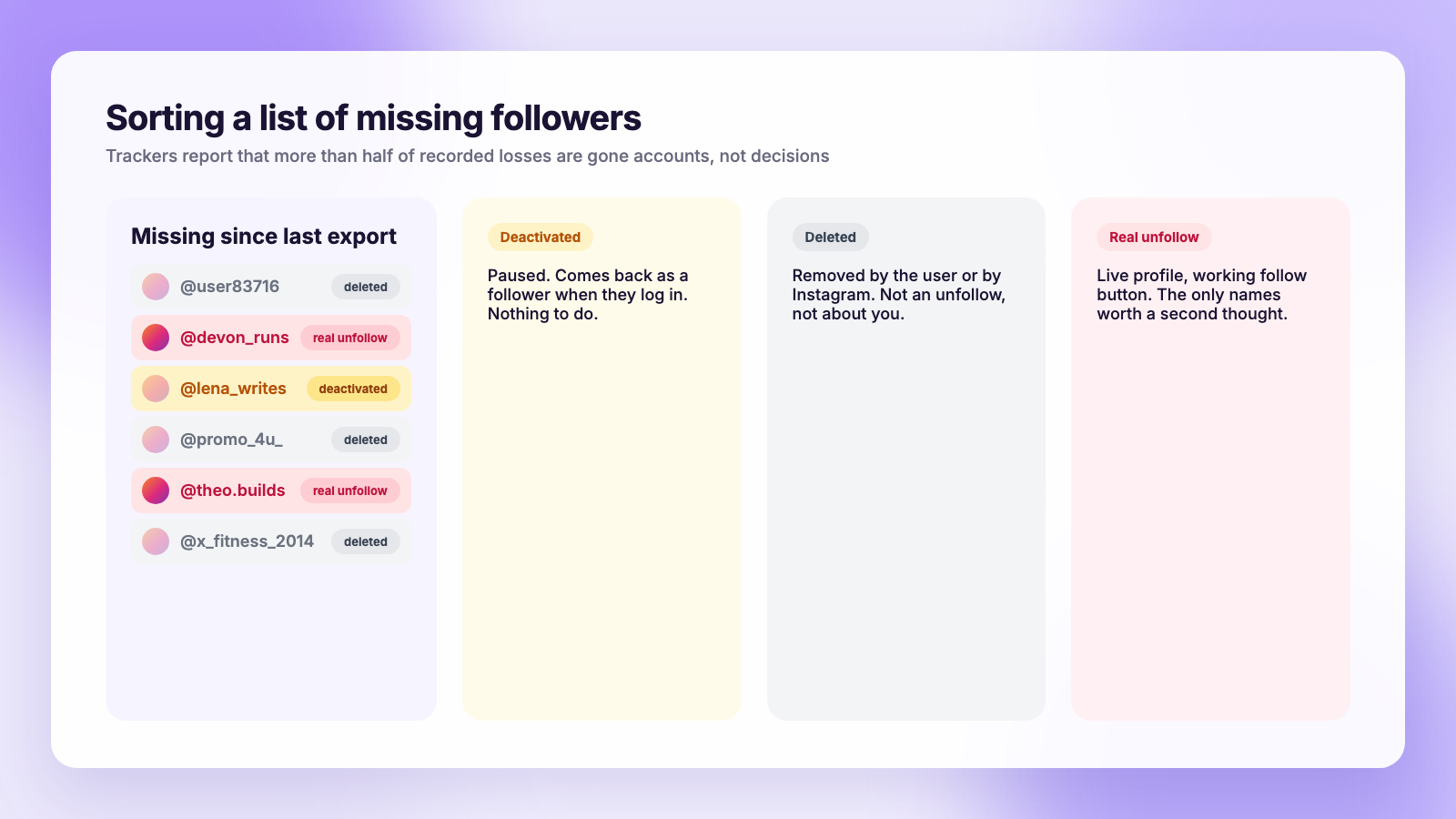
This matters if you got here because your follower count dropped and you are hunting for who left. Tracker services that record follower changes over time report that more than half of the losses they log are accounts that were deleted, deactivated or suspended, not people choosing to leave. One X tracker put the figure above 50% of all recorded losses. Instagram's own periodic purges push the proportion higher on the days they happen, as our guide to sudden follower drops and purges explains.
So the honest workflow when you notice a name is gone:
- Check whether they are in your Deactivated accounts row. If yes, they paused their account, and they will reappear as a follower when they come back.
- Try the logged-out check. A live profile you cannot see means a block. No profile anywhere means the account is gone.
- Only if the profile is live for you, logged in, with posts and a working follow button, did they actually unfollow you.
Instagram never notifies anyone about any of this, in either direction, which our post on whether people get notified when you unfollow covers in detail.
How an export-based tracker labels each case
If you track your followers the safe way, by comparing two copies of your own Instagram data export, the comparison simply lists accounts that were in the older file and are missing from the newer one. It cannot know why, because the export does not say. The guide to seeing who unfollowed you on Instagram shows the method, and downloading your Instagram data covers the export itself.
Plumefy's unfollower tracker works from those exports, uploaded as the zip Instagram emails you, with no password involved. It shows who left between two uploads, who is new and who never followed back. When a username on the "left" list turns out to be deactivated or deleted, that is still a loss to your count, but it is not a decision about you, and the checks above take a minute per name to sort out.
The reason we keep steering people away from login-based apps here is that those apps often produce the very problem they claim to diagnose. The suspicious-login warnings and logouts people report after using them are documented in are Instagram unfollower apps safe, and the browser-extension variants in are Instagram unfollower Chrome extensions safe.
A note on what you do with the answer
Finding out you were blocked rarely changes anything worth doing. Instagram's rules treat creating new accounts to get around a block as harassment, and the block itself is the other person's call. If you run a brand or creator account, the better use of this knowledge is cleaning up your own data: knowing that a chunk of your "lost followers" were deleted accounts tells you your content is fine, and knowing a few were real unfollows after one specific post tells you something useful.
If you post on several platforms, consistency does more for retention than any amount of investigating. Scheduling a week at a time through a tool keeps the feed moving while you look at the numbers. Our Buffer comparison and Publer comparison show how those tools and Plumefy differ for a small account, including the follower tracking that only Plumefy includes.
FAQ
Does "User not found" on Instagram mean I am blocked?
Not reliably. "User not found" most often means the account is deactivated or deleted, but some people see it for blocks too. Open the profile in a private browser window while logged out: if it loads there, you are blocked; if it is missing everywhere, the account is paused or gone.
How do I know if someone deactivated their Instagram?
If you follow them, open your Following list and look for the "Deactivated accounts" row at the top. Their name there confirms deactivation. Their old DM thread will also usually show "Instagram User" instead of their name while the account is paused.
Can I see who blocked me on Instagram?
There is no list. Instagram never notifies you of a block and no app can produce a list of blockers, because the data is not exposed. You can only check one account at a time with the logged-out test.
If someone blocked me, do they still follow me?
No. Blocking removes the follow in both directions. If the block is later lifted, neither of you is automatically re-followed.
The takeaway
One private browser window answers the blocked-or-gone question in ten seconds. The Deactivated accounts row answers the paused-or-deleted question. Everything else is circumstantial. And if you are here because your count dropped, remember that more than half of missing followers are usually gone accounts, not people leaving, which is a much better reason to keep posting than to stop.
Post everywhere, once.
Start on the free plan — no card needed, upgrade when you need scheduling.
Start free