Instagram Data Export Not Working? How to Fix Stuck, Missing or Wrong Follower Files
Instagram data export not working? Fix stuck requests, HTML vs JSON, missing followers_2 files, low counts, the Oct 2025 format change and the recently unfollowed file.
The export-based method for finding Instagram unfollowers has one dependency: the export. And the export is where most people get stuck. The request sits on "in progress" for a day, the email never arrives, the zip opens into a folder of HTML pages instead of data, or the follower count inside is hundreds short of what the app shows. None of those mean the method is broken. They mean one setting or one expectation was off.
The short version for 2026: Request only Followers and following, in JSON, with media quality set to low. Expect hours rather than the 15 minutes it used to take, and up to a few days for a full-account export. Large accounts get several followers files and you need all of them. The "recently unfollowed" file lists accounts you unfollowed, not people who left you. And the counts will sit a little below the app, because pending and deactivated accounts are left out.
Start with the right request
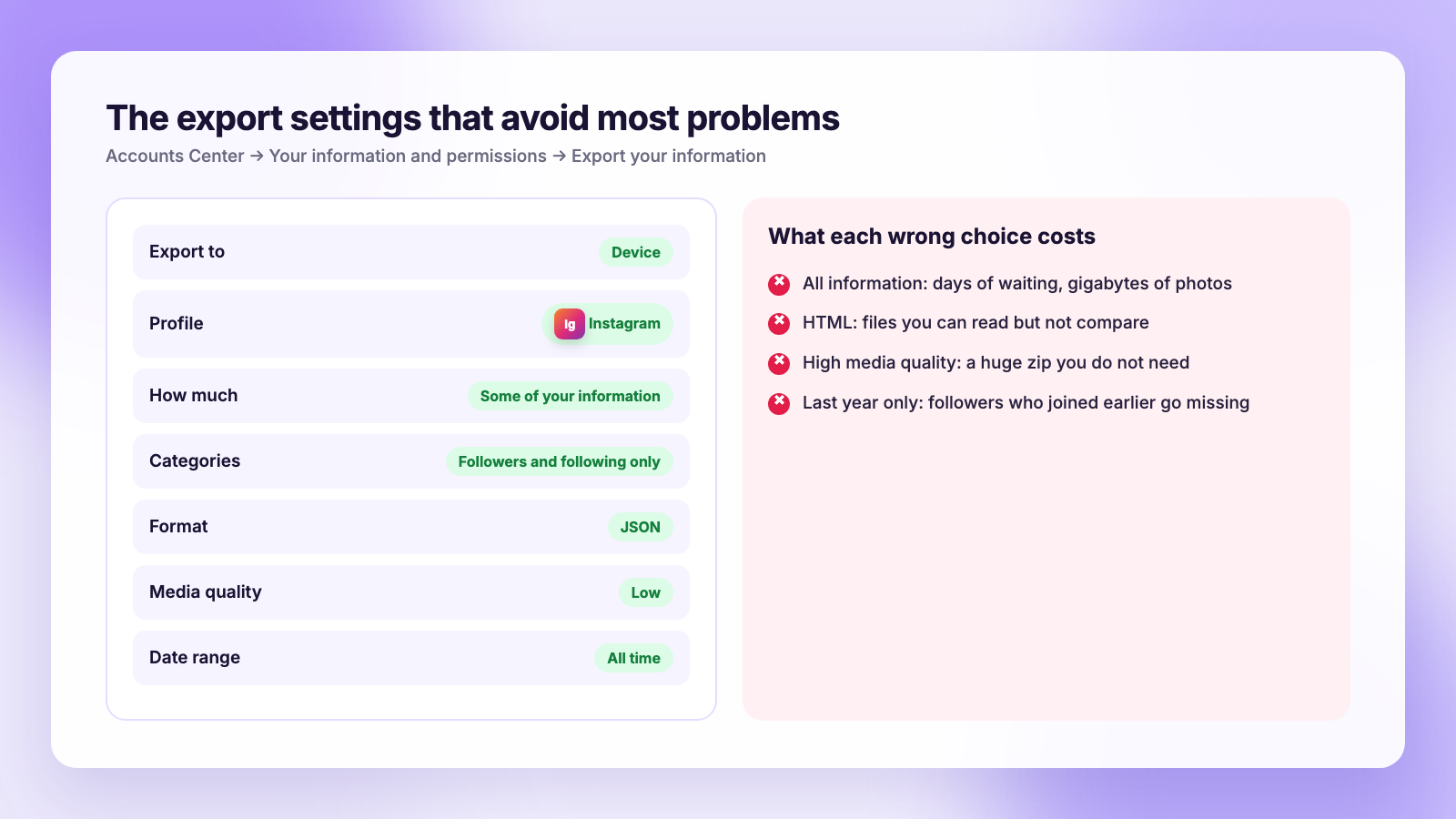
Half of export problems are the request itself. Here is the path as of November 2026; Meta renames things, so follow the sequence if a label differs.
- Open your profile, tap the menu, then Accounts Center (newer versions say Meta Account).
- Tap Your information and permissions, then Export your information. Older versions say Download your information.
- Choose Export to device, then select your Instagram profile.
- Choose Some of your information, not all of it. Tick Followers and following only.
- Set format to JSON, media quality to Low, and date range to All time.
- Submit, then wait for the email or the notification in the same screen.
Each of those choices fixes a specific problem, which the rest of this guide walks through. The full walkthrough with every screen is in our guide to downloading your Instagram data.
Problem 1: The export is stuck or taking forever
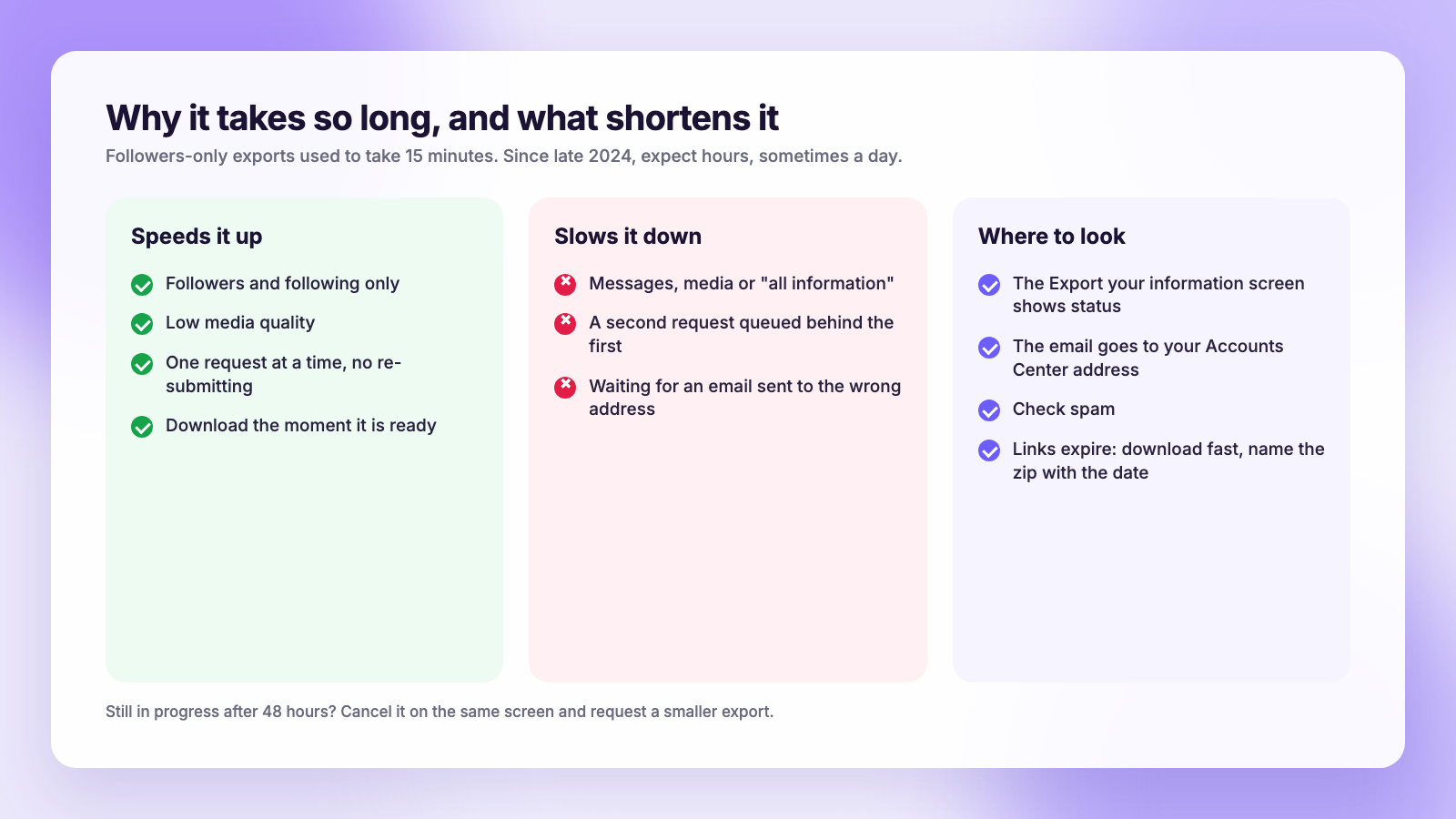
A followers-only export used to be ready in about 15 minutes. Since late 2024, people on r/Instagram have consistently reported that the same request takes hours, and sometimes more than a day, even for a small account. A full-account export, with every photo and message, can take several days.
What helps:
- Request less. Followers and following only. Every extra category, especially messages and media, adds to the wait.
- Low media quality. Even with followers only, leaving quality on high makes Meta package files you do not need.
- Do not re-request. Submitting again does not speed things up and may queue a second export behind the first. Check the Export your information screen; a pending request shows there with its status.
- Check the email address. The notification goes to the address on your Accounts Center profile, which may not be the one you expect, and it lands in spam often enough to be worth a look.
- Give it 48 hours before assuming it failed. If the status still shows in progress after that, cancel it on the same screen and request a smaller export.
Problem 2: The download link expired
Export links are valid for a limited time, and the zip is only downloadable from the Export your information screen while logged in. If you opened the email days later and the link is dead, request again. Download it the moment it is ready, and rename the zip with the date, for example ig-followers-2026-11-03.zip, because the date is what turns two exports into an unfollower list.
Problem 3: The files are HTML, not data
If you open the zip and see pages that look like a website, you exported in HTML. The HTML version is fine for reading your own lists on screen and useless for comparison. The two files are formatted differently, with the following list wrapping each username in a separate link, which is what broke the old copy-into-a-list-comparison-site trick in October 2025. Several Reddit threads from that month describe the "differences" between the lists suddenly being every single line.
The fix is to request again in JSON. JSON files hold each follower as a record with the username, a profile link and a timestamp, and every tool that compares exports expects that format. If you already have an older JSON export, keep it; a JSON and an HTML export cannot be compared to each other.
Problem 4: The follower count is lower than the app
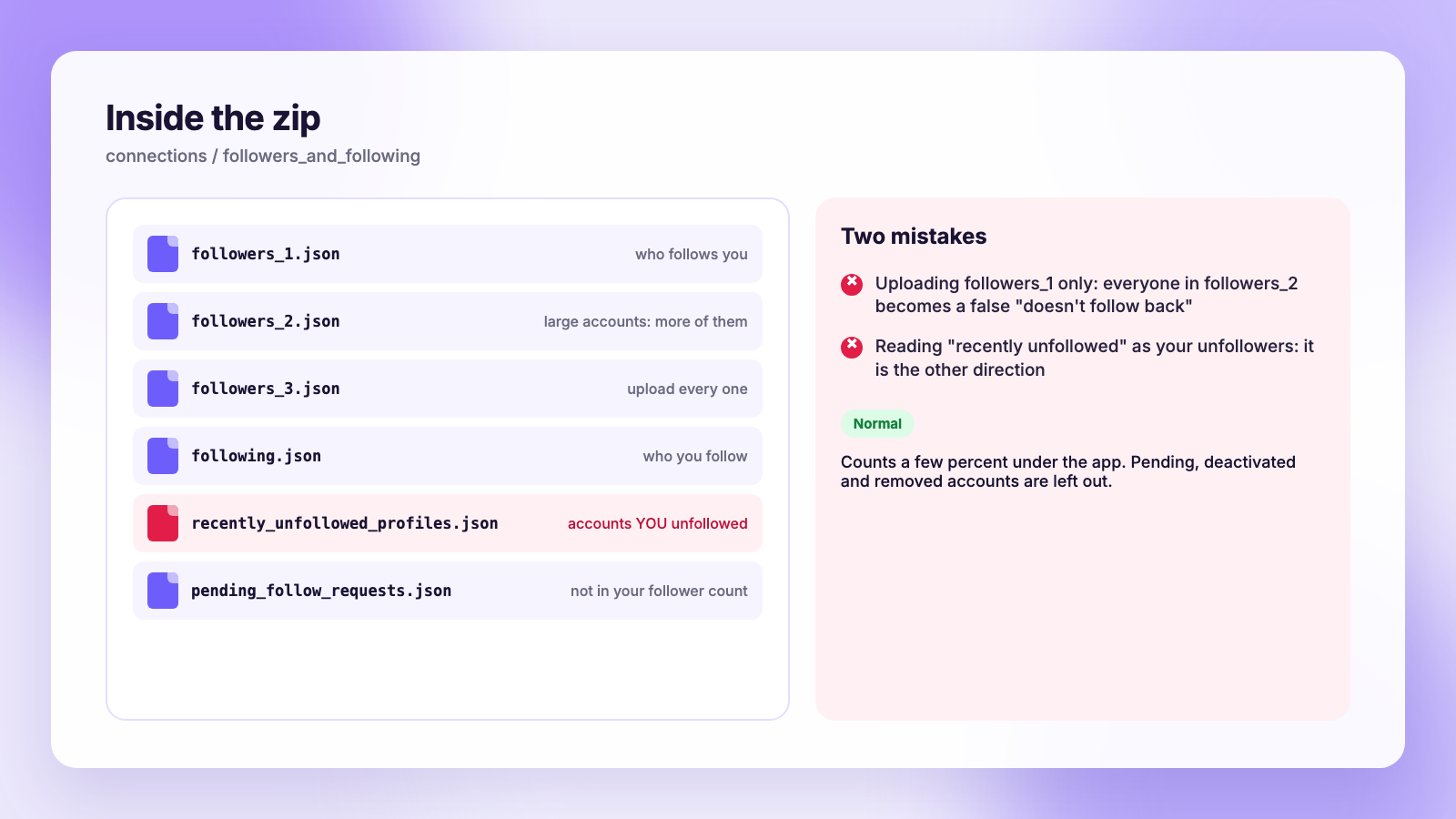
Open followers_1.json and count the entries, and you will usually get a number a little below your profile. That is expected. The export leaves out follow requests that are pending on a private account, accounts that have been deactivated, and accounts Instagram has removed. It also lags the live list by a day or so.
A difference of a few percent is normal. A difference of half is problem 5.
Problem 5: You only got part of the list
Instagram splits large follower lists into several files: followers_1.json, followers_2.json and so on, each holding a few thousand records. The following.json file is usually a single file. If you upload only followers_1 to a comparison tool, every follower in the other files shows up as "doesn't follow you back", and your unfollower list is garbage.
Check the folder, connections/followers_and_following, and count the followers files. Upload all of them, or if your tool takes the whole zip, upload the zip rather than picking files out of it. Plumefy's unfollower tracker reads the entire zip for exactly this reason.
Problem 6: "Recently unfollowed" is backwards
The export often includes a file with "recently unfollowed" in its name. It is tempting to treat it as the answer. It is not. That file lists accounts you unfollowed recently. Instagram keeps no list of people who unfollowed you, in the export or anywhere else.
The only way to get that list is two exports from different dates: anyone in the older followers files who is missing from the newer ones left in between. Our main guide to seeing who unfollowed you on Instagram walks through the comparison, and if you want a tool to do it, our guide on using ChatGPT to compare the files shows the prompt that works.
Problem 7: The comparison tool says the file is invalid
Three usual causes, in order of frequency:
- HTML export. See problem 3.
- Old tool, new format. Meta changed the export structure in October 2025 and many hobby tools and browser bookmarklets stopped parsing it. If a tool was last updated before then, it may fail on a current export. Look for one that mentions the current format or accepts the whole zip.
- Renamed or re-zipped files. Some tools look for the exact folder path inside the zip. Upload the original zip rather than a folder you re-compressed.
A tool that asks you to log in "because the export didn't work" is not a fix, it is the risk you were avoiding. Our guide to unfollower Chrome extensions and scripts explains why.
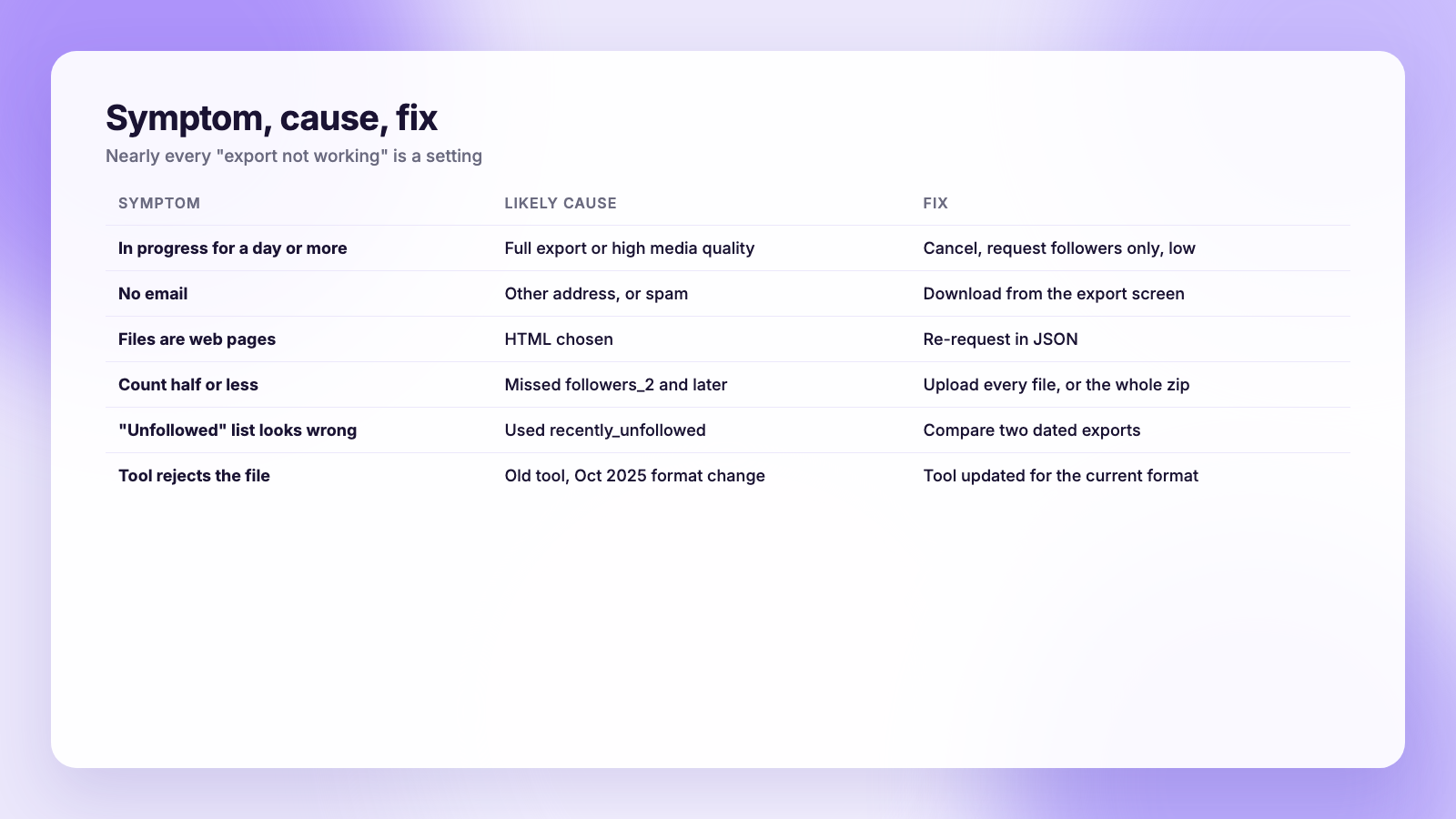
| Symptom | Likely cause | Fix |
|---|---|---|
| In progress for more than a day | Full export or high media quality | Cancel, request followers only, low quality |
| No email | Different address or spam | Check Accounts Center email and spam; download from the export screen |
| Files are web pages | HTML format chosen | Re-request in JSON |
| Count a few percent low | Pending and deactivated accounts excluded | Normal, ignore |
| Count half or less | Missed followers_2 and later | Upload every followers file or the whole zip |
| "Unfollowed" list looks wrong | Used the recently unfollowed file | That is who you unfollowed; compare two exports instead |
| Tool rejects the file | Old tool, Oct 2025 format change | Use a tool updated for the current format |
Problem 8: Two exports, same day, different results
If you compare two exports taken close together and see dozens of "unfollowers", check the dates on the entries before reacting. The export is generated from a snapshot that can lag, and a small batch of accounts disappearing at once often means Instagram removed them, not that people left. Our post on sudden Instagram follower drops covers the platform-wide purges that produce that pattern, and our guide to why you are losing followers covers the slower kind.
Make the next export painless
- Keep a folder of dated zips. Three or four exports a year is enough for most accounts.
- Always JSON, always followers only, always low quality.
- Upload the whole zip to your tracker rather than picking files.
- Do the TikTok export the same day if you run both; Plumefy reads both, and our guide to downloading your TikTok data has that path.
And keep posting on a schedule while you wait for the export. If you are choosing a scheduler, see how Plumefy compares with Buffer and Publer on Instagram, TikTok and Threads, where per-channel pricing adds up fastest.
FAQ
How long does an Instagram data export take in 2026?
Followers-only exports are usually ready within hours, though reports of a day or more are common. Full-account exports can take several days. Instagram does not publish a time.
Why does my Instagram export not include who unfollowed me?
Instagram keeps no history of lost followers. The export contains your current followers only. Compare two exports from different dates to see who left in between.
Should I choose JSON or HTML?
JSON. HTML is for reading on screen and cannot be compared reliably; JSON is what every comparison tool, spreadsheet workflow and tracker expects.
Why is my exported follower count lower than my profile?
The export excludes pending follow requests, deactivated accounts and accounts Instagram removed, and it lags the live list slightly. A few percent lower is normal.
The bottom line
Nearly every "export not working" problem is a setting: JSON, followers only, low media quality, patience, and every followers file uploaded together. Get those right once, name the zip with the date, and the next export is a two-minute job that turns into a real unfollower list the moment you have two of them.
Post everywhere, once.
Start on the free plan — no card needed, upgrade when you need scheduling.
Start free