Instagram Followers Dropped Suddenly? What a Purge Is and What to Do
Instagram followers dropped suddenly? It is usually a purge, like the May 6, 2026 sweep that cut about 2% from every account. Purge vs real unfollows explained.
You open Instagram and the number is wrong. Forty followers gone in an hour, or four hundred, or two thousand overnight, with no post that could have caused it. The first instinct is to assume you did something, or that a group of people quietly turned on you. Most of the time neither is true.
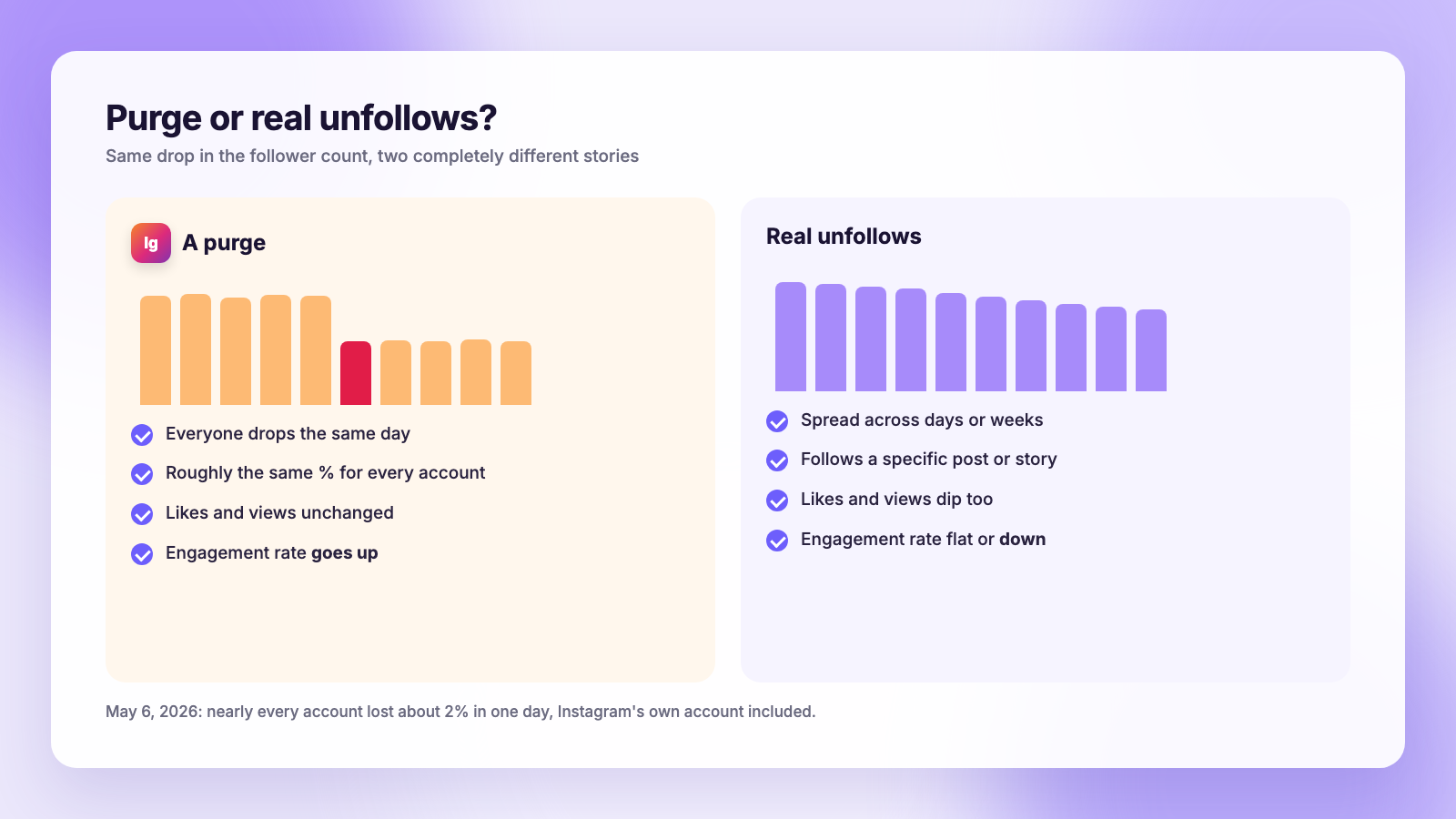
The short version: when follower counts drop sharply across many accounts on the same day, Instagram is removing accounts, not people unfollowing you. These sweeps are called purges. The biggest one in recent memory hit on May 6, 2026, when nearly every account lost about 2% of its followers at once, including Instagram's own. A purge needs no fix. A slow daily bleed is a different problem with a different cause, and this guide shows you how to tell the two apart and what to do about each.
What happened on May 6, 2026
On May 5, 2026, Meta announced an AI-based age detection system that scans content and behaviour to identify underage users. The next day, follower counts fell across the platform. People who track large accounts reported drops of roughly 2% almost everywhere they looked, and the biggest profiles lost followers by the million. Instagram's official account was not exempt.
r/Instagram filled up within the hour. "Sudden follower drop?" asked someone managing a brand account that lost 40 followers in sixty minutes. Another person watched their count glitch between 15,000 and 14,600 before settling on the lower number. Someone else lost 2,000 overnight. One commenter mentioned that an old account they had not logged into since 2014 was suspended the day before, which is a useful clue about what was being removed.
The pattern is the point. When your drop happens on the same day as everyone else's, in roughly the same proportion, you are looking at Instagram removing accounts from the platform. Those accounts stopped existing, so they stopped following you. Nobody made a decision about your content.
Why Instagram runs purges
Instagram does not announce purges, but the categories of accounts it removes are well understood from Meta's own policy pages and from what disappears each time:
- Inactive accounts. Profiles that have not logged in for years. The 2014 account suspended on May 5 fits this bucket.
- Bot and spam accounts. Fake profiles created to inflate counts, run engagement pods, or sell followers. When a seller's network is taken down, every account it followed loses that chunk at once.
- Underage accounts. The May 2026 sweep came the day after the age detection announcement, and followed the EU's Digital Services Act ruling in late April and Australia's under-16 rules. Accounts flagged as belonging to children were removed or restricted.
- Policy violations in bulk. Periodic sweeps of accounts that broke community guidelines, including impersonation and repeated spam.
Removals in the thousands or millions happen on Meta's schedule, not yours. There is no way to predict the next one, which is why the dated export step at the end of this guide matters.
Purge or real unfollows? Five tells
A purge and a wave of real unfollows look identical in the follower count. They look different everywhere else.
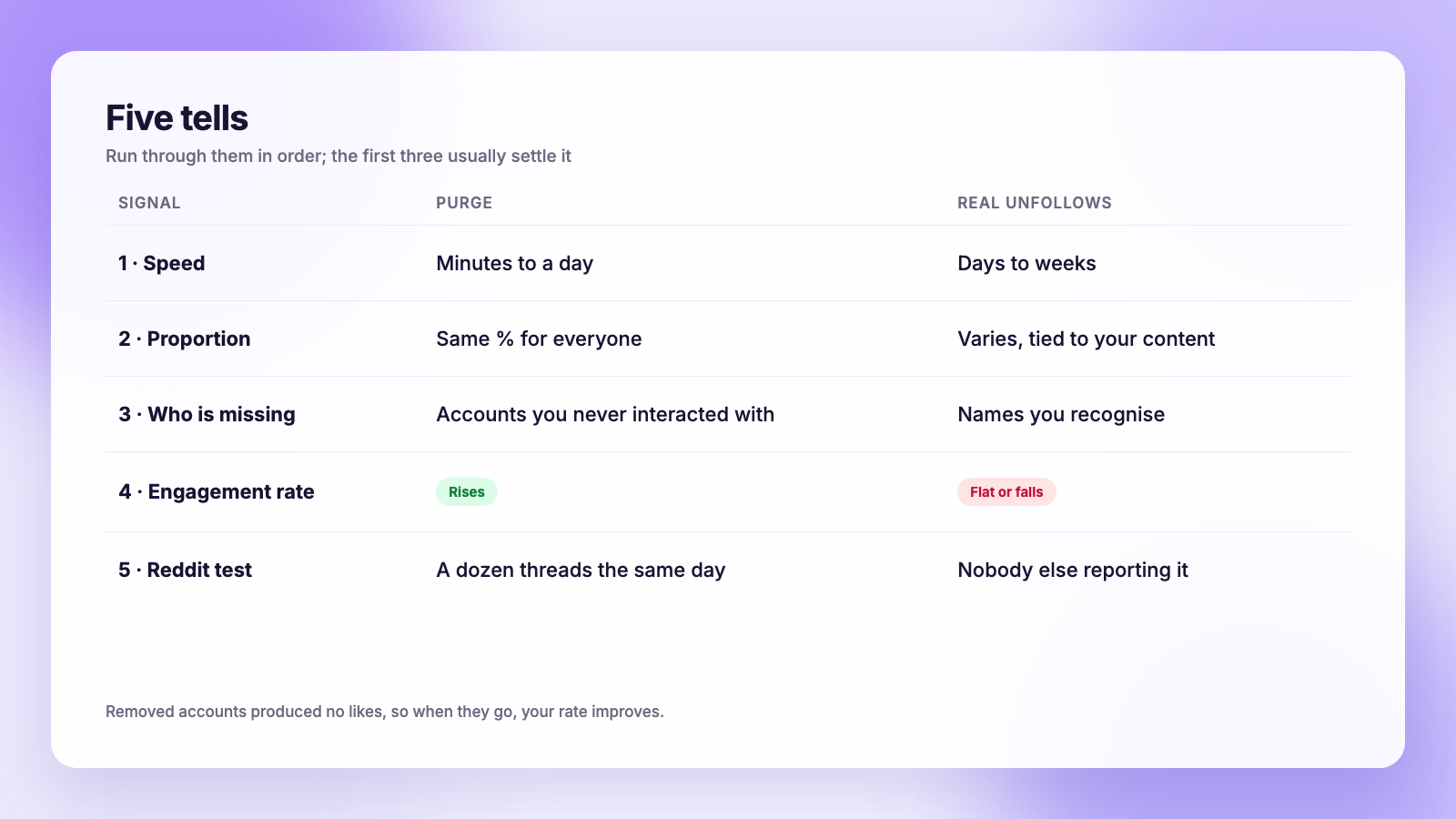
- Timing. A purge lands in minutes or hours, usually within a single day. Real unfollows spread across days and tend to follow a specific post or story.
- Proportion. Purges scale with account size. A 2% sweep takes 20 from a thousand-follower account and 200,000 from a ten-million one. Real unfollows do not scale that neatly.
- Who left. Open your follower list and look at the accounts you can still see. After a purge the people you actually know are all still there. After real unfollows, names you recognise are missing.
- Engagement rate. Removed accounts were not liking or watching anything. When they go, your likes and views stay the same while your follower count shrinks, so your engagement rate goes up. Real unfollows usually come with a dip in engagement too, because the people leaving were once engaged.
- The Reddit test. Search r/Instagram for "followers dropped" with today's date. If there are a dozen threads from the last few hours, it is a purge. This is unscientific and it works every time.
| Signal | Purge | Real unfollows |
|---|---|---|
| Speed | Minutes to a day | Days to weeks |
| Proportion | Roughly the same % for everyone | Varies, tied to your content |
| Engagement rate | Rises | Flat or falls |
| Who is missing | Accounts you never interacted with | Names you recognise |
| Other people reporting it | Yes, the same day | No |
| What to do | Nothing | Look at the last few posts |
The slow bleed is a different problem
Not every drop is a purge. A food and deals account on r/InstagramMarketing described losing about 2,000 followers over a couple of weeks with no single bad day. That is churn, and it has its own well-known shape.
People follow deal, giveaway and freebie accounts for one specific thing. Once they have it, or once the giveaway ends, they leave. The same happens to accounts that grow through viral posts outside their niche: the viral post brings people who wanted that one post, not the account. Growth from follow-for-follow routines has the worst retention of all, because the people who followed back never wanted your content in the first place.
If your drop is gradual and your engagement is sliding with it, the purge explanation does not apply. Our guide to why you are losing followers on Instagram walks through the usual causes, and follower growth: what is normal gives benchmarks so you can tell healthy churn from a real problem.
What to do after a purge
Nothing drastic. That is the honest advice, and it is also what the most upvoted replies on May 6 said.
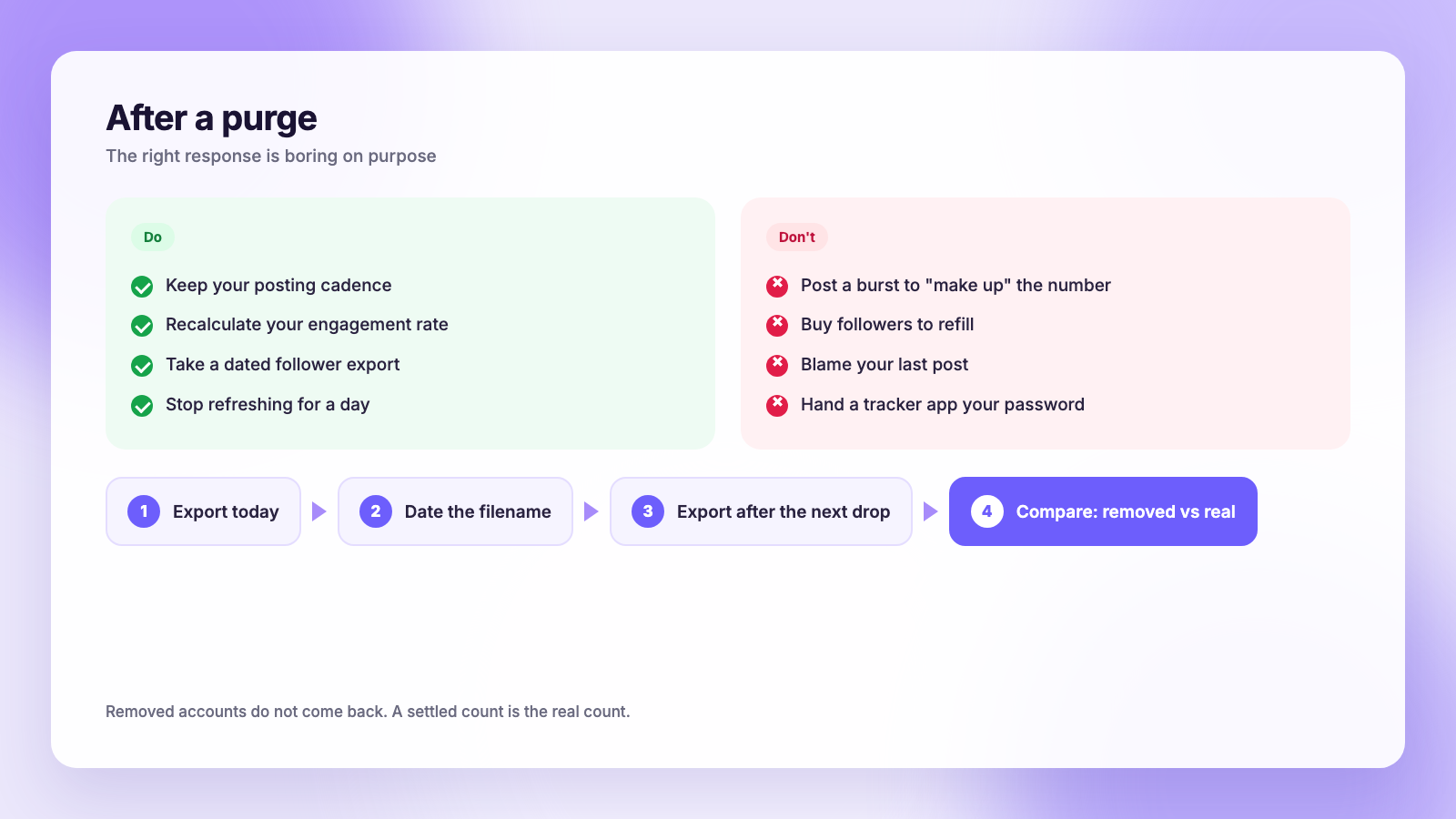
- Keep your cadence. Posting more to "make up" the number does not bring removed accounts back, and a sudden burst of posts can hurt reach on its own.
- Do not buy followers to refill. The accounts you buy are exactly the kind the next purge removes, and the sweep may take real followers from the same seller network.
- Recalculate your engagement rate. It just went up. If you pitch brands, that number is now more honest than it was last week.
- Stop checking for a day. Counts can glitch during a sweep, bouncing between the old and new numbers for hours. The figure settles.
The one thing worth doing today: take a dated export
The reason purges feel so unsettling is that you cannot see who left. Instagram only shows your current followers, never the ones that disappeared. The fix is to have a copy of your follower list from before the drop, so next time you can compare.
Instagram gives you that list for free. The steps are in our guide to downloading your Instagram data, and the short form is:
- Open your profile, tap the menu, then Accounts Center.
- Tap Your information and permissions, then Export your information.
- Choose your Instagram profile, then Some of your information, and tick only Followers and following.
- Set the format to JSON and the date range to All time.
- When the email arrives, download the zip and put today's date in the filename.
Do this once a month, or the day before anything you expect to be controversial. The next time your count drops, export again and compare the two files. Accounts in the old list and missing from the new one are the ones that left. Open a few of their profiles: "User not found" means the account was removed, which confirms a purge. A live profile means a real unfollow. Our guide to blocked, deactivated or deleted explains how to read each case.
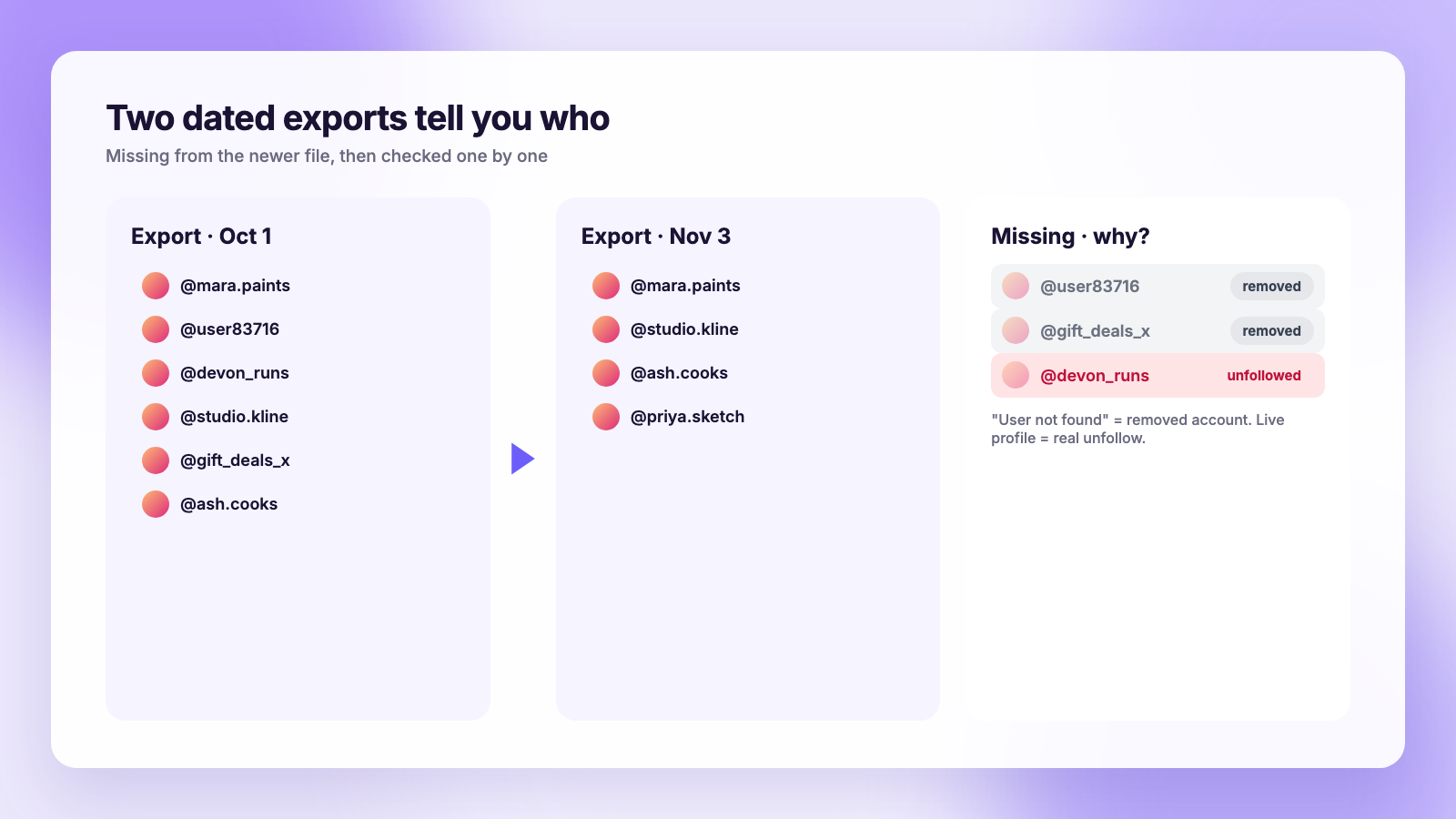
If you would rather not do the comparison in a spreadsheet, Plumefy's unfollower tracker takes the zip you just downloaded and does it for you. Upload an export, upload the next one, and it lists who unfollowed, who is new, and who never followed back. It works from the file Instagram gave you, never from your password, which is the only approach we recommend after seeing what login-based apps do to accounts. The full method, including how to see who unfollowed you on Instagram without any app, is in how to see who unfollowed you on Instagram.
Where scheduling fits in
The accounts that ride out purges best are the ones that keep publishing at the same rhythm, because the algorithm is scoring the content people watch and save, not the follower total. A scheduler helps here in a boring, practical way: your next two weeks of posts are already queued, so a bad number on a Tuesday morning does not turn into a skipped week.
If you are choosing one, our Buffer comparison and Publer comparison cover how each tool handles Instagram alongside the other platforms, and where Plumefy differs on pricing and the built-in follower tracking that those tools do not have.
FAQ
Did Instagram delete my followers?
If your count fell sharply on the same day many other people reported a drop, yes: Instagram removed accounts from the platform and they stopped counting as your followers. The May 6, 2026 purge took roughly 2% from almost every account. You did not lose real people.
Why did my follower count go down but my likes stayed the same?
Because the removed accounts were never liking anything. Purges take inactive, fake and policy-breaking accounts, which produce no engagement. Your real audience is intact, which is why engagement rate rises after a sweep.
How can I see which accounts were removed?
Only by comparing a follower list from before the drop with one from after. Instagram keeps no history. Export your followers and following from Accounts Center today, and again after the next drop, then compare the two files yourself or with an export-based tracker.
Will the followers come back?
Removed accounts do not return. Occasionally a count glitches during a sweep and bounces back up within hours, but once the number settles, that is the real figure. If a real person was suspended by mistake and appeals successfully, they return as a follower when their account is restored.
The takeaway
A sudden drop on a busy day is Instagram cleaning house, and the right response is to do nothing. A slow leak is about your content and audience, and the right response is in your last ten posts. The thing that separates the two with certainty is a dated follower export, which takes five minutes and costs nothing. Take one today.
Post everywhere, once.
Start on the free plan — no card needed, upgrade when you need scheduling.
Start free