How to See Who Unfollowed You on Twitch in 2026
Who unfollowed you on Twitch? Twitch keeps no unfollow history. The three honest ways to find out in 2026, how to spot a bot purge, and which trackers are safe.
Your Twitch follower count was 1,284 last night and it is 1,261 this morning. Nothing in the Creator Dashboard explains it. No alert, no "these people left" screen, no history tab. That silence is why "who unfollowed me on Twitch" gets typed into Google so often, and why most of the answers you find are either a YouTube video about a streamer drama or a tool that wants your login.
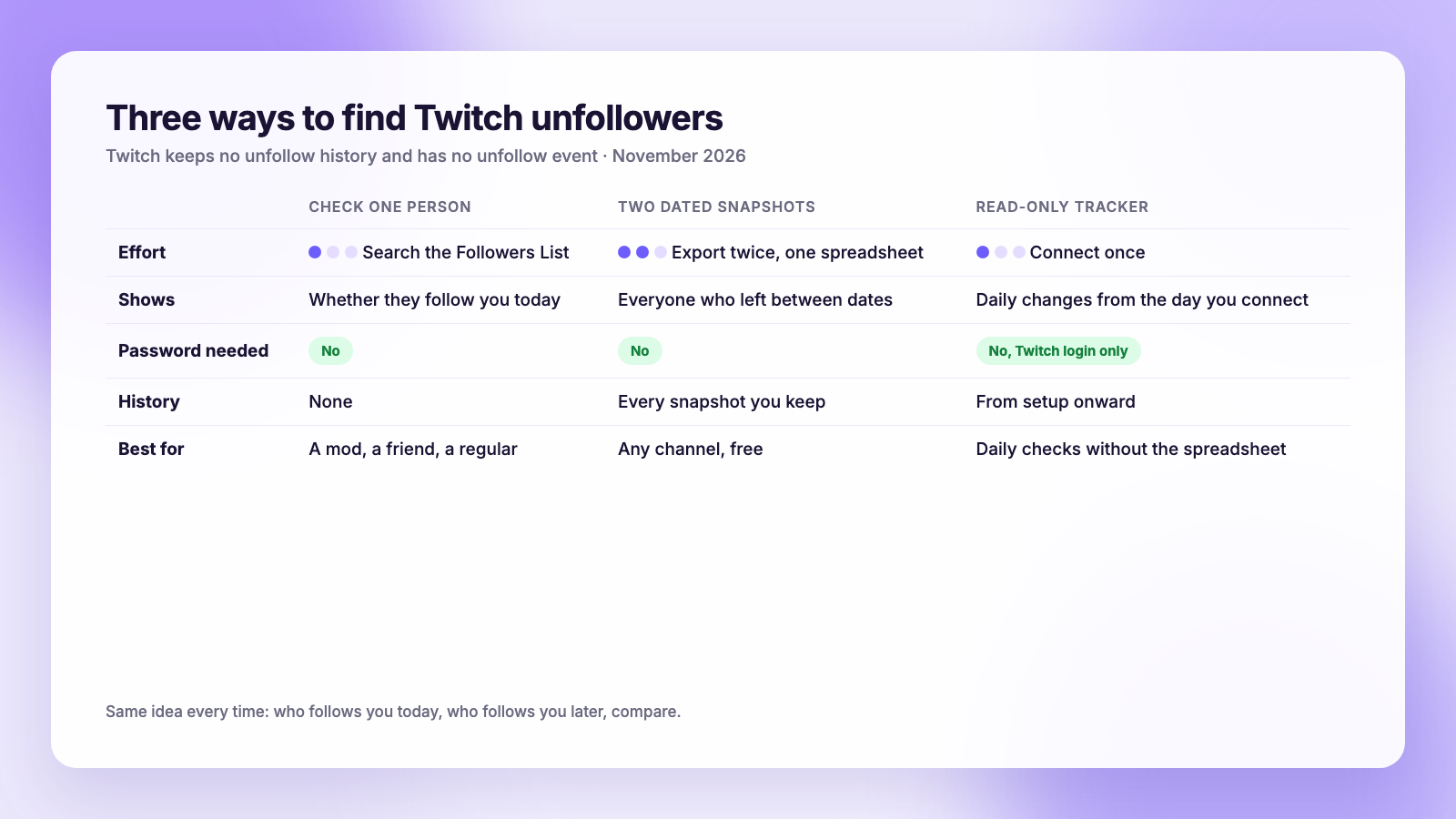
The short version for 2026: Twitch does not record who unfollowed you, and it never has. The Creator Dashboard shows who follows you right now, Twitch's API tells apps about new follows but has no unfollow event, and no export contains past followers. The only honest method is the same one that works on every platform: save your follower list today, save it again later, and compare. This guide walks through that, how to check one specific person, how to tell a bot purge from real unfollows, and which trackers are safe to connect.
What Twitch shows you, and what it does not
Twitch is more open than Instagram or TikTok about who follows you, and more closed about who leaves. Here is where the lines sit as of November 2026.
You can see:
- Your current follower list. Open the Creator Dashboard, go to Community, then Followers List. Every account that follows you right now is there, newest first, with the date they followed.
- Your follower count over time in the Channel Analytics charts. That is a net number, so 20 new follows and 25 unfollows shows as "minus 5" with no names attached.
- New follows as they happen, through the activity feed and the follower alert on your stream.
You cannot see:
- A list of accounts that used to follow you and stopped.
- When a specific account unfollowed.
- Any notification when someone leaves. Twitch does not tell you, and it does not tell them when you unfollow either.
The developer side matches. Twitch's Helix API lets a broadcaster, or a moderator the broadcaster authorizes, read the current follower list. EventSub, the system apps use to get live updates, fires a channel.follow event for new follows. There is no channel.unfollow. So any tool that shows you unfollowers has to build its own history by reading your follower list repeatedly and noticing what changed. Nothing is "looking up" an unfollow log, because Twitch does not keep one.
That last point explains the whole guide. Every method below, by hand or with a tool, is a snapshot taken today and compared with a snapshot taken later.
Method 1: Check one person
If you are wondering about a particular viewer, mod or friend, you do not need any tool.
- Open the Creator Dashboard and go to Community → Followers List.
- Use the search box at the top of the list and type their username.
- If they appear, they still follow you. If they do not, they either unfollowed, got suspended, or deleted their account.
Twitch gives no way to tell those three apart from your side. If their channel page still loads normally, they are still on Twitch and chose to leave. If it shows an error, the account is gone or suspended, and that is not an unfollow in any meaningful sense.
This is fast and accurate for a handful of names. It does not scale. Past a few hundred followers you will not remember who was there last week, which is what the next method fixes.
Method 2: Save two snapshots and compare them
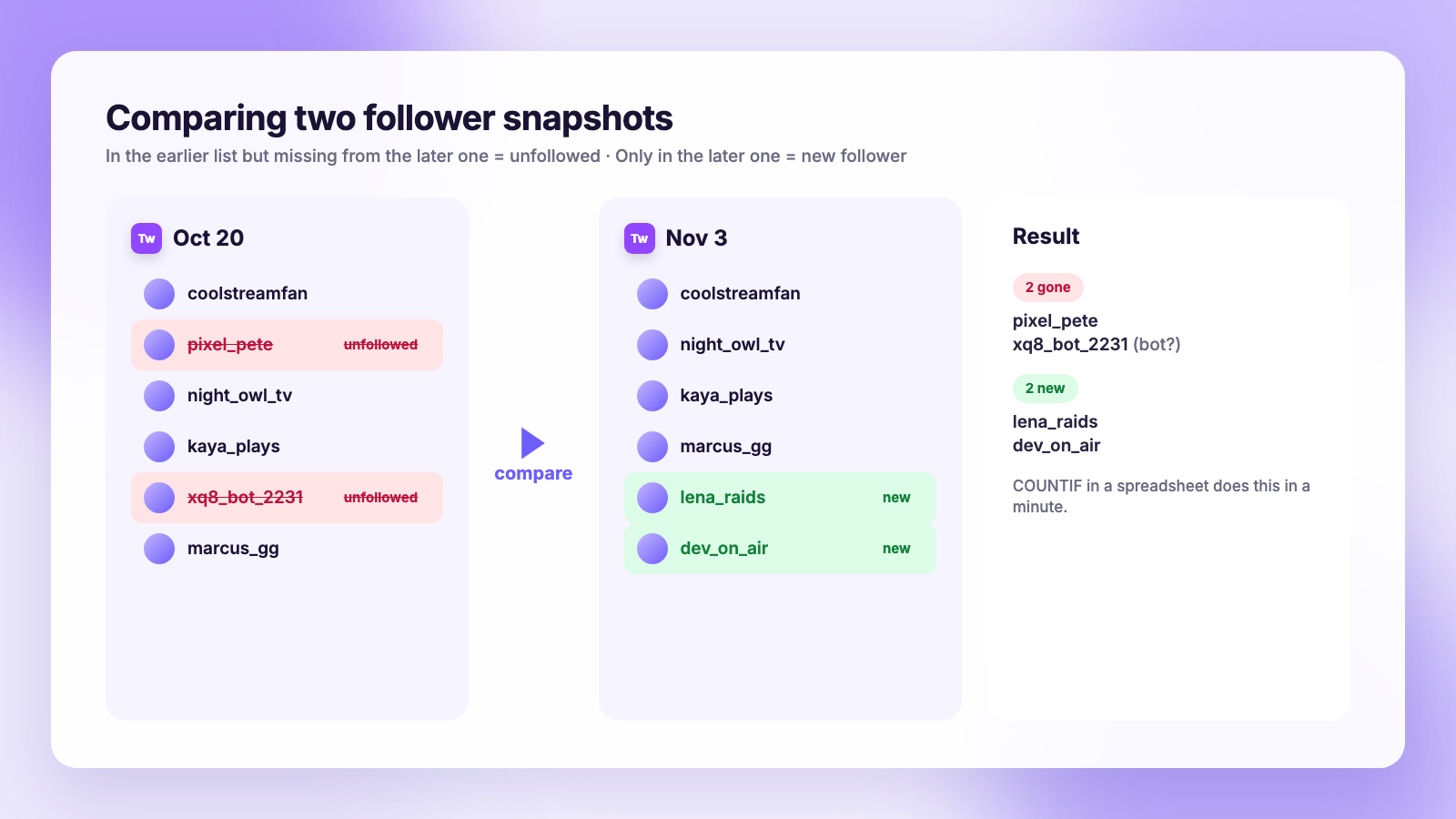
This is the method that gives you a real list, and it costs nothing. The idea is to keep a dated copy of your follower list and compare the newest copy with an older one. Anyone on the old list and missing from the new one unfollowed, was suspended or deleted their account in between.
Getting the list out of Twitch
Twitch has no "export followers" button in the dashboard. You have three practical ways to capture the list:
- Scroll and copy. In Followers List, scroll to the bottom so everything loads, select the usernames and paste them into a spreadsheet or a plain text file. Workable up to a few hundred followers, tedious beyond that.
- A read-only exporter. Several small tools and browser extensions sign in with Twitch's own login screen, ask only for permission to read your follower list, and download it as a CSV. The permission prompt should say it can read followers and nothing about chat, stream settings or payouts. If it asks for more than that, close it.
- The API yourself. If you are comfortable with a terminal, the Helix
channels/followersendpoint returns your list in pages of up to 100, and the Twitch CLI can fetch it with a broadcaster token. This is the cleanest copy and it is entirely within Twitch's rules, because it is your data and your token.
Whichever route you use, name the file with the date: twitch-followers-2026-11-03.csv. Then do it again in two weeks, or the next time the count drops.
Comparing the two files
Open a blank spreadsheet. Paste the older list into column A and the newer list into column B. In C1 type =COUNTIF(B:B,A1) and fill it down the length of column A. Every row that shows a 0 is a name that was in the old list and is not in the new one. Filter column C for zeros and you have your unfollower list. Flip the columns to get your new followers.
The comparison only sees the gap between snapshots, so someone who unfollowed and refollowed within the two weeks never shows up, and nothing before your first snapshot is visible. Take that first snapshot today rather than after the next drop.
If you already do this for Instagram or TikTok, the workflow is identical to the one in our guide to seeing who unfollowed you on TikTok. Plumefy's unfollower tracker automates the comparison for those two platforms from their official data exports. It does not connect to Twitch, so for Twitch the spreadsheet is the tool.
Why your Twitch count dropped (it is often not people)
Before you take an unfollow personally, look at the shape of the drop. Twitch runs periodic sweeps that remove bot accounts, view-bots and abandoned accounts, and every streamer those accounts followed loses them at the same time. Three signs point to a purge rather than a real audience change:
- A cliff, not a slope. Dozens or hundreds gone within an hour, then flat again.
- Other streamers report it the same day. Search "twitch followers dropped" with today's date and you will usually find a thread.
- The names you can check look like bots. Random strings of letters and numbers, zero chat history, created in bulk.
A follow-bot raid works the other way around: you gain a wave of fake followers in minutes, and Twitch later removes them. Either way, the follower count was never real. Your concurrent viewers and chat activity are the numbers that reflect an actual audience, which is the same lesson we draw in follower growth: what is normal.
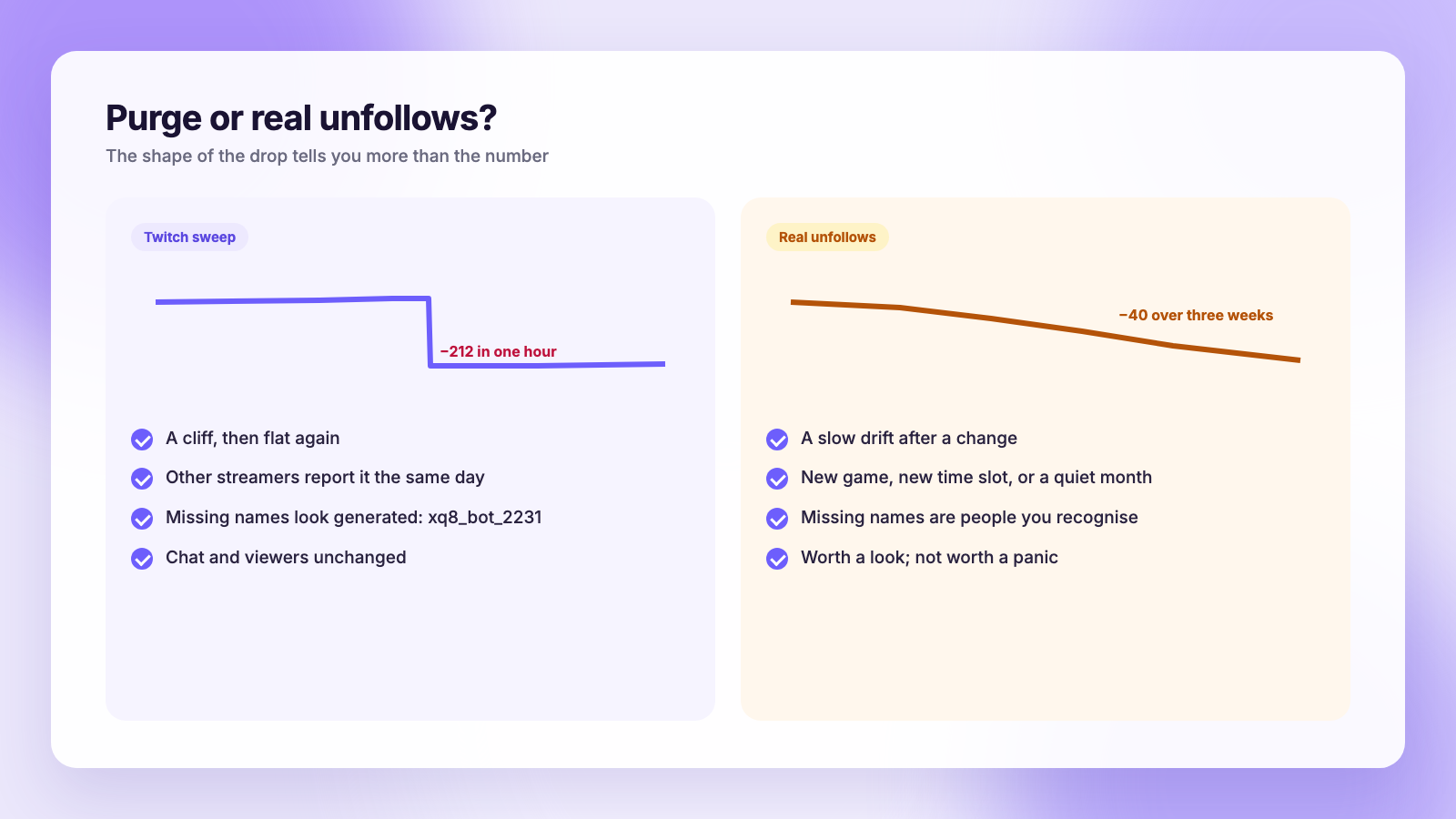
Genuine unfollows tend to be a slow drift, and they usually have a cause you can name: you changed games, moved your stream time, went quiet for a month, or a clip reached people who were never going to stick around. Those are worth noticing. A bot sweep is not.
Method 3: Connect a tracker (safely)
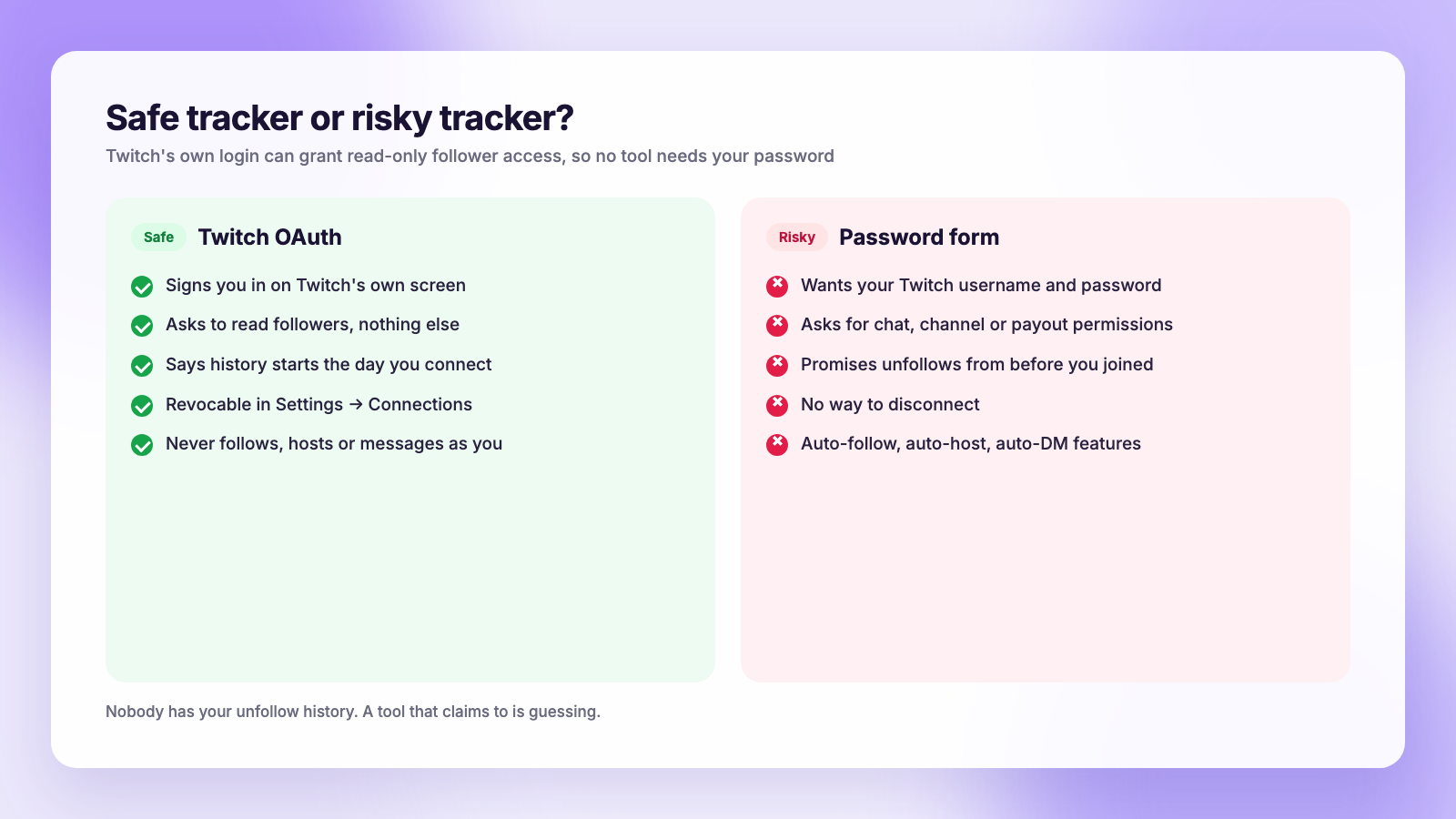
Because the follower list is readable through Twitch's own login, a tracker can do the snapshot-and-compare work for you without ever seeing your password. It asks you to sign in on Twitch's page, requests read access to your followers, and then checks the list on a schedule, usually daily, keeping a history from the day you connected.
That is the safe design. The risky one asks you to type your Twitch username and password into the app itself, or promises things no data supports. Here is how to tell them apart.
| Safe tracker | Risky tracker | |
|---|---|---|
| Login | Twitch's own OAuth screen | Password typed into the app |
| Permissions | Read followers only | Chat, channel settings, or "everything" |
| History | "From the day you connect" | "See everyone who ever unfollowed you" |
| Disconnect | Revoke in Twitch Settings → Connections | No way to disconnect |
| Actions | Reads data, never acts as you | Auto-follow, auto-host, auto-message |
Two rules cover most of it. A tracker should never need your password, because Twitch's login handles that. And a tracker cannot show unfollows from before you connected, because nobody has that history. Any app that claims otherwise is guessing or lying.
To revoke a tool later, open Settings → Connections on Twitch, find it under Other Connections and disconnect. Its token stops working immediately.
What to do with the list
Once you know who left, the useful question is what changed, not who to confront. Regulars who leave after a schedule change usually come back once the new schedule is pinned and posted everywhere. People who arrived from one clip followed a moment, not a channel, and no action is needed. A long-time viewer or mod leaving is worth a direct message.
The bigger lever is off-platform. Streamers who grow in 2026 are usually the ones whose clips travel: a 40-second highlight on TikTok, Reels, Shorts and X brings new people to the stream, which matters more than any single unfollow. Our podcast and stream clip guide covers the cutting; Plumefy handles the posting, sending one clip to TikTok, Instagram, Facebook, Threads, Bluesky, X, LinkedIn and Pinterest from a single composer with a caption for each. YouTube Shorts you upload in YouTube Studio. If you are comparing schedulers for that job, our Buffer comparison and Publer comparison go feature by feature, and the cross-posting guide explains how to keep the clip clean on every feed.
FAQ
Does Twitch notify you when someone unfollows?
No. Twitch sends follow alerts and nothing for unfollows, in either direction. The person you unfollow is not told, and you are not told when someone leaves.
Can I see who unfollowed me before I started tracking?
No. Twitch keeps no unfollow history, the API has no unfollow event, and there is no export of past followers. Every method starts from the first snapshot you save, which is why it is worth saving one today.
Is it against Twitch's rules to use an unfollow tracker?
Reading your own follower list through Twitch's login is exactly what the API is for, and tools that do only that are within the rules. The problems start with tools that take your password, or that follow, host or message on your behalf. Those can trigger Twitch's automated enforcement, and they are the ones to avoid.
Why did I lose 200 followers in an hour?
Almost certainly a Twitch bot sweep. Check whether other streamers report the same drop that day, and spot-check a few of the missing names. If they look like generated usernames with no history, the accounts were never real viewers and your actual audience is unchanged.
Start the snapshot today
The method is not complicated. Save your follower list with today's date, save it again in two weeks, compare the two. Check one person in the Followers List search whenever you are curious. Connect a tracker only if it uses Twitch's login and asks for read access alone. And when the count drops by hundreds in an hour, assume a purge before you assume a problem.
Post everywhere, once.
Start on the free plan — no card needed, upgrade when you need scheduling.
Start free