How to See Who Unfollowed You on Snapchat in 2026
Who unfollowed you on Snapchat? There is no list, but four in-app checks and a dated data download give you the answer without handing any app your password.
Snapchat is the quietest of the big apps about who comes and goes. Your friend count moves, a streak ends, someone's story stops appearing, and the app says nothing. Searching "who unfollowed me on Snapchat" brings up a wall of apps that promise a list in exchange for your login, which is the one thing you should not hand over.
The short version: Snapchat has no unfollower list, no unfollow notification, and no API that would let an app build one. You can check one person at a time using four signals inside the app, none of which is proof on its own. For a real answer across your whole friends list, download your Snapchat data, keep the dated file, and compare it with a later download. This guide covers each check, why the login-based apps are a bad trade, and how the data download works.
Friends, followers and what "unfollowed" means on Snapchat
Snapchat's vocabulary is different from Instagram's, and it changes what you are actually asking.
- A friend is a two-way relationship. You added each other.
- A follower only exists if you have a Public Profile. Then people can follow you one-way, and you can follow others without being friends.
Open your profile, tap View All under Friends & Followers, and you will see Friends and Following tabs. If you have a Public Profile, you also get a Followers tab. Without a Public Profile, "unfollowed" really means "removed me as a friend".
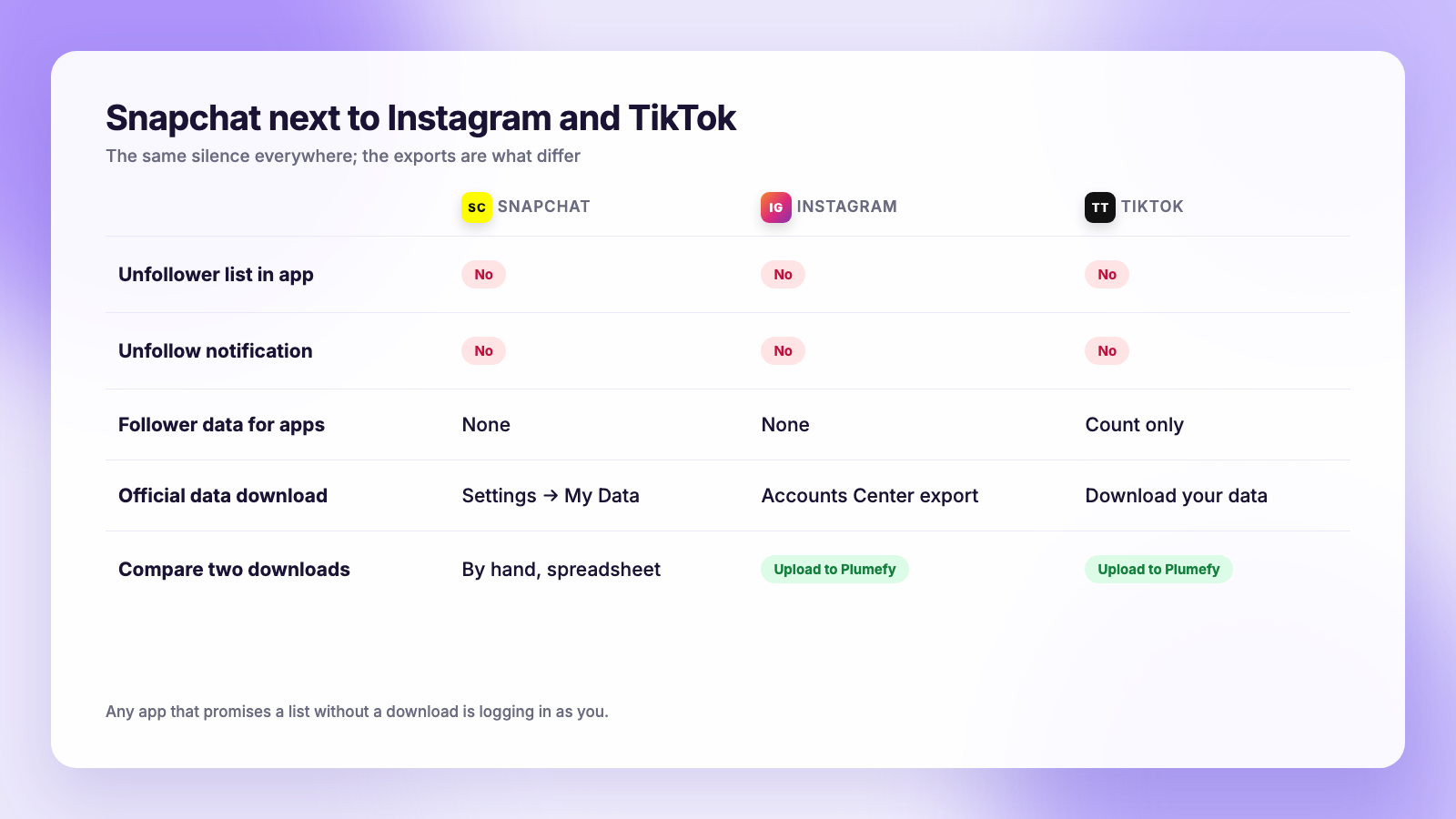
Snapchat says it hides unfollow and unfriend information on purpose, to reduce social pressure. That is also why there is nothing for third-party apps to pull: the developer tools Snapchat offers do not expose friend history or removal events to anyone.
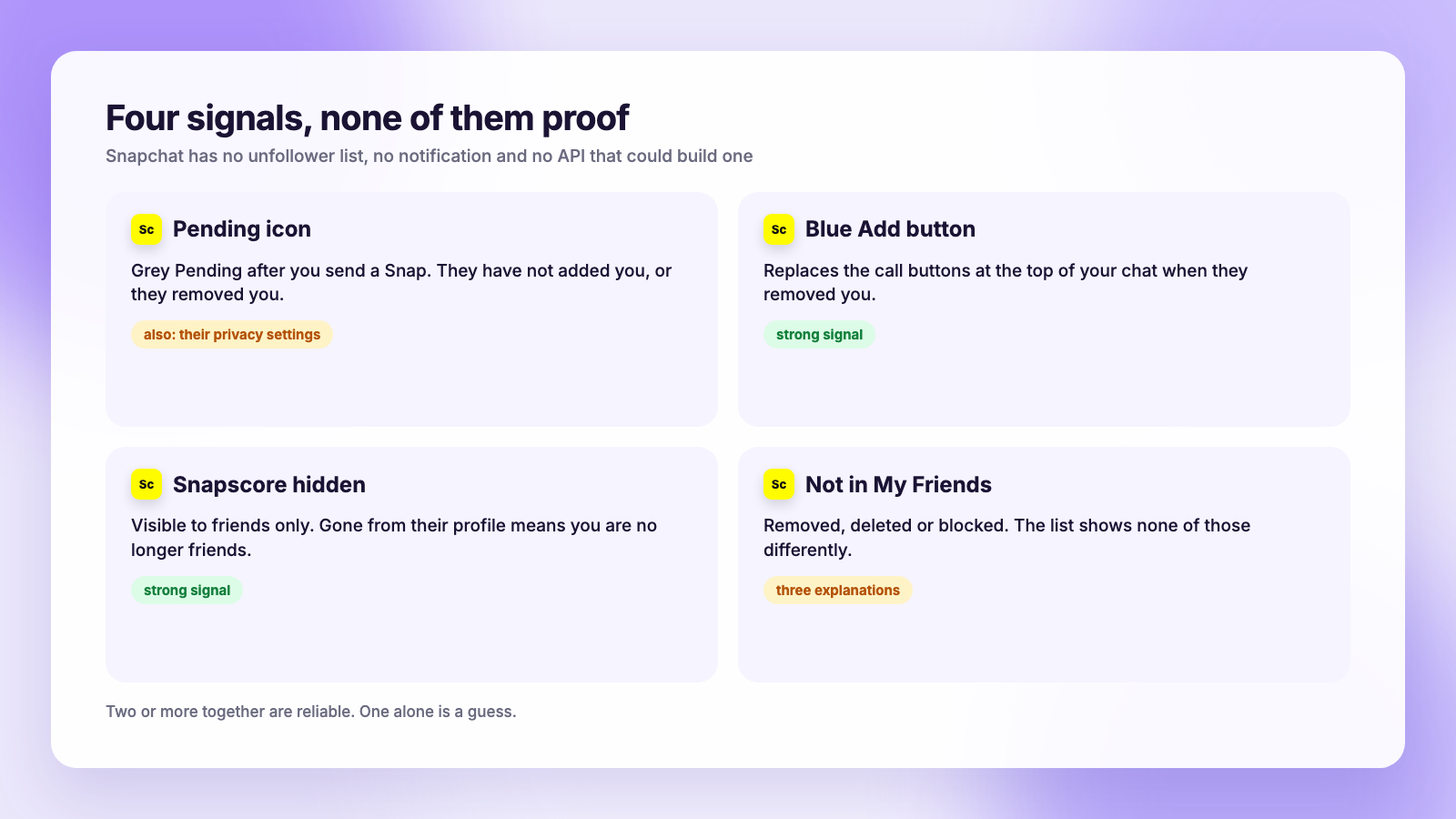
Check 1: The Pending icon in Chat
The quickest hint. Open Chat, find the person, and send a Snap or a short message. Look at the icon under their name afterwards.
A grey Pending icon means your message is waiting, which happens when they have not added you, or have removed you. Snapchat's own support pages say this icon depends on privacy settings, so it also appears for people who only accept messages from friends and have simply never added you back.
Pending is a hint. If you were friends yesterday and the icon is grey today, the likely explanation is that they removed you. It is not proof, and it tells you nothing about why.
Check 2: The blue Add button
Open the chat with them and look at the top right corner. If you are still friends, you see the voice and video call buttons. If they removed you, those are replaced with a blue Add button inviting you to add them again.
This one is a strong signal, with two caveats. If they deleted their account entirely, the chat may not open at all. And if they blocked you, you will not be able to add them, so a missing Add button plus a missing profile points toward a block or a deleted account rather than a plain removal.
Check 3: Their Snapscore
Snapscore, the number that climbs as someone sends and receives Snaps, is visible only to friends. Search for the person, open their profile, and look for the score next to their name.
- Score visible: you are still friends.
- Score hidden: they removed you, or they were never a friend in the first place.
If you could see their score last week and cannot today, that is as close to confirmation as Snapchat offers. Combined with the Add button, it is hard to explain any other way.
Check 4: Missing from My Friends
The simplest check, and the easiest to misread. Tap your avatar, go to My Friends, and search for the name. Not there means they removed you, deleted their account, or blocked you. Snapchat shows none of those differently in the list.
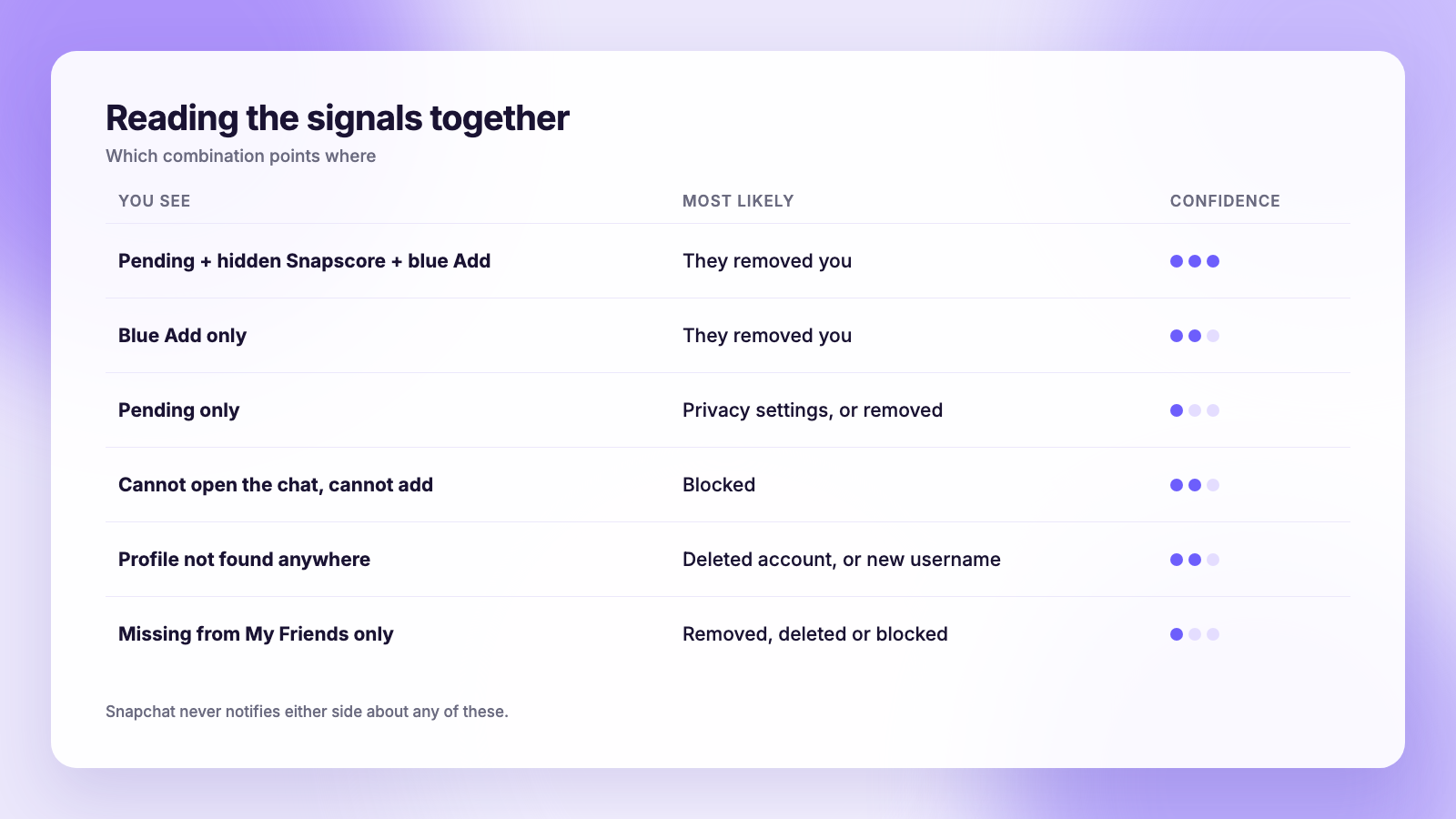
| Signal | Where to look | Means | Also explained by |
|---|---|---|---|
| Grey Pending icon | Chat, after sending | They have not added you, or removed you | Their privacy settings |
| Blue Add button | Top right of the chat | They removed you | Account deleted |
| Snapscore hidden | Their profile | You are no longer friends | Never were friends |
| Missing from My Friends | Your friends list | Removed, deleted or blocked | Any of the three |
| Cannot find profile at all | Search | Blocked or deleted | Username changed |
Two or more signals together are reliable. Any one of them alone is a guess, which is why a dated record of your friends list is the only real answer for more than a handful of people.
The apps that promise a list
Search the App Store for "Snapchat unfollowers" and you will find apps that promise exactly what this article says does not exist. Every one of them needs your Snapchat username and password, because there is no other way for them to see your friends list.
Handing your login to a third party violates Snapchat's terms, and Snapchat's security systems treat logins from unknown apps and servers as suspicious. The documented outcomes on Instagram and TikTok, where the same category of app has existed for years, are forced logouts, "suspicious login" warnings, locked accounts and in some cases suspensions. Snapchat's rules on this are no looser. Our guide to whether Instagram unfollower apps are safe explains the mechanics, and they transfer directly.
The other problem is that the apps cannot deliver. Without an API that returns friend history, an app can at best scrape your current friends list with your login and compare it next time. That is the same snapshot-and-compare method you can do yourself for free with the official data download, without giving anyone your password.
The real method: compare two data downloads
Snapchat lets you download a copy of your account data, including your friends list. Two downloads taken on different dates are a dated record of who left in between. This is the method Plumefy's unfollower tracker is built on for Instagram and TikTok, and it works by hand for Snapchat.
- Open Snapchat, tap your avatar, then the gear for Settings.
- Scroll to My Data (under Privacy Controls or Account Actions, depending on your version) and open it.
- Tick the data you want. Friends is the one that matters; leave media and memories unticked to keep the file small.
- Set a date range, submit, and wait for the email. Snapchat says this can take some time; it usually arrives the same day for a friends-only request.
- Download the zip from the link in the email and rename it with today's date, for example
snapchat-friends-2026-11-03.zip.
Inside, the friends file lists your current friends with the date each friendship started. It does not list who removed you, because Snapchat does not record that. What it gives you is a snapshot.
A few weeks later, or the day you notice your count dropped, request the download again. Open both files, paste the usernames into two columns of a spreadsheet, and use a lookup to flag names in the older column that are missing from the newer one. Those are the people who removed you, deleted their accounts, or blocked you. The four checks above sort out which.
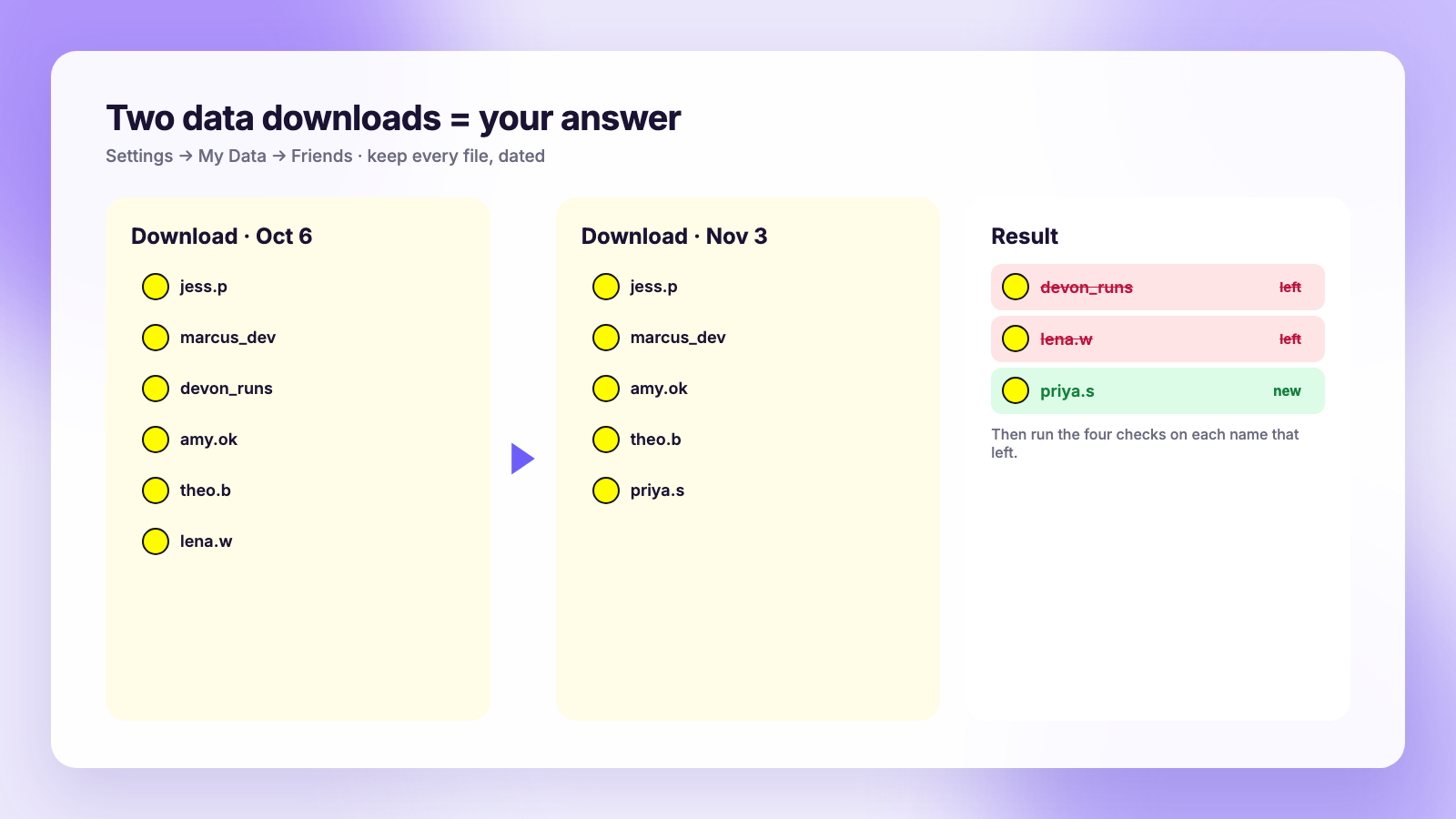
Keep every download. The comparison only ever covers the gap between two files, so the first one you take becomes your baseline, and anyone who left before it is gone from the record.
Does Snapchat notify anyone?
No, in either direction. Removing a friend sends no notification, and nobody is told when you remove them. Blocking is equally silent. The only trace is the signals above, and the person has to go looking for them. Our broader post on whether people get notified when you unfollow covers how each platform handles this.
Where Plumefy fits, honestly
Plumefy does not track Snapchat. The tracker reads Instagram and TikTok data exports, the zip files those apps email you, and compares them to show who unfollowed, who is new and who never followed back. It works from the file, never from your password. For Snapchat you are doing the same comparison yourself with the download above.
Where Plumefy does help if you are a creator spread across several apps is on the posting side. It schedules to Instagram, TikTok, Facebook, Threads, Bluesky, X, LinkedIn and Pinterest from one composer, so the public-profile content you cross-post from Snapchat stories goes out everywhere on a calendar. If you are weighing schedulers, our Buffer comparison and Publer comparison cover platform support and pricing side by side, including the unfollower tracking that only Plumefy bundles in.
If Instagram is the account you care about most, the equivalent guides for it are how to see who unfollowed you on Instagram and how to download your Instagram data. The TikTok version is here.
Why the friend count matters less than it feels
Snapchat's own analytics for public profiles, in Insights, show story views, completion rate, screenshots and replies. None of those depend on your friend count. A friend who never opens your story adds nothing to reach, and Snapchat's recommendation surfaces reward completion and engagement, not list size.
So when the count drops, the useful question is whether story views dropped with it. If they did not, the people who left were not watching anyway. If they did, look at the last few stories rather than the friends list.
FAQ
Can you see who unfollowed you on Snapchat?
Not as a list. Snapchat keeps no unfollow history and offers no notification. You can check individuals using the Pending icon, the blue Add button, a hidden Snapscore and your My Friends list, or compare two data downloads to find everyone who left between them.
How do I know if someone removed me on Snapchat without adding them back?
Open your chat with them. A blue Add button where the call buttons used to be means they removed you. Check their profile for a Snapscore: hidden means you are no longer friends. Neither check sends them anything.
Is there a safe Snapchat unfollower app?
No app can do it safely, because Snapchat gives apps no friend history and every app that claims to has to log in as you. Use the official data download instead and compare files yourself.
Does the Snapchat data download show who unfollowed me?
No. It shows your current friends with the date each friendship began. To see who left, you need two downloads from different dates and a comparison between them.
The takeaway
Snapchat will never tell you who left, and no app can either. Check the four signals for one person, take a dated data download for everyone, and ignore anything that asks for your password. The friends who matter are the ones watching your stories, and that number is in Insights whenever you want it.
Post everywhere, once.
Start on the free plan — no card needed, upgrade when you need scheduling.
Start free