Instagram Unfollow Limit Per Day in 2026 (and the "We Limit How Often" Block)
Instagram unfollow limit per day in 2026: the one official number, community-measured daily and hourly ranges, what the action block means and how to fix it.
You tap Unfollow one more time and Instagram answers with a wall: "Try again later. We limit how often you can do certain things on Instagram, like following people, to protect our community." Sometimes it just says "Action Blocked". Either way, the button stops working and nobody tells you for how long.
The short version for 2026: Instagram publishes exactly one number, a cap of 7,500 accounts you can follow in total. Every daily and hourly unfollow limit you read online is a community estimate from testing, not a rule from Meta. Those estimates cluster around 100 to 200 unfollows a day for established accounts, far less for new ones, with bursts of more than about 30 to 40 in an hour tripping the block early. The block is temporary, it clears on its own, and the fix is to stop for a day, remove any app that logs in as you, and come back slowly.
The one official number
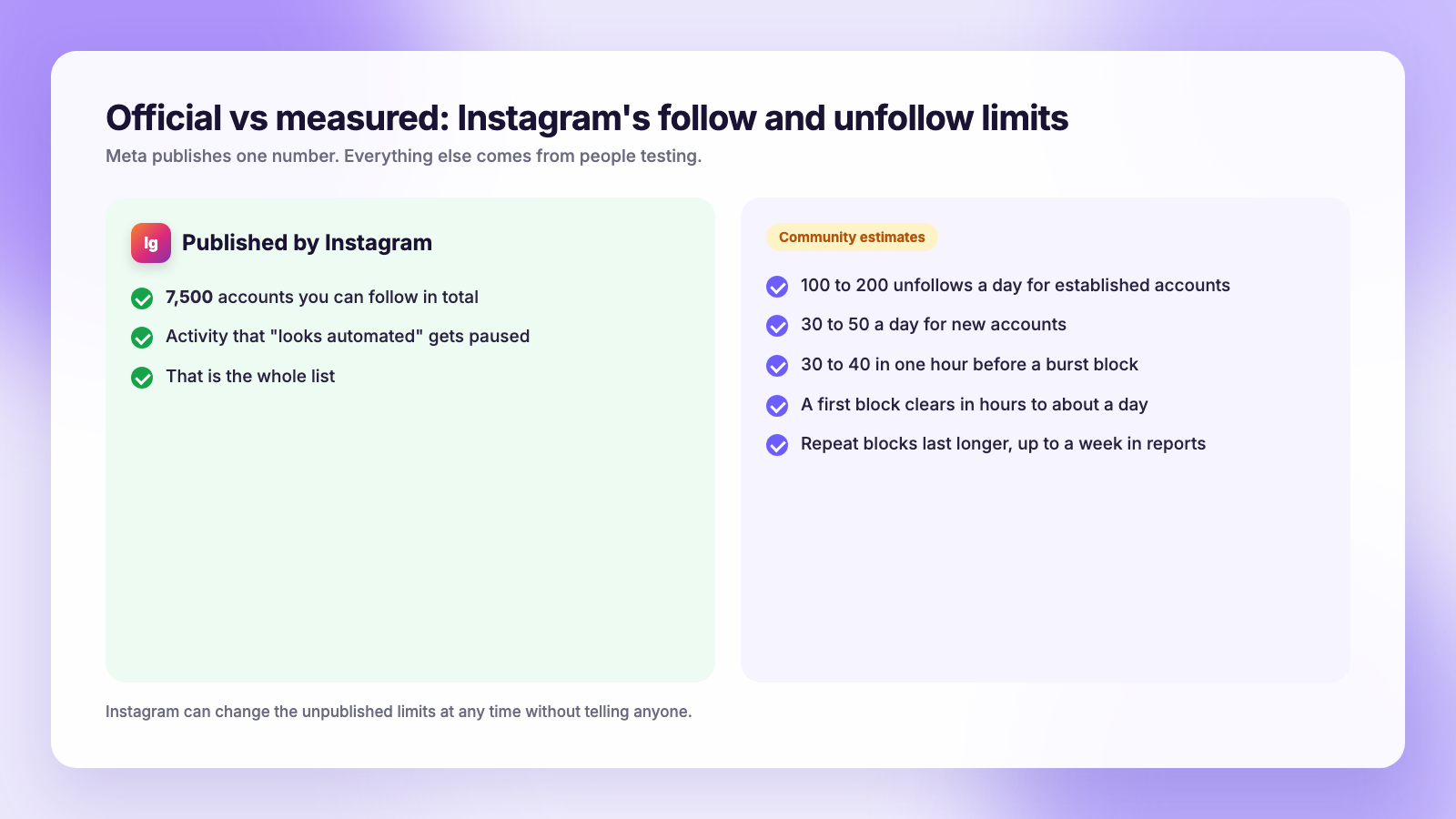
Instagram's help pages say an account can follow at most 7,500 accounts in total. That is the only follow-related limit Meta states. There is no published daily unfollow limit, no hourly limit, and no published duration for a block. Instagram's page on temporary limits says only that it pauses activity that looks automated.
That matters because most articles on this topic present their numbers as if Instagram wrote them. It did not. Treat every number below as what people have measured, which Instagram can change without notice.
What the community has measured
Across creator forums, growth-tool blogs and years of Reddit threads, the reported pattern is consistent enough to plan around, as long as you remember these are estimates:
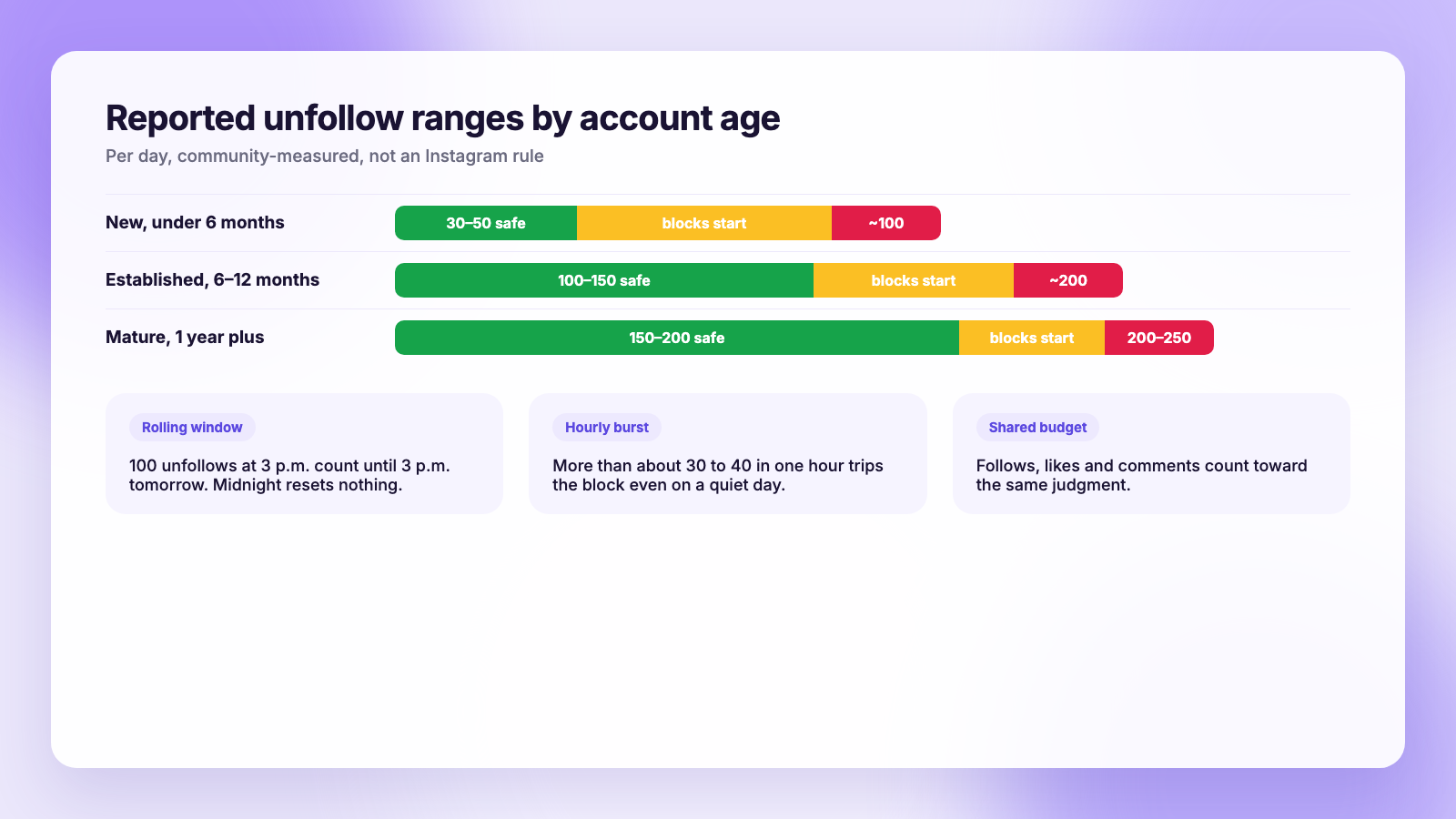
| Account | Reported safe range per day | Reported point where blocks start |
|---|---|---|
| New, under about 6 months | 30 to 50 unfollows | around 100 |
| Established, 6 to 12 months | 100 to 150 | around 200 |
| Mature, 1 year plus, clean history | 150 to 200 | 200 to 250 |
| Any account, within one hour | 30 to 40 | bursts above that |
Three details from those reports matter more than the exact numbers:
- The window rolls. If you unfollow 100 accounts at 3 p.m., those count against you until 3 p.m. tomorrow. Waiting for midnight resets nothing.
- Actions share a budget. Follows, unfollows, likes and comments all count toward the same "looks automated" judgment. A quiet day of unfollowing after a busy hour of liking still adds up.
- Bursts hurt more than totals. Unfollowing 100 accounts in ten minutes gets blocked faster than 100 spread across a day, even though the daily total is identical.
Your own account's history also shifts the line. An account with a past block or a growth app in its past sits lower; a years-old account that has only ever behaved like a person sits higher.
What the "we limit how often" message actually means
The message means Instagram paused one action type, usually following or unfollowing, because your account did it too fast or too often. It is not a ban, it is not a shadowban, and it is not a sign that someone reported you. Instagram's own description is that the pause exists to stop activity that looks automated, whether a human did it or not.
Which action got paused is usually obvious from when the message appears. If it pops up when you tap Unfollow, that is the one. If it appears when you like or comment, those are paused instead. Posting and messaging normally keep working.
If your reach has dropped as well as the button failing, that is a different problem; our guide to the Instagram shadowban covers it.
How long the block lasts
Instagram does not say, and it is worth repeating because so many pages give a number as if it were official. User reports put a first block at a few hours to about a day. A second or third block in a short span lasts longer, and some people report close to a week. Those are reports, not rules.
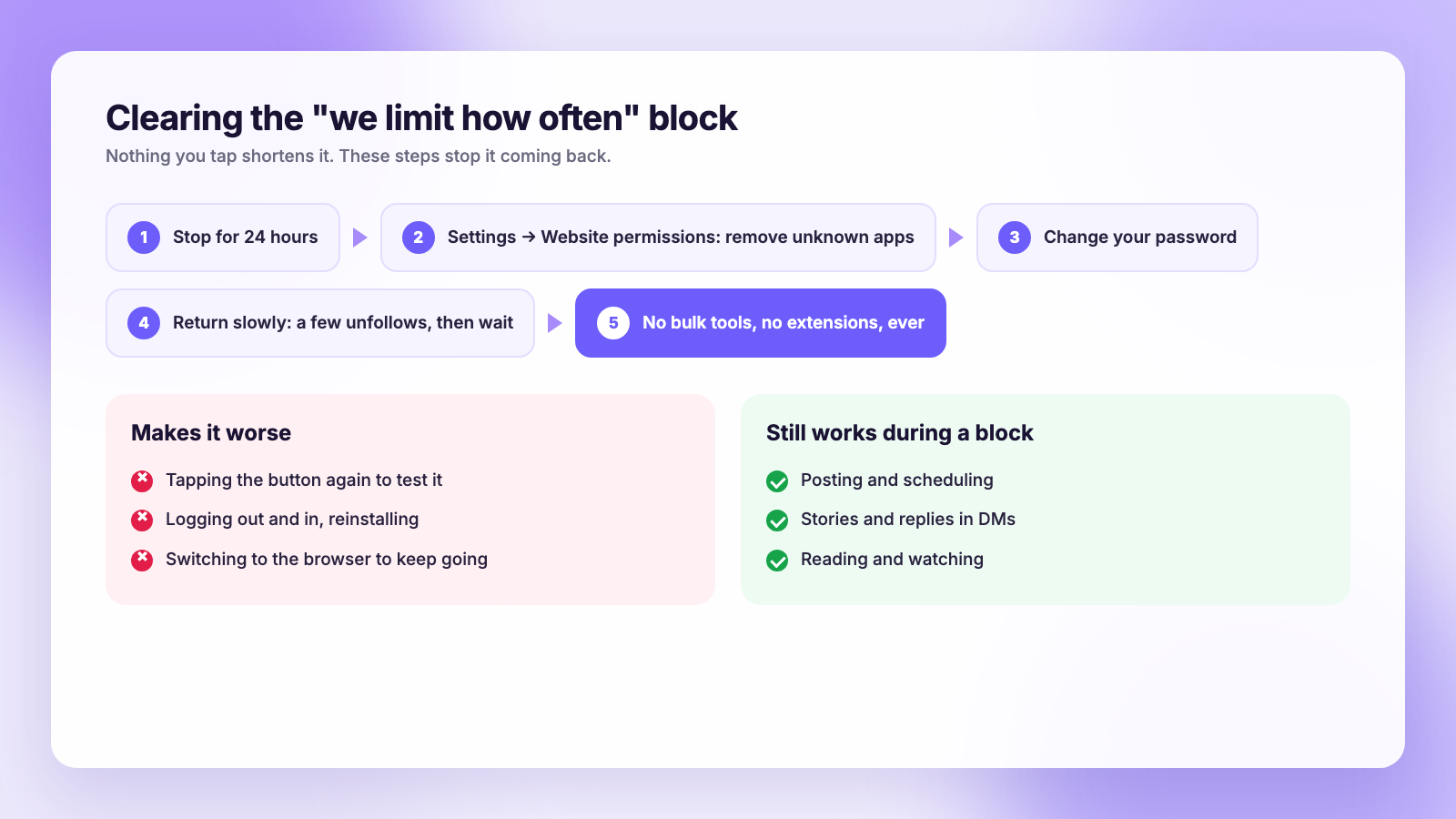
What is reliable is that the block is temporary and clears on its own once the behaviour stops. Nothing you tap shortens it. Repeatedly testing the button, logging out and in, reinstalling the app, or switching to a browser does not help and may extend it, because each attempt is another action.
The fix, in order
- Stop for 24 hours. No follows, no unfollows, and go easy on likes and comments. Posting is fine.
- Check what has access to your account. Open Settings, then Website permissions (on some versions, Apps and websites). Anything you do not recognise had your login. Remove it.
- Change your password if anything was on that list. An app that had your password may still have it.
- Come back slowly. When the block lifts, unfollow a handful of accounts, wait, and spread the rest across days.
- Stay away from bulk tools. Mass-unfollow apps and browser extensions are the single most common cause of repeat blocks. If you are weighing one, read our take on Instagram unfollower Chrome extensions first.
The follow-for-follow trap
Most blocks come from the same routine: follow 50 accounts in a sitting, wait, unfollow the ones who did not follow back. Instagram sees that as machine behaviour even when a human does every tap, because real people do not follow and unfollow in batches.
It also does not work. The 7,500 cap ends it eventually, and the people who follow back out of courtesy tend to leave again. Our post on why you are losing followers on Instagram goes into that churn. If your following count is near 7,500, the follow button stopping is the cap, not a block, and no amount of waiting changes it.
Cleaning up safely: audit first, unfollow slowly
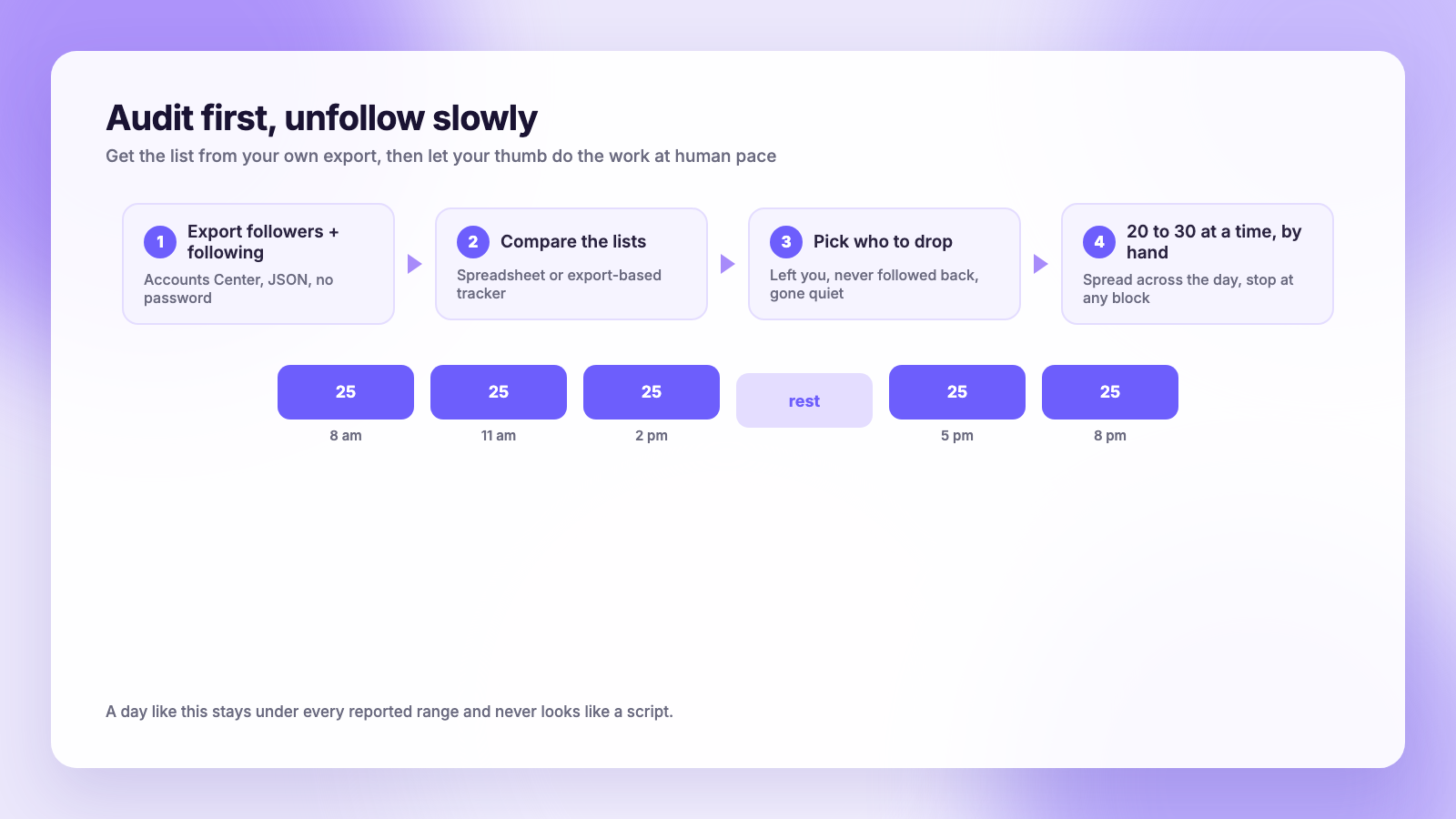
There is a legitimate reason to unfollow a lot of accounts: you have years of follows you no longer want, or you want to drop people who unfollowed you. The safe way is to get the list from your own data and work through it at human speed.
- Export your followers and following from Accounts Center. Our guide to downloading your Instagram data has the exact path.
- Compare the two lists. A spreadsheet works; so does an export-based tracker. Plumefy's unfollower tracker reads the Instagram zip you upload, never asks for your password, and shows who doesn't follow you back and, once you upload a second export, who unfollowed you.
- Sort the result by what you actually care about: accounts that left, accounts that never followed back, accounts that have gone quiet. Our guide to ghost followers covers the last group.
- Unfollow by hand, a batch of 20 to 30, spread across the day, well under the community ranges. The tracker gives you the list; your thumb does the work.
- Stop at the first sign of a block and wait a full day.
The point of auditing first is that you unfollow fewer people, on purpose, rather than scrolling and tapping until Instagram stops you.
Keep posting while you wait
An action block pauses following, not publishing. The accounts that come through a cleanup well are the ones that kept their posting cadence steady while the numbers settled. If you schedule, it also removes the temptation to sit in the app tapping. Plumefy schedules Instagram alongside TikTok, Threads, Facebook and the rest from one composer; if you are comparing tools, see how it lines up against Buffer and Publer, both of which charge per connected channel.
FAQ
What is the Instagram unfollow limit per day in 2026?
Instagram does not publish one. Community testing puts the safe range at roughly 100 to 150 unfollows a day for established accounts and 30 to 50 for new ones, with blocks reported around 200. The only official number is the 7,500 total follow cap.
Is there an hourly unfollow limit?
Not an official one. Reports consistently describe blocks when more than about 30 to 40 unfollows happen within an hour, even when the daily total is low. Spreading unfollows across the day avoids it.
Will I get banned for hitting the limit?
A single overreach almost always results in a temporary block, not a ban. Repeated blocks, especially combined with an app that logs in as you, are what escalate to longer restrictions or account review.
Does buying followers cause the block?
No, because it involves no action from your account. Growth apps that log in as you and like, follow or unfollow on your behalf do, and they are the usual cause of repeat blocks.
The bottom line
One official number, 7,500. Everything else is measured by people, and the measurements say the same thing: stay well under 100 to 200 a day, never burst, and never let an app act as you. Get your unfollow list from an export, work through it slowly, and the block never shows up.
Post everywhere, once.
Start on the free plan — no card needed, upgrade when you need scheduling.
Start free