How to Download Your TikTok Data (Step by Step)
Learn how to download your TikTok data in a few taps. A free file from TikTok holds your follower lists — and it's the safe, no-password way to see who unfollowed you.
Want to know who stopped following you on TikTok? The first step is to download your TikTok data. This is a free file from TikTok that holds a copy of your own info, including the people you follow and the people who follow you. The best part: you never share your password to get it. Let me show you how, one easy step at a time.
You do not need a special app or any tech skills. If you can tap buttons in the TikTok app, you can do this.
Why download your TikTok data?
TikTok never tells you when someone unfollows you. Your follower count just drops, and you are left guessing. But your data file holds the answer. Inside it is a list of every account that follows you and every account you follow. Compare two of these files from different days, and you can see exactly who left.
Other good reasons to grab your data:
- It is yours. You have a right to a copy of your own info.
- It is safe. No password sharing, no shady tools.
- It is a backup. If you ever lose access to your account, you still have your lists.
How to download your TikTok data
Follow these steps inside the TikTok app on your phone. The exact words may change a little over time, but the path stays close to this.
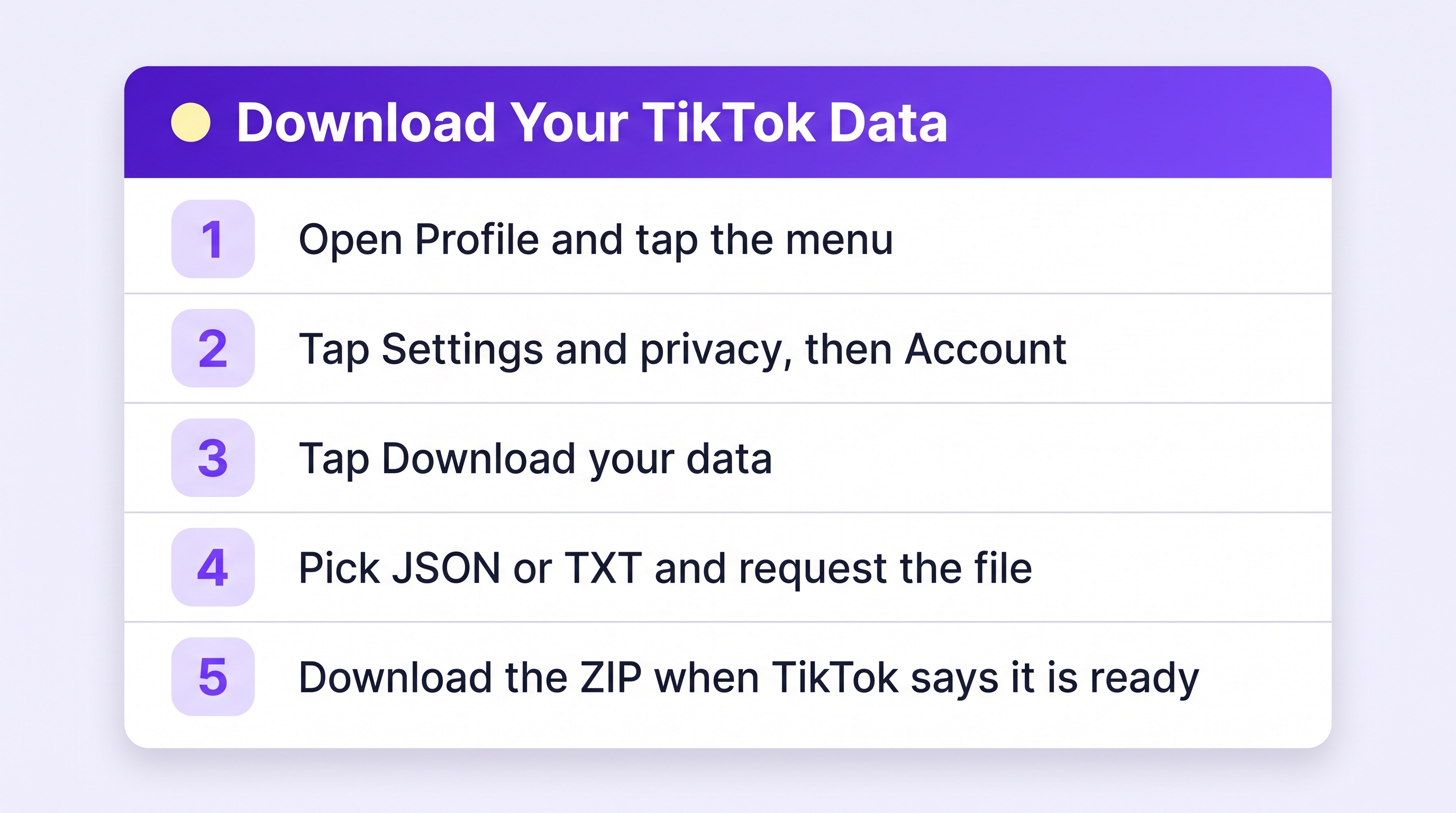
- Open TikTok and tap Profile in the bottom corner.
- Tap the menu lines in the top corner, then tap Settings and privacy.
- Tap Account.
- Tap Download your data.
- Under what to include, make sure your Activity data is selected — that is where your follower and following lists live. (Choosing all data works too; the file is just a bit bigger.)
- Pick a format: JSON or TXT. Both work with Plumefy, so choose either.
- Tap Request data.
Now TikTok builds your file. This can take a few hours or up to a couple of days. Check back under the Download data tab on the same screen. When it is ready, tap Download and save the ZIP file to your phone or computer. Done. You just downloaded your own TikTok data.
Now find out who unfollowed you
The data file is great, but reading it by hand is no fun. It is full of code-like text that is hard for a person to scan. This is where Plumefy helps. You upload the ZIP file you just saved, and Plumefy reads it for you, turning that messy file into a clean, simple list.
Here is how the import works:
- Sign in to Plumefy and open the Unfollower tracker.
- Choose TikTok as the platform.
- Drag your TikTok ZIP file onto the page, or tap to choose it.
- Plumefy reads it right away and shows your followers and following.
- Upload a newer file later, and Plumefy compares the two to show who unfollowed you.
You never type your TikTok password into Plumefy. It only reads the file you hand it, so your account stays safe and in your control. Plumefy can also schedule and cross-post to many social platforms, so it makes a handy home base for your whole online presence.
A few tips to make it easy
- Download more than once. To spot unfollowers, you need at least two files from different days.
- Keep your files. Save them in a folder so you can look back over time.
- Be patient. If your file is not ready yet, give it time. TikTok sends it when it is done.
- Set a reminder. A download at the start of each month makes a nice habit.
Frequently asked questions
Is it safe to download my TikTok data?
Yes. You are simply asking TikTok for a copy of your own info. You do not share your password with anyone, and the file comes straight from TikTok to you.
Do I need to give Plumefy my TikTok password?
No, never. Plumefy only reads the data file you upload. It does not log into TikTok for you, so your password stays private.
How long does the download take?
It depends. Sometimes the file is ready in a few hours. It can also take a day or two. TikTok shows it under the Download data tab when it is done.
Should I pick JSON or TXT?
Either works. Plumefy reads both formats, plus the ZIP itself. If you plan to use other tools too, JSON is usually the most flexible.
Can I see who unfollowed me with just one file?
Not quite. One file shows who follows you right now. To see who left, you need a second file from a later day so the two can be compared.
You did it. Downloading your TikTok data is simple once you know the path, and it puts you back in charge of your own lists. Upload that file to Plumefy and let it do the hard part for you.
Post everywhere, once.
Start on the free plan — no card needed, upgrade when you need scheduling.
Start free