How to Cross-Post Reels, TikToks & Shorts at Once Without Watermarks
Post one short video to TikTok, Instagram Reels and YouTube Shorts without a watermark: keep a clean master, get clean copies of old videos, match 2026 specs, and upload once to every feed.

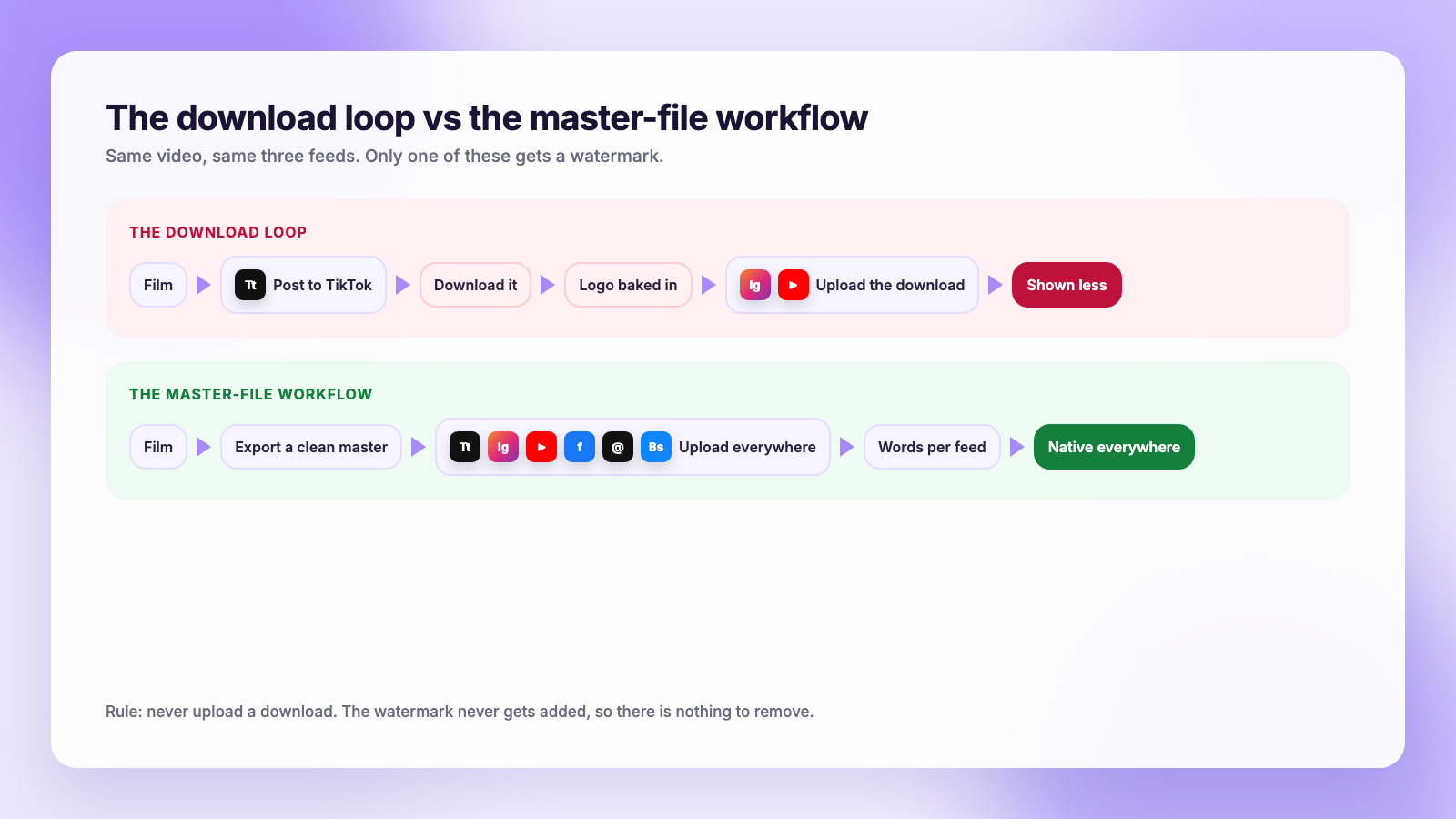
You film one vertical video. It belongs on TikTok, Instagram Reels and YouTube Shorts, and ideally on Facebook, Threads and Bluesky too. The slow way is to post it to one app, download it, and upload the download everywhere else. That is also the way that gets you a bouncing TikTok logo on Instagram, and Instagram has said in plain words that it makes Reels "visibly recycled from other apps" less discoverable.
The fix is not a watermark remover. It is a workflow where the watermark never gets added in the first place: keep one clean master file, upload that file to every platform, and change only the caption, cover and title per network. This guide walks through it step by step, including where to find a clean copy of videos you have already posted, the specs each feed wants in 2026, and how to send one upload to every short-video feed at once.
Why watermarks hurt, platform by platform
Each platform wants to look like the place your video was born, and each has its own way of discouraging the other apps' logos.
| Platform | What happens to a watermarked clip |
|---|---|
| Instagram Reels | Instagram says it de-prioritises Reels that are "visibly recycled from other apps", naming logos and watermarks specifically. They still post, they just get shown less. |
| YouTube Shorts | YouTube has never recommended other platforms' branding, and it ruled TikTok-watermarked clips ineligible for the original Shorts Fund. Reused-content rules also weigh against obviously reposted video. |
| TikTok | TikTok adds its own watermark to downloads so clips carry its brand elsewhere. It has no stated penalty for other logos, but a Reels or Shorts stamp screams "repost" to viewers. |
| Facebook, Threads, Bluesky, X | No formal penalty, but a watermark from a rival app is the first thing viewers notice, and it dates the clip. |
Notice that none of this is about cross-posting itself. Posting the same video to three feeds is normal and expected, and YouTube said explicitly that videos posted elsewhere are welcome. What the platforms object to is the visible evidence of a download. Remove that and cross-posting is just publishing. If you want the longer argument for posting the same clip everywhere, read TikTok vs Reels vs Shorts: where should you post.
Step 1: Keep a clean master of every video
The whole workflow depends on one habit: the file you upload is never a file you downloaded from a social app.
- Shooting in your phone camera? The original is already in your camera roll. Edit in CapCut, InShot, Premiere or the editor of your choice and export at 1080 by 1920. That export is your master.
- Shooting inside TikTok or Instagram? Both apps keep the edited clip in your device before you post. On TikTok, tap Save to device on the review screen, or save it as a draft and export from there. On Instagram, the Reel sits in your drafts and you can save it to your camera roll before publishing. Do this before you tap post, and the saved copy has no watermark.
- Using CapCut? Export directly from CapCut, not through TikTok. If the export shows a CapCut end card or logo, turn that off in the export settings; it is a toggle, not a paid feature.
Put the master in a folder named by date and topic. Thirty seconds of filing now saves an hour of re-exporting later, and it is the foundation of the batch workflow in batch-film a month of short video.
Step 2: Get a clean copy of videos you already posted
The common objection: "I have 200 TikToks and no originals." You have more options than a watermark remover, and all of them are within the platforms' rules because the videos are yours.
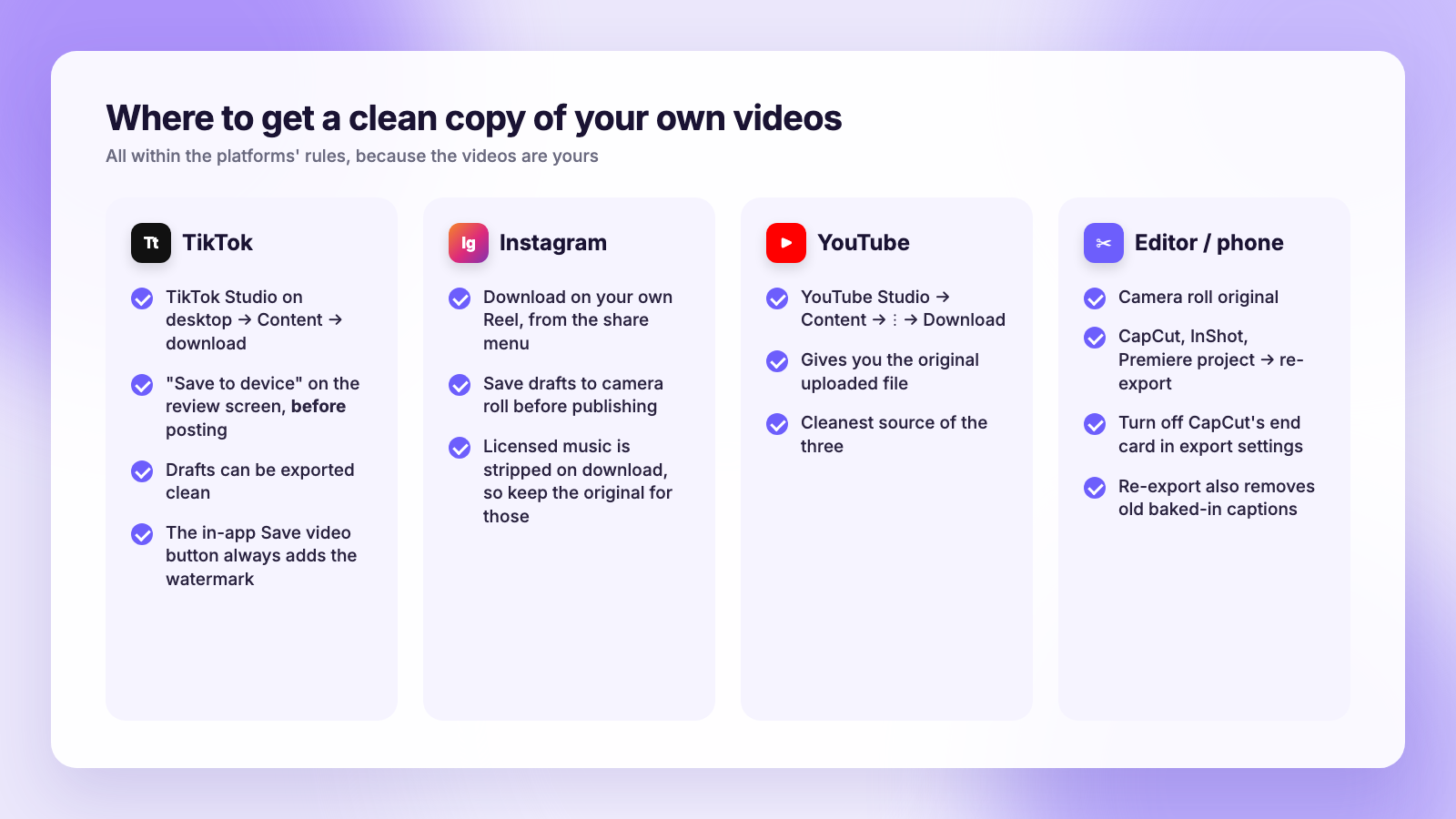
- TikTok: sign in to TikTok Studio on desktop, open Content, and use the download option on your own videos. Availability has varied by region and account, so if you do not see it, check your phone: TikTok often keeps a local copy of recently posted videos in the app's cache folder or your camera roll if "Save to device" was on. The in-app Save video button always adds the watermark, so that is the one to avoid.
- Instagram: for your own Reels, the download option in the share menu gives you the clip without Instagram branding. The exception is Reels with licensed music, which Instagram strips or blocks on download, so you will need the original in that case.
- YouTube: YouTube Studio lets you download the original file of any video you uploaded under Content, then the three-dot menu, then Download. This is the cleanest source of the three.
- Editors: CapCut, InShot and most editors keep a project history. Reopen the project and re-export, which also lets you remove any old captions baked into the video.
If a video exists only as a watermarked download and nowhere else, you have a judgement call. Watermark-removal tools work by cropping or inpainting, which costs quality and sits in a grey area with TikTok's terms. For a clip that matters, it is usually faster and safer to reshoot or re-edit from the project file.
Step 3: One master, three sets of specs
The good news for 2026 is that the three big short-video feeds have converged. One 9:16 file at 1080 by 1920 works on all of them. The differences are at the edges.
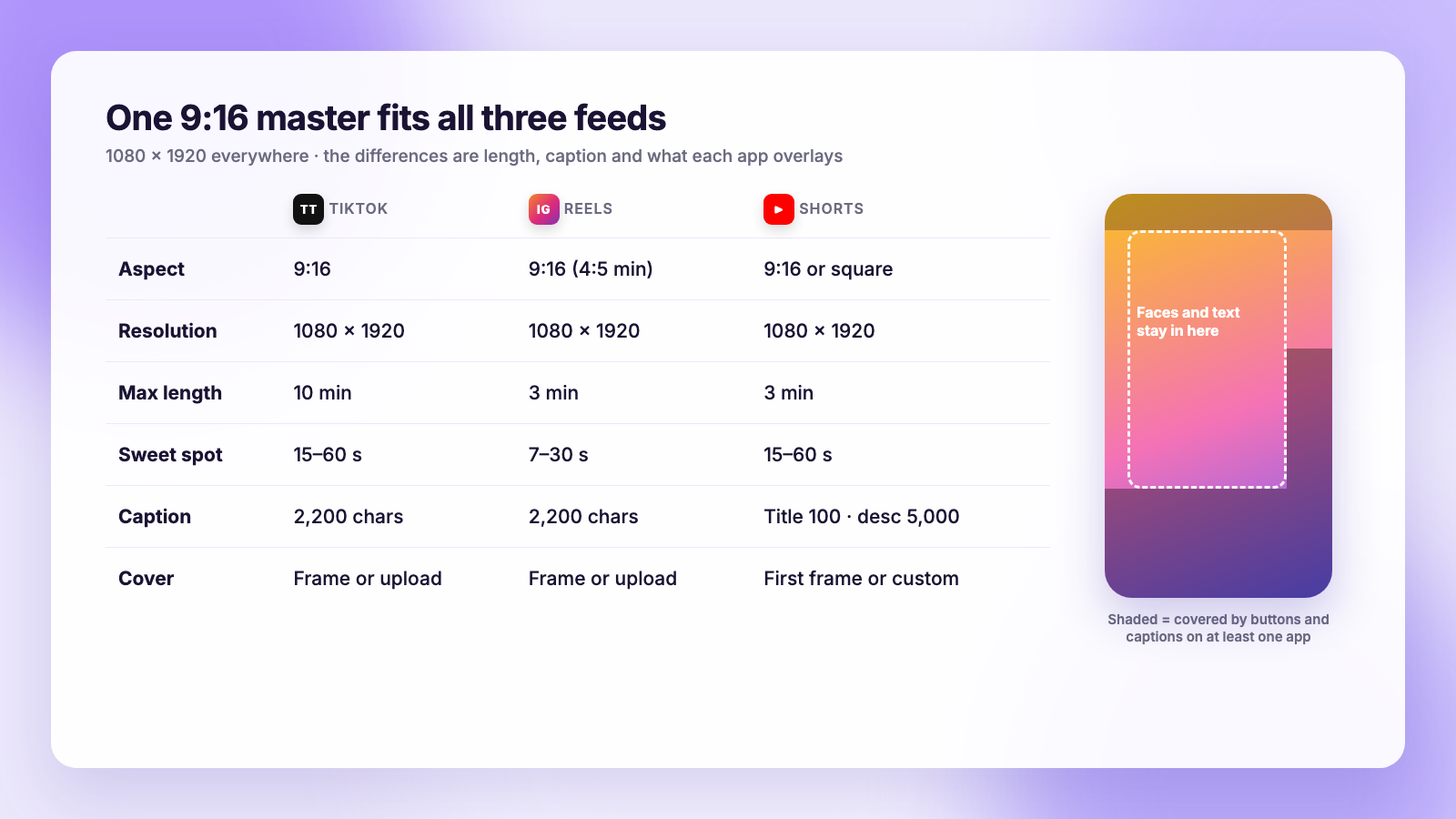
| TikTok | Instagram Reels | YouTube Shorts | |
|---|---|---|---|
| Aspect ratio | 9:16 | 9:16 (4:5 minimum) | 9:16 (vertical or square) |
| Resolution | 1080 x 1920 | 1080 x 1920 | 1080 x 1920 |
| Max length | 10 min (up to 60 min for some) | 3 min | 3 min |
| Sweet spot | 15 to 60 s | 7 to 30 s | 15 to 60 s |
| Caption | 2,200 characters | 2,200 characters | Title 100, description 5,000 |
| Cover | Pick a frame or upload | Pick a frame or upload | First frame or custom thumbnail |
Three habits make one master fit all three:
- Keep text and faces inside the middle 80 percent. Each app overlays its own buttons and caption down the right side and across the bottom. Anything you place there will be covered on at least one platform.
- Burn in captions only if they sit high. Baked-in subtitles near the bottom collide with the caption overlay on Reels and TikTok. Place them around the upper-middle, or use each platform's auto-captions instead.
- Avoid in-app effects you cannot export. TikTok's and Instagram's native text, stickers and trending effects exist only inside that app. Use your editor's equivalents and the master stays portable. The full per-network list is in our video specs cheat sheet.
Step 4: Upload once, adjust the words per platform
With a clean master and portable edit, publishing is a captions problem. Each feed searches and recommends differently, so the video stays the same and the text changes:
- TikTok: conversational caption, three to five hashtags, a comment-bait question if it fits.
- Instagram Reels: hook line first, a shorter caption, hashtags at the end, and a cover frame chosen for the grid.
- YouTube Shorts: a searchable title that says what the video delivers, a two-line description, and #Shorts is optional now.
- Facebook, Threads, Bluesky, X: a one-line caption, no hashtags on Bluesky and X, and mind the 300-character limit on Bluesky and 280 on X.
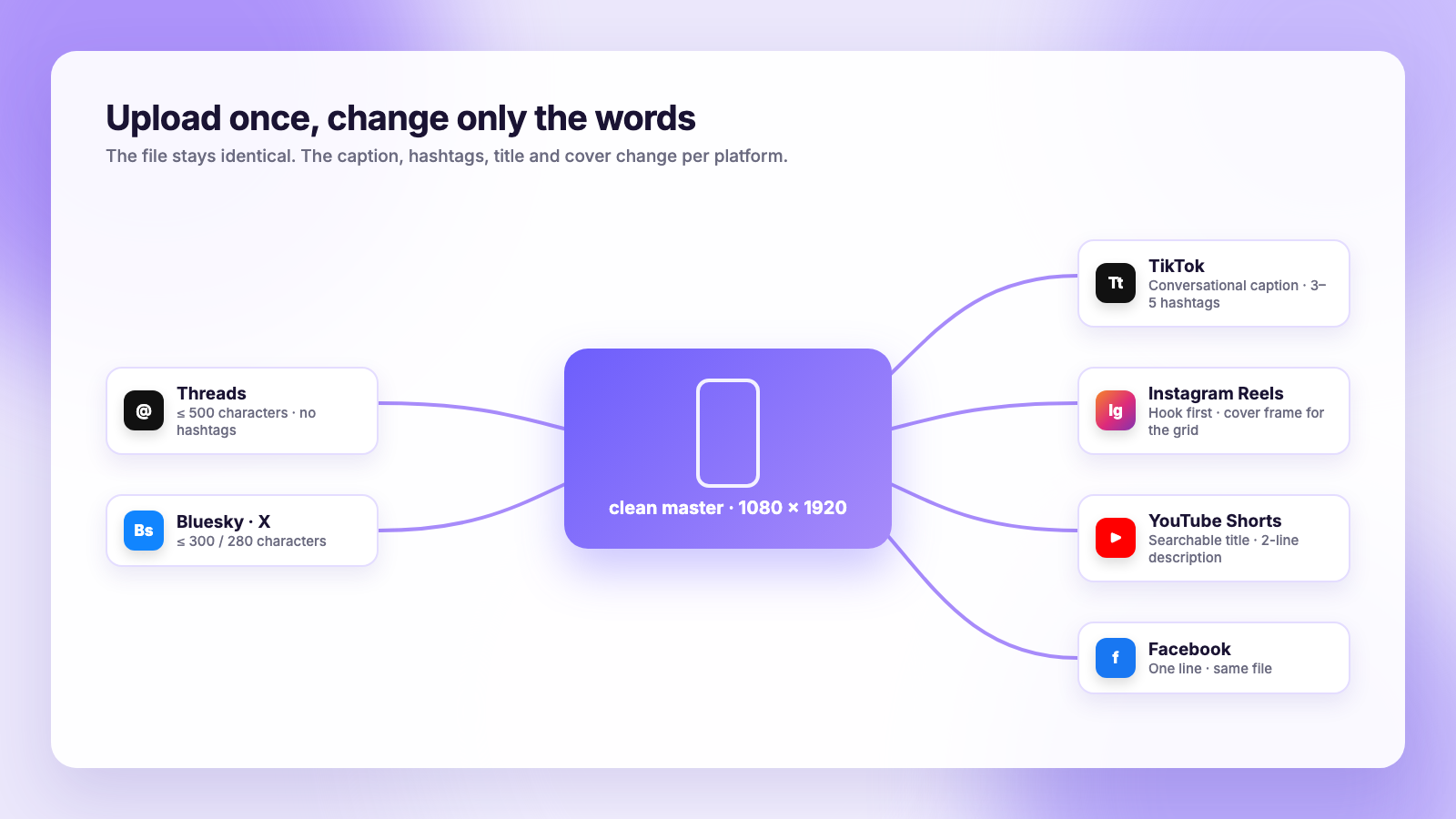
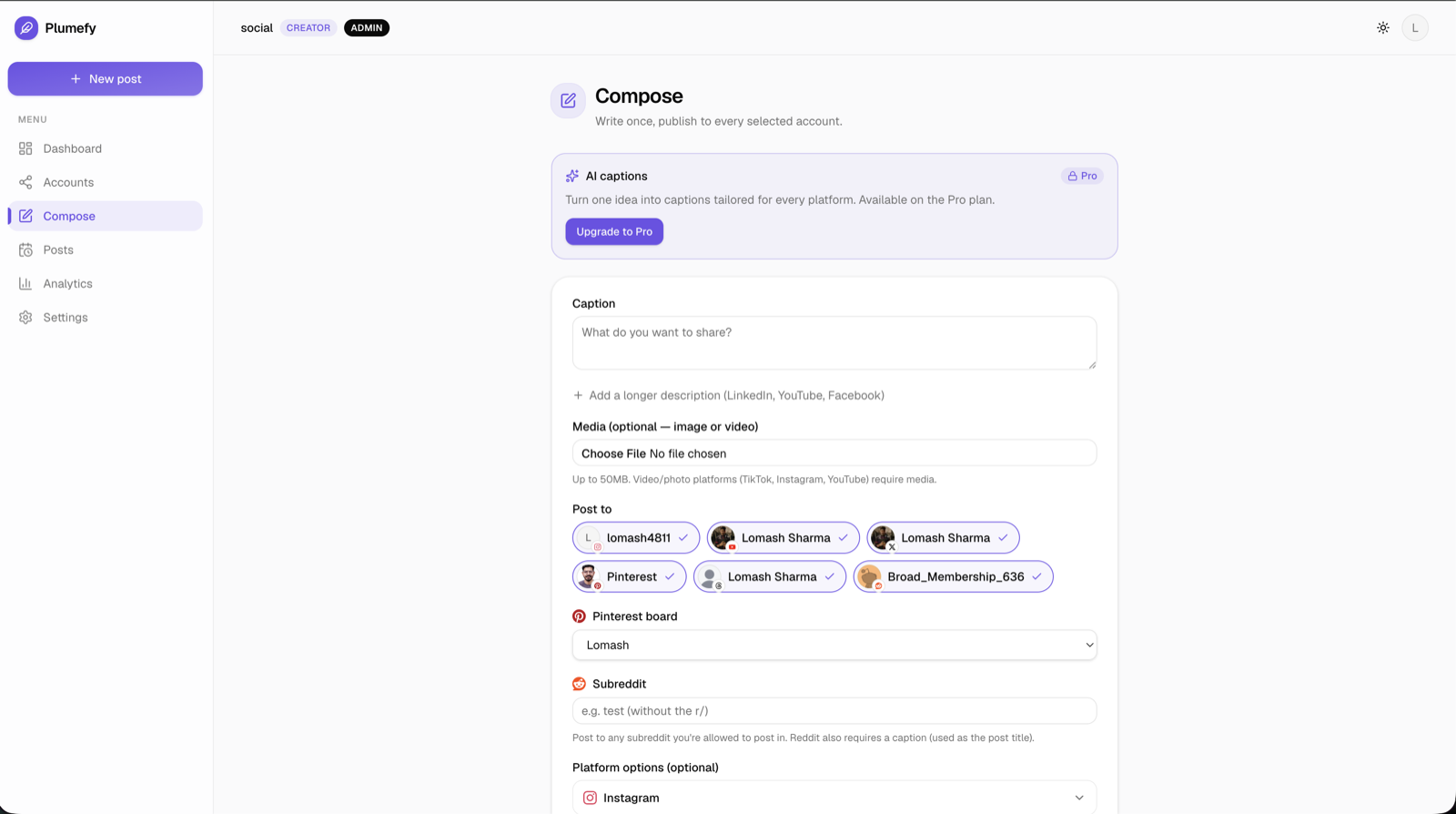
Doing this by hand is six uploads of the same file, which is the tedium that pushes people back into the download loop. A cross-posting tool removes it. In Plumefy you upload the master once, pick the networks, and write or let the AI draft a caption per platform, each one checked against that network's limits. The same file goes to Instagram Reels, TikTok, Facebook, Threads, Bluesky, X, LinkedIn and Pinterest, so there is no download step and nothing to watermark. For YouTube, schedule the same master in YouTube Studio with a search-friendly title, following how to schedule YouTube Shorts.
If you are comparing tools for this exact job, the questions to ask are whether per-platform captions are included, whether several accounts on the same network cost extra, and whether video goes out at full quality. Our Plumefy vs Buffer and Plumefy vs Publer pages answer those three for each.
A checklist before you hit post
- The file came from your editor, camera roll or a studio download, never from an app's share sheet.
- No logo in any corner, including CapCut's end card.
- Text and faces sit inside the middle of the frame.
- Caption, hashtags and title rewritten for each platform.
- Cover frame chosen on Instagram and YouTube.
- Music is licensed on each platform you are posting to, since a sound available on TikTok may be muted on Reels.
FAQ
Is cross-posting the same video to TikTok, Reels and Shorts bad for reach?
No. The platforms object to visible watermarks and obvious reposts, not to the same original video appearing in several places. Upload a clean file with a caption written for each feed and it is treated as native content.
Can I remove a TikTok watermark from my own video?
You can, with cropping or inpainting tools, but you lose quality and it conflicts with TikTok's terms. Because the video is yours, the better route is a clean copy: TikTok Studio downloads, your editor's project, or the original in your camera roll.
Does Instagram still penalise TikTok watermarks in 2026?
Instagram's stated policy is that Reels visibly recycled from other apps, including those with logos or watermarks, are made less discoverable in Reels recommendations. It has not reversed that, so assume a watermark costs reach.
Does YouTube care if my Short was on TikTok first?
Not about the posting. YouTube said videos published elsewhere are fine. It did exclude TikTok-watermarked clips from the Shorts Fund, and reused-content rules can affect monetisation, so upload the clean master.
What about the YouTube watermark on downloaded Shorts?
YouTube adds its own branding to Shorts downloaded through the app, for the same reason TikTok does. Download the original from YouTube Studio instead and it stays clean.
Does Plumefy strip watermarks?
No, and nothing should need to. Plumefy publishes the file you upload, at full quality, to every network you pick. Keep a clean master and there is nothing to strip.
Cross-posting Reels, TikToks and Shorts without watermarks comes down to one rule: never upload a download. Keep a clean master, let the file travel unchanged, and change only the words around it. When you are ready to send one upload to every feed from one place, try Plumefy free.
Post everywhere, once.
Start on the free plan — no card needed, upgrade when you need scheduling.
Start free