Buffer vs Publer vs Metricool in 2026: Which Scheduler Fits You?
Buffer vs Publer vs Metricool compared on pricing model, real cost at 5, 10 and 15 channels, Threads and Bluesky support, team features and analytics depth.

Type "best social media scheduler" into Reddit and three names come back more than any others: Buffer, Publer and Metricool. All three will queue a post to Instagram, TikTok, LinkedIn, Threads and Bluesky. All three have a free plan. And all three charge in a different way, which is why the right answer depends less on features and more on how many accounts you run and what you need beyond the posting button.
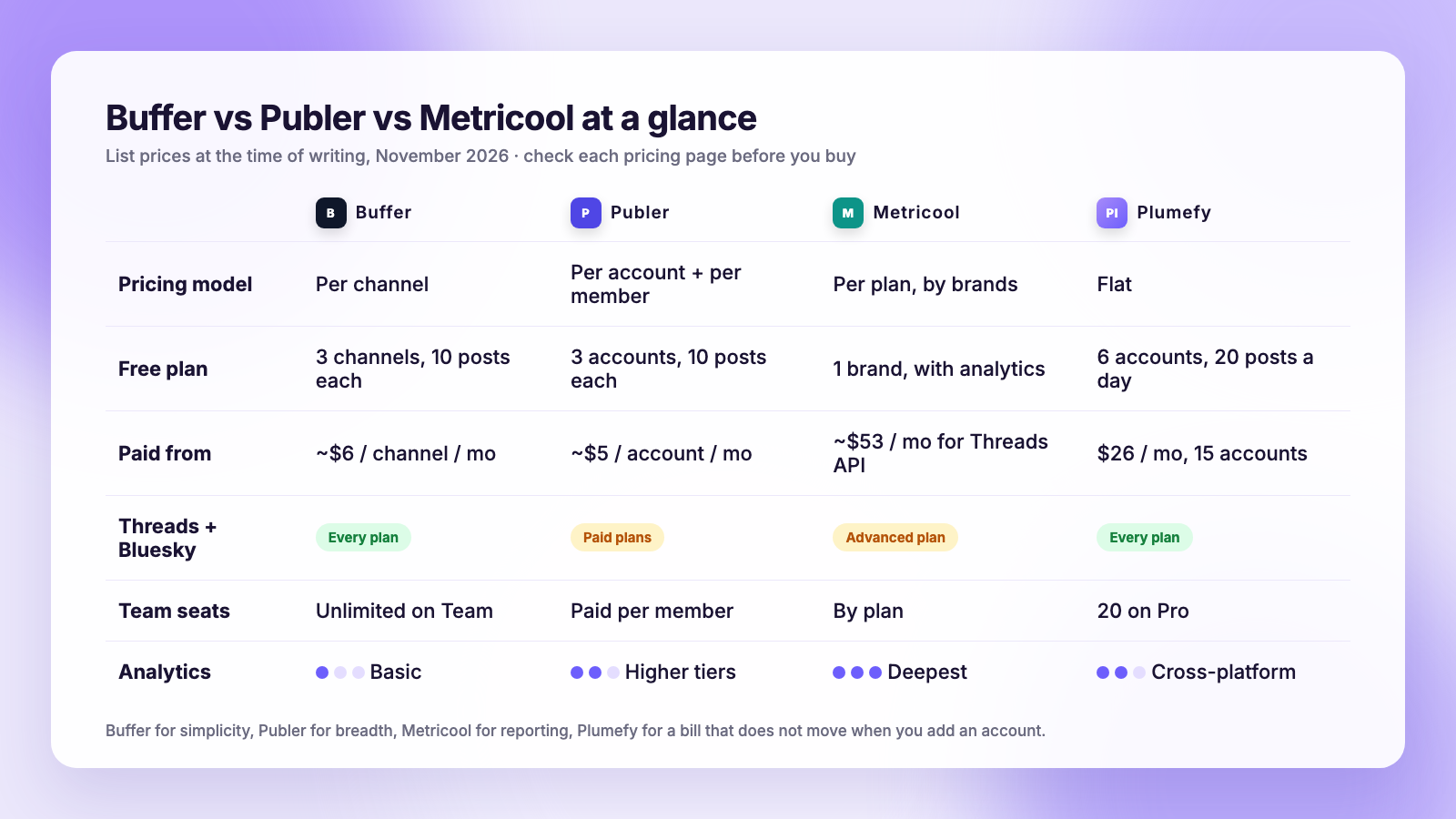
The short version for 2026: Buffer is the simplest and the cleanest to use, priced per channel, with analytics that stay basic. Publer is the cheapest way to cover the widest list of networks, with analytics and team seats sold as upgrades. Metricool is the analytics tool that also schedules, with a free tier that is generous on reporting and a paid tier that unlocks the network APIs most people want. Below is how they compare on price, networks, team features and reporting, with the real monthly cost at 5, 10 and 15 channels, and where a flat-price option like Plumefy fits.
Three pricing models, not three prices
The sticker price is the least useful number on any of these sites. What matters is what the price is attached to.
Buffer charges per channel. A channel is one social account. At the time of writing, the Free plan connects 3 channels and holds 10 scheduled posts per channel at a time. Essentials is about $6 per channel per month, or $5 on annual billing, with unlimited posts. Team is about $12 per channel per month, or $10 annual, and adds collaboration with unlimited users. That last part is Buffer's quiet strength: you never pay for a seat, only for accounts.
Publer charges per account and per member. The free plan covers 3 social accounts with 10 scheduled posts per account at a time and 25 saved drafts. Professional starts at about $5 per month for one account at the time of writing, Business from about $10 per month for one account, and every extra account or team member adds to the bill. Threads and Bluesky publishing sit on the Business tier, and so do the deeper analytics.
Metricool charges per plan, with brand limits. The free tier is unusual because it includes real reporting: cross-platform analytics, competitor tracking and a unified inbox for comments and messages, limited to one brand. Paid plans are priced by the number of brands and users. The catch is that the network APIs people ask about most, Threads being the common one, arrive on the Advanced plan, which starts at about $53 per month on annual billing at the time of writing.
Prices on all three change often, so check each pricing page before you commit. The models, though, have been stable for years, and the models are what decide your bill.
What each one actually costs at 5, 10 and 15 channels
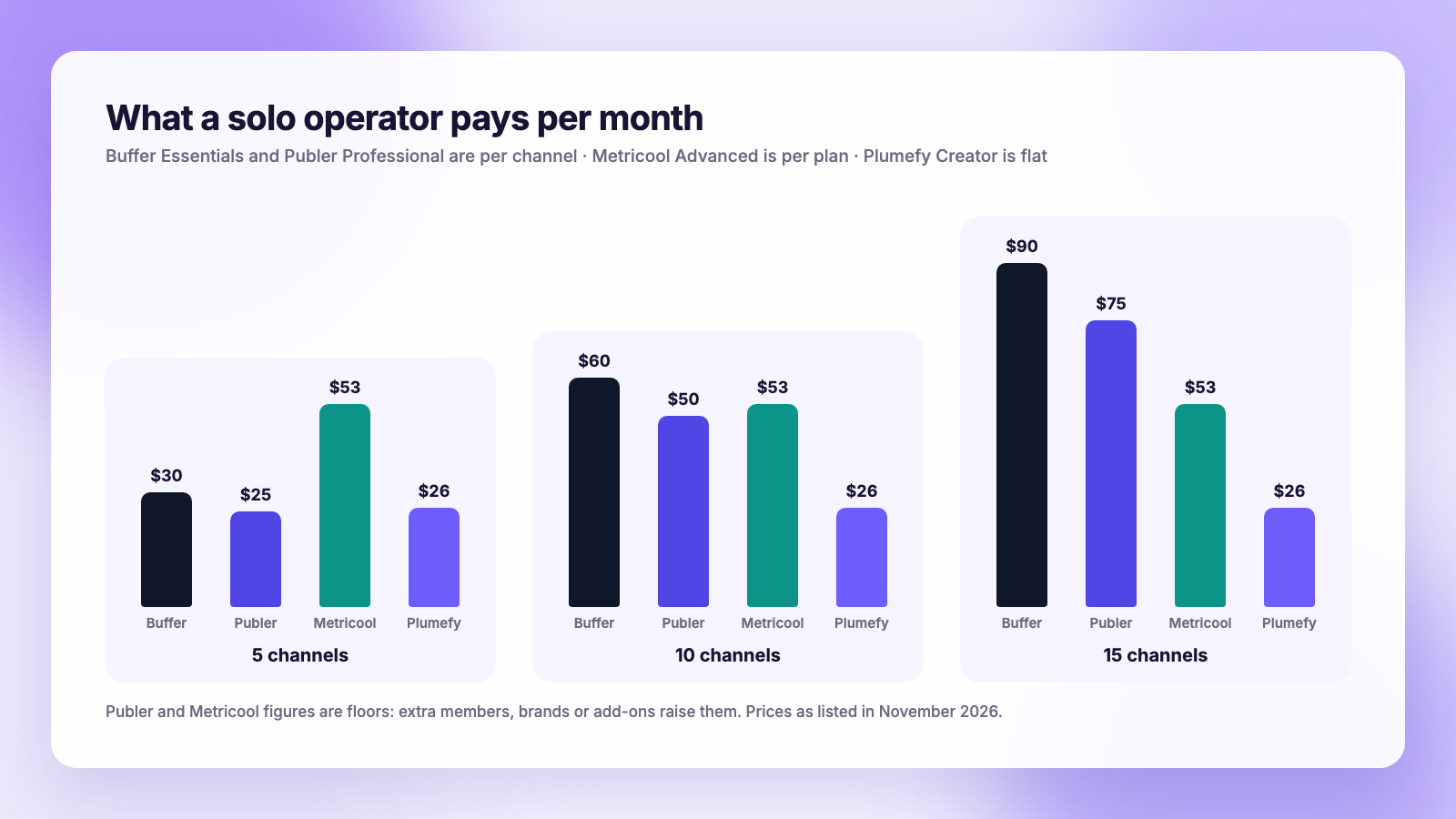
The per-channel math is where Buffer and Publer surprise people. Here is a monthly estimate for a solo operator who wants unlimited posts and nothing fancy, using list prices at the time of writing.
| Channels | Buffer Essentials | Buffer Team | Publer Professional | Metricool Advanced | Plumefy Creator |
|---|---|---|---|---|---|
| 5 | about $30 | about $60 | from about $25 | from about $53 | $26 flat |
| 10 | about $60 | about $120 | from about $50 | from about $53 | $26 flat |
| 15 | about $90 | about $180 | from about $75 | from about $53 | $26 flat |
Publer's column is a floor, because team members and some features add per-item charges on top. Metricool's column assumes one brand; a second brand moves you up a tier. Plumefy's Creator plan covers up to 15 connected accounts for one flat price, which is the whole point of a flat model: the line does not move when you add an account.
At 3 channels or fewer, all three free plans are fine and Buffer's is the most polished. The decision gets interesting between 5 and 15 channels, which is exactly where most creators with a couple of brands, and most freelancers with a couple of clients, end up.
Network coverage
All three publish to the big six: Instagram, Facebook, TikTok, LinkedIn, X and Pinterest. The differences are at the edges.
| Network | Buffer | Publer | Metricool |
|---|---|---|---|
| Threads | Yes, every plan including Free | Yes, on Business and above | Yes, on Advanced and above |
| Bluesky | Yes | Yes, on paid plans | Check current plan |
| YouTube | Yes | Yes | Yes |
| Google Business Profile | Yes | Yes | Yes |
| Mastodon | Yes | Yes | No |
| WordPress, Telegram | No | Yes | No |
| Multi-post Threads threads | Up to 25 posts | Single posts | Single posts |
Two details from Buffer's own help pages are worth knowing if Threads is a priority: Buffer supports multi-post threads up to 25 posts, but polls, GIFs and alt text on Threads are listed as unsupported. If you post a lot to Threads, read our guide to scheduling Threads posts, because the native Threads scheduler is free and covers the gaps.
Publer wins on sheer breadth. If your client list includes a WordPress blog and a Telegram channel, it is the only one of the three that posts to both.
Analytics: the real dividing line
This is where the three stop looking alike.
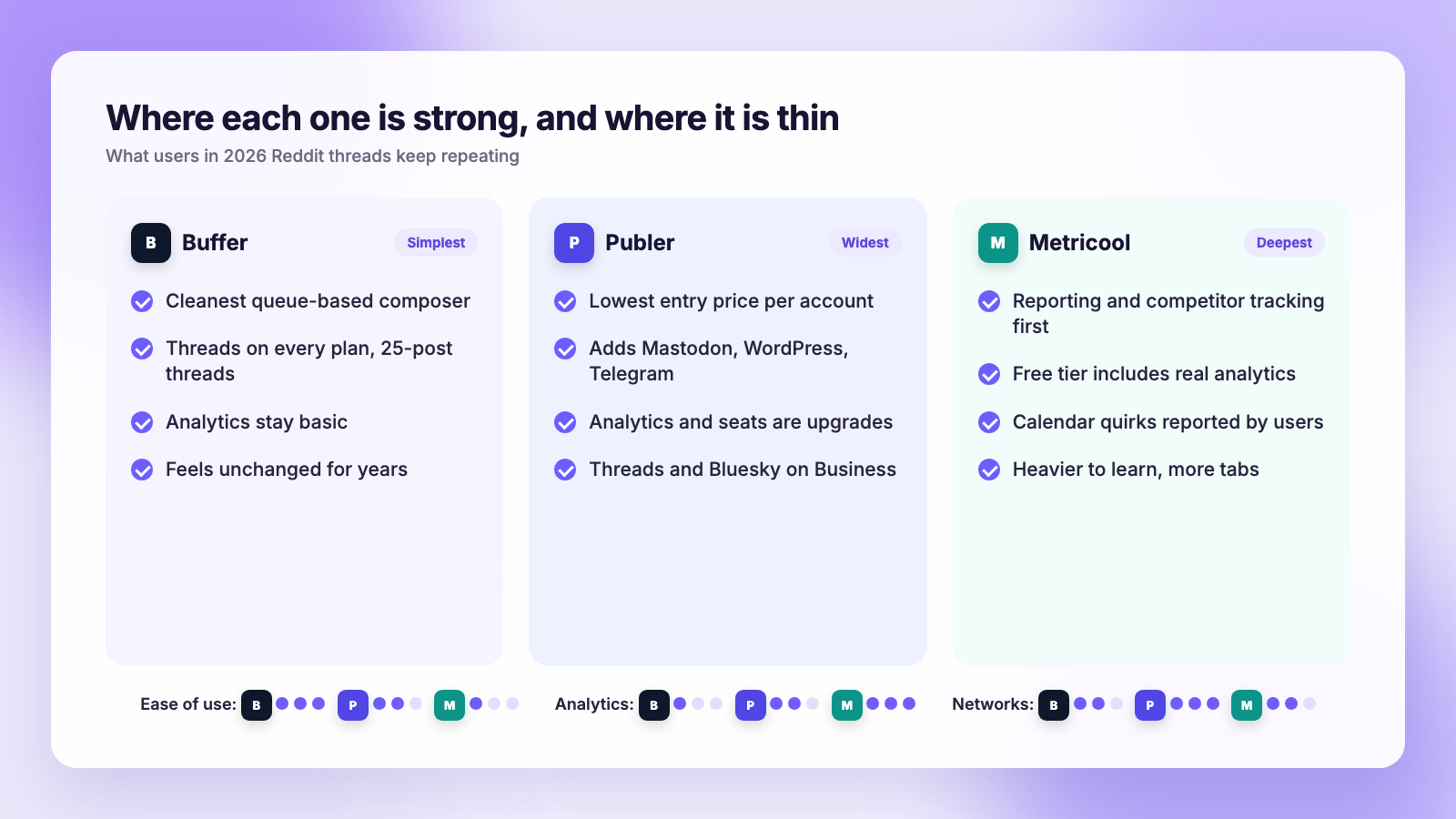
Buffer gives you post-level and channel-level numbers that are easy to read and easy to export. The common complaint on Reddit, repeated in a June 2026 r/SaaS thread comparing schedulers, is that Buffer "feels frozen in time": the analytics are basic, there is no real automation, and the AI features feel bolted on. If you only want to know which posts did well, it is enough. If you report to a client every month, it is thin.
Publer has analytics, but the useful depth is on the Business tier. On the entry plans you are mostly paying for publishing.
Metricool is the reverse. People choose it for the reporting first: cross-platform dashboards, competitor benchmarking, best-time heatmaps built from your own audience, and a unified inbox. An r/SocialMediaManagers thread from August 2026 put it bluntly: you would rather be able to dig into data and make better decisions than just have a nicer interface. The trade-off is polish. Several users in late 2025 and 2026 described calendar glitches, such as a day being skipped or two posts swapping dates, and one agency owner said it gets shaky once you need team workflows and client reporting at scale.
If you want to understand which numbers matter before you choose a tool, our guide to social media metrics that matter is a good place to start.
Team and client features
- Buffer Team includes unlimited users on the Team plan, with approval and draft collaboration. For a small team that runs a handful of channels, paying per channel and never per seat is a good deal.
- Publer charges per member, so a three-person team costs more than a solo operator on the same accounts. Workspaces for clients exist on Business.
- Metricool prices by brands and users, which maps well to agencies where each client is a brand. Reporting per brand is its strongest agency feature.
If you manage accounts for other people, our checklist on managing client social accounts covers the permissions and hand-off questions none of the pricing pages mention.
Ease of use
Buffer is the one people recommend to someone who has never used a scheduler. The queue model, where you set time slots once and drop posts into them, has barely changed since 2015, and that is a compliment. Publer's composer is busier but clear, and its media integrations for finding images are a nice touch. Metricool asks more of you up front: more tabs, more settings, more data. People who like data love it. People who want to post and leave find it heavy.
Where Plumefy fits
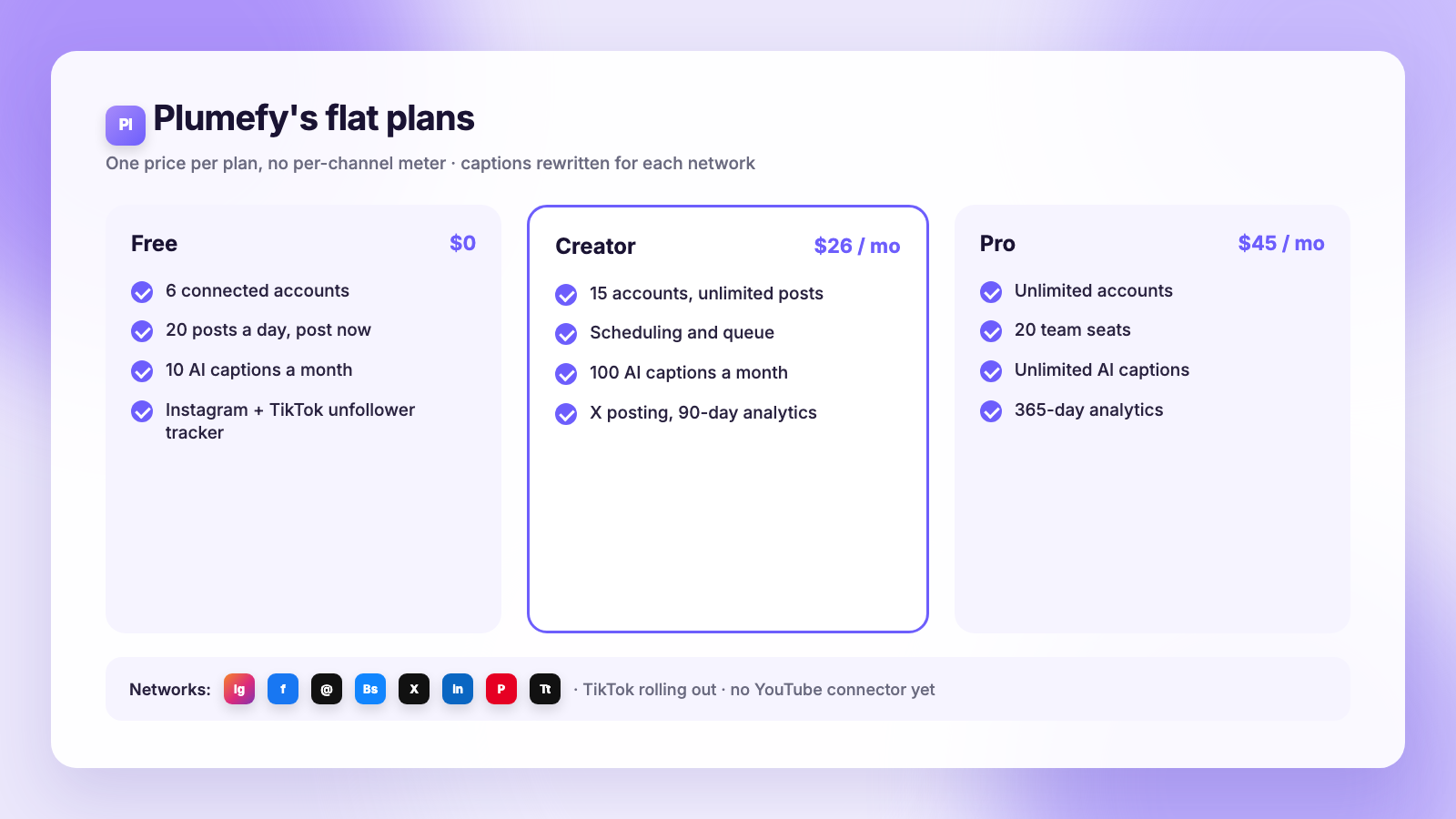
Plumefy is built around a different idea: one flat plan, no per-channel meter, and captions rewritten for each network rather than one text box copied everywhere. Here is the honest shape of it at the time of writing.
- Free: 6 connected accounts, 20 posts a day, 10 AI captions a month, and the export-based unfollower tracker for Instagram and TikTok. Posting is immediate on Free; scheduling is on the paid plans.
- Creator, $26 a month: 15 accounts, unlimited posts, scheduling, 100 AI captions a month, X posting, and 90 days of analytics.
- Pro, $45 a month: effectively unlimited accounts, 20 team seats, unlimited AI captions, and a year of analytics.
Networks covered are Instagram, Facebook, Threads, Bluesky, X, LinkedIn, Pinterest and TikTok, with TikTok posting still rolling out account by account. There is no YouTube connector today, so if Shorts are central to you, Buffer or Publer cover that and Plumefy does not yet.
For a detailed side-by-side, see Plumefy vs Buffer and Plumefy vs Publer. If your shortlist also includes the bigger suites, Plumefy vs Hootsuite and Plumefy vs Later cover those.
Which one should you pick?
- Pick Buffer if you run 3 to 6 channels, want the least friction, and are happy with simple reports. The free plan is the best of the three for a small account, and Threads works on it.
- Pick Publer if you need the widest network list on a tight budget, including WordPress, Telegram or Mastodon, and you are a solo operator who will not pay for extra seats.
- Pick Metricool if reporting is the job. Agencies that send monthly client reports and want competitor benchmarks get the most from it, as long as they can live with occasional calendar quirks.
- Pick a flat-price tool like Plumefy if you are between 5 and 15 accounts, you want per-platform captions written for you, and you would rather not do per-channel math every time a client adds a profile.
Our wider roundup of social media scheduling tools covers the suites beyond these three, and free vs paid schedulers walks through when a free plan stops being enough.
FAQ
Is Buffer or Publer cheaper?
At 1 to 3 accounts, both are free. From 4 accounts up, Publer's per-account entry price is lower than Buffer's per-channel price at the time of writing, but Publer adds charges for team members and keeps Threads, Bluesky and deeper analytics on its Business tier. For a solo creator who only needs publishing, Publer is usually cheaper. For a small team, Buffer's unlimited users on the Team plan often wins.
Is Metricool better than Buffer for analytics?
Yes, by a wide margin. Metricool's free tier already includes cross-platform reporting and competitor tracking, which Buffer does not offer at any price. Buffer's advantage is that its analytics are simple enough to read in a minute, which is all some people want.
Do all three support Threads and Bluesky?
Buffer supports both on every plan, including Free. Publer supports both on paid plans. Metricool adds Threads on its Advanced plan. Plumefy supports both on every plan. If you are deciding which of the two networks deserves your time, read Threads vs Bluesky for creators.
Can I switch later without losing my posts?
Scheduled posts do not transfer between tools, but your social accounts reconnect in minutes anywhere. The practical move is to let the current queue run out, connect the new tool, and schedule the next batch there. Keep a copy of captions in a document during the switch.
The bottom line
Buffer for simplicity, Publer for breadth on a budget, Metricool for reporting. All three are good tools, and all three get expensive in different ways as you grow. If you would rather pay one flat price, have captions adapted per network, and keep an eye on unfollowers from the same dashboard, start on Plumefy's free plan and compare it against your current bill.
Post everywhere, once.
Start on the free plan — no card needed, upgrade when you need scheduling.
Start free