Threads vs Bluesky for Creators in 2026: Where Should You Post?
Threads or Bluesky in 2026? Compare audience, discovery, links, video, follower data and scheduling side by side, and see why most creators should post to both.

Threads and Bluesky are the two text-first networks that grew out of the X exodus, and by late 2026 they have settled into very different places. Threads is the big one, with hundreds of millions of monthly users, an algorithmic feed and the full weight of Meta behind it. Bluesky is smaller, open, and built around custom feeds and a culture that rewards conversation. Creators keep asking which one deserves their time.
The short answer: if you can only run one, Threads wins on raw reach and Bluesky wins on depth, and most creators should post to both because the marginal cost of the second one is close to zero. This guide compares them where it matters for creators: audience size, how discovery works, what you can measure, how much they tell you about your followers, and how to post to both without doubling your work.
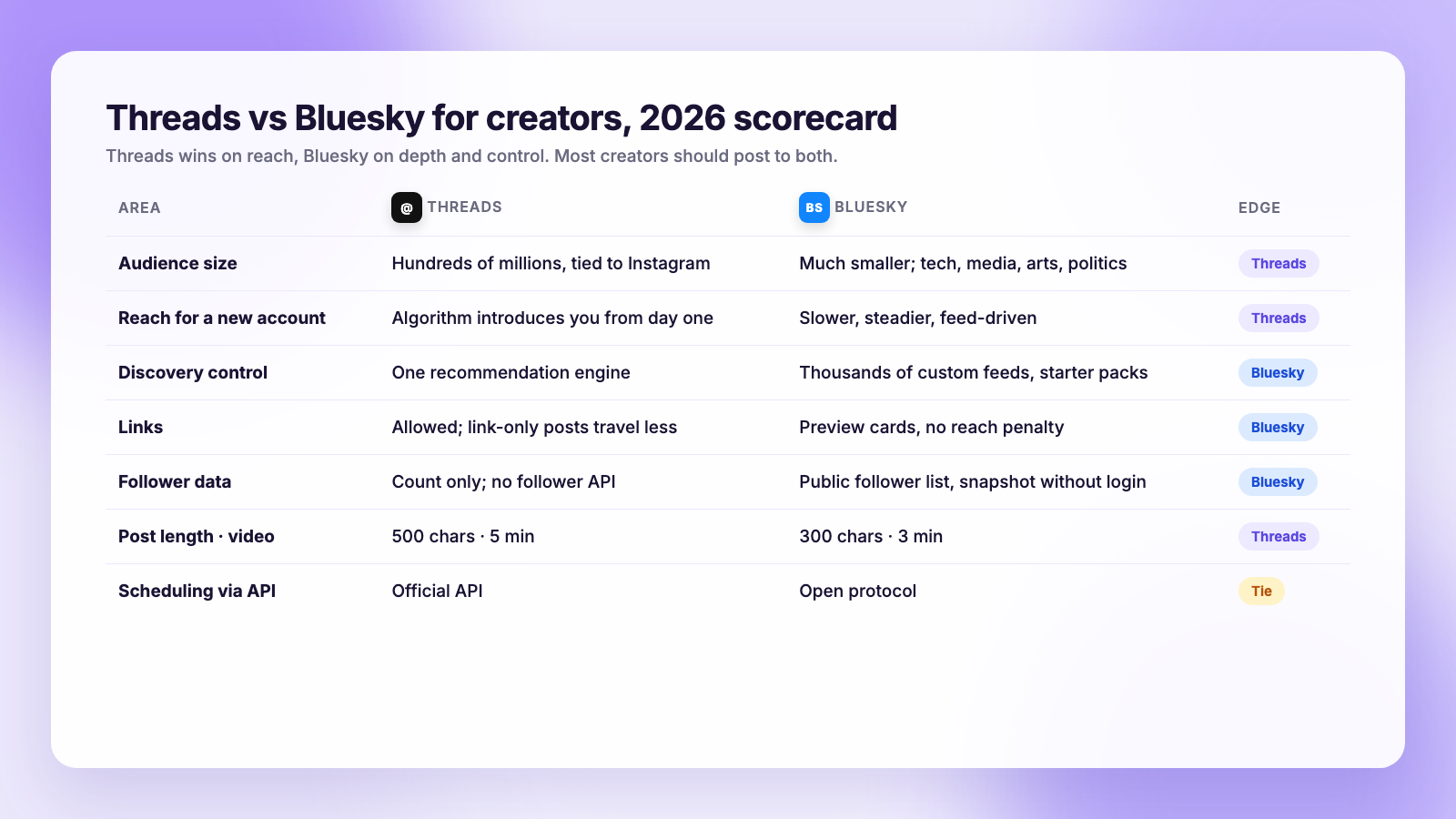
The two networks at a glance
| Threads | Bluesky | |
|---|---|---|
| Owner | Meta | Bluesky Social, on the open AT Protocol |
| Audience | Very large; tied to Instagram sign-up | Much smaller; tech, media, arts and politics skew |
| Feed | Algorithmic "For you", plus Following | Following, Discover, plus thousands of custom feeds anyone can build |
| Post length | 500 characters | 300 characters |
| Links | Allowed; historically less reach for link posts | Allowed, with link cards; no reach penalty |
| Video | Up to 5 minutes | Up to 3 minutes |
| Scheduling via API | Yes, official | Yes, open protocol |
| Follower data | Count only; no unfollow list | Public follower list anyone can read |
| Analytics | Insights inside the app | Third-party only |
Audience: size versus fit
Threads has the numbers. It launched on top of Instagram's sign-up flow and never gave that advantage back, so a brand-new Threads account can be put in front of strangers by the algorithm from day one. For lifestyle, business, humour and anything with broad appeal, that reach is real.
Bluesky's audience is a fraction of the size and noticeably skewed: developers, journalists, academics, artists, and a strong political and activist presence. If that is your audience, Bluesky can be worth more per follower than Threads, because the people there are unusually likely to reply, repost and click. If it is not, you will find the room quieter than the follower counts suggest.
The question to ask is not "which is bigger" but "where do the people who would pay me, hire me or read me actually hang out". If you are unsure, post the same thing to both for a month and look at who replies.
Discovery: the algorithm versus the feed market
This is the deepest difference between the two.
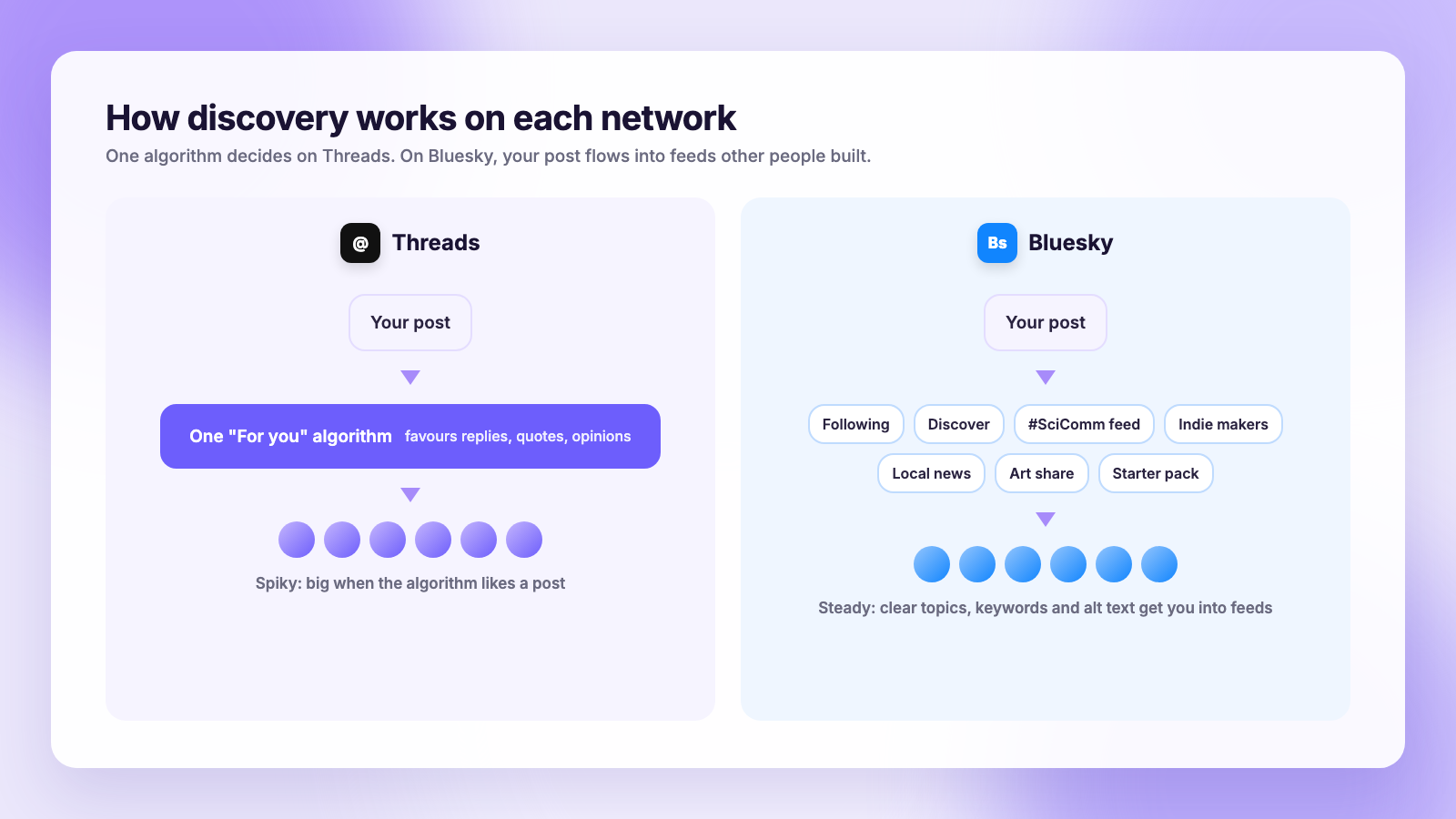
Threads runs one recommendation engine. It decides what strangers see, and it favours conversation: replies, quotes, and posts that start a thread. Text-only posts with a strong opinion or question travel far. Posts that are mostly a link travel less, which Meta has acknowledged and partially walked back several times. Your strategy is to write things people want to argue with or add to, and to reply a lot. We go deeper in how to grow on Threads.
Bluesky has no single algorithm. Beyond the Following and Discover feeds, anyone can build a custom feed, from "posts with cat photos" to "science news" to a feed of a specific community's members, and users subscribe to the ones they like. Your post can surface in feeds you have never heard of just by matching their rules. That rewards clear topics, consistent keywords and alt text on images, and it makes starter packs and feed membership a growth lever that has no equivalent on Threads. Our Bluesky getting-started guide covers the mechanics.
In practice: Threads growth is spiky and depends on the algorithm liking a post. Bluesky growth is slower, steadier, and more under your control.
Links, video and formats
Threads caps posts at 500 characters, allows up to 20 images in a carousel and video up to five minutes, and it is where Meta is pushing creator features like topic tags and text-based polls. Links work, but a post that is only a link tends to get less distribution than one with a point.
Bluesky caps posts at 300 characters, four images, and three-minute video. Links get a proper preview card and no reach penalty, which is why journalists and newsletter writers often see more clicks from a much smaller Bluesky following than from Threads. The 300-character limit means a caption written for Threads will need trimming, a detail that matters once you cross-post. Our character limits by platform guide has the full table.
What each one tells you about your followers
Creators ask about this constantly, so here is the straight comparison.
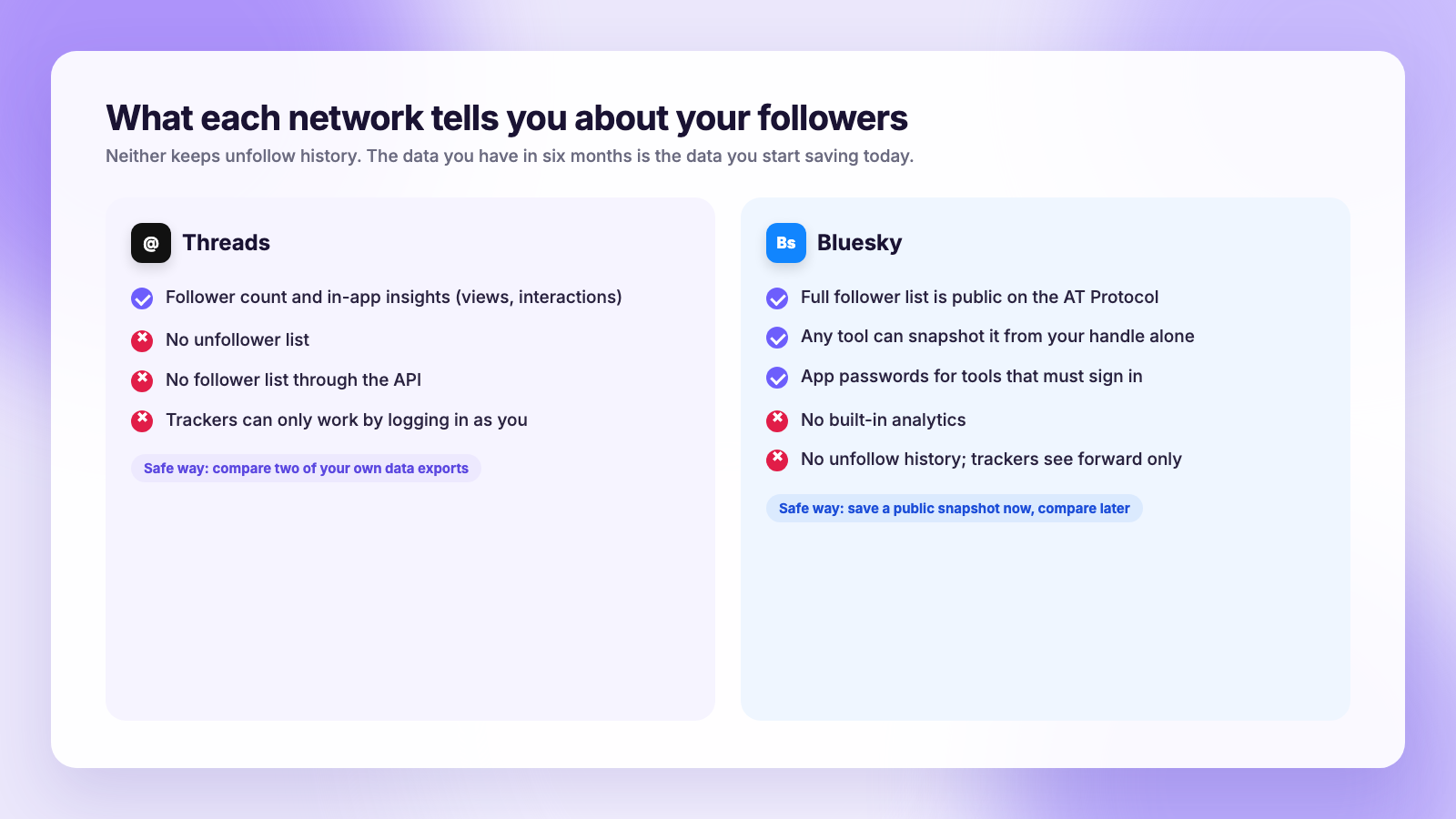
Threads gives you a follower count and, inside the app, insights on views and interactions. It does not show who unfollowed you, and its API does not expose your follower list to any app, so the only safe way to track unfollowers is comparing two of your own data exports. Step by step in how to see who unfollowed you on Threads.
Bluesky has no built-in analytics, but its follower list is public on the open protocol. Any tool, or you, can save a copy of it without logging in and compare copies over time. That makes unfollower tracking easier and safer on Bluesky than anywhere else, as long as you take the first snapshot. Details in how to see who unfollowed you on Bluesky.
Neither network notifies anyone about an unfollow, and neither keeps a history of them. On both, the unfollow data you have in six months is the data you start saving today.
Post to both without doubling the work
The practical conclusion for most creators: treat Threads and Bluesky as one job with two outputs. Write the post once, adjust it, and schedule it to both.
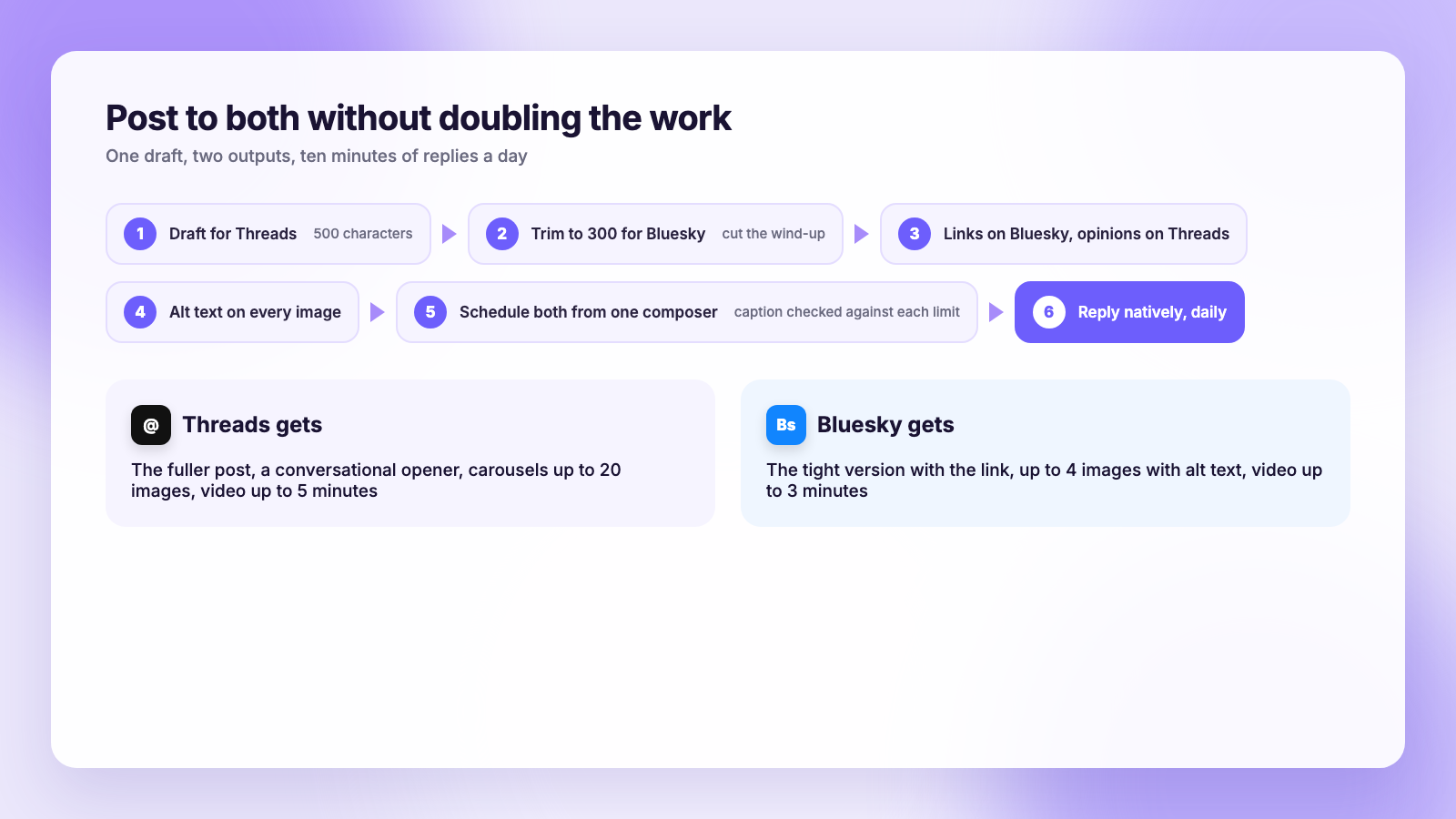
A routine that holds up:
- Draft for Threads first. The 500-character version is the fuller one.
- Trim to 300 for Bluesky. Usually that means cutting the wind-up, which often improves the post.
- Move links to Bluesky, keep opinions on Threads. Same idea, different lead.
- Add alt text to images. Bluesky's accessibility culture expects it, and some custom feeds use it for discovery.
- Schedule both from one place. This is the step that turns two networks into one habit. Plumefy's composer takes one draft, lets you tailor the text per network, warns when a caption exceeds Bluesky's 300 or Threads' 500 characters, and publishes both on schedule alongside Instagram, X, TikTok and the rest.
- Reply natively, daily. Scheduling handles the publishing; the growth on both networks comes from showing up in the replies, and that cannot be automated without it showing.
If you are choosing a scheduler for this, check that Threads and Bluesky are both first-class networks and not add-ons, and whether running several accounts on one network costs extra. Our Plumefy vs Buffer and Plumefy vs Publer comparisons go through exactly those points.
The verdict
- Pick Threads if your audience is broad, your content is opinion or lifestyle, and you want the algorithm to do the introductions.
- Pick Bluesky if your audience is technical, journalistic, academic or creative, if links matter to your business, or if you want growth you can engineer through feeds and starter packs.
- Pick both if you can spare the ten minutes a day to reply on two apps. Scheduling makes the posting free; the replies are the real cost.
FAQ
Is Threads or Bluesky bigger in 2026?
Threads, by a wide margin. It is tied to Instagram's sign-up and counts its users in the hundreds of millions. Bluesky is much smaller but has a concentrated audience in tech, media, academia and the arts.
Which is better for getting clicks on links?
Bluesky. Links get a preview card and no reach penalty, and the audience clicks. Threads allows links but tends to distribute link-only posts less widely.
Can I schedule posts to Threads and Bluesky?
Yes. Both have official ways for tools to publish, and schedulers like Plumefy post to both from one composer with the caption adjusted to each one's character limit.
Can I see who unfollowed me on Threads or Bluesky?
Not from the apps themselves. On Threads, compare two of your own data exports. On Bluesky, your follower list is public, so save a copy now and compare it later. Neither network keeps unfollow history.
Should I post the exact same text to both?
Mostly, with a trim. Bluesky's 300-character limit is shorter than Threads' 500, and Bluesky readers respond better to links and specifics while Threads rewards a conversational opener.
Does Plumefy support both?
Yes. Threads and Bluesky are both included on every Plumefy plan, with per-network captions and scheduling. Try Plumefy free and post to both from one place.
Threads gives you reach you did not earn yet; Bluesky gives you an audience you can actually hold. In 2026 the smart move for most creators is to stop choosing, write once, and let a scheduler carry the post to both while you spend your time where it counts, in the replies.
Post everywhere, once.
Start on the free plan — no card needed, upgrade when you need scheduling.
Start free