Best Time to Post on TikTok in 2026, by Day (US Data)
Best time to post on TikTok in 2026: Sprout Social and Buffer data by day, why they disagree, US time zones, and how to find your own peak in TikTok Studio.

Search "best time to post on TikTok" and you get two confident answers that contradict each other. One says weekday afternoons. The other says Sunday morning. Both come from large, serious datasets published in 2026, and both are right about the people they measured. This guide puts the two side by side, explains why they disagree, and shows you how to find the only number that matters: when your own audience is on the app.
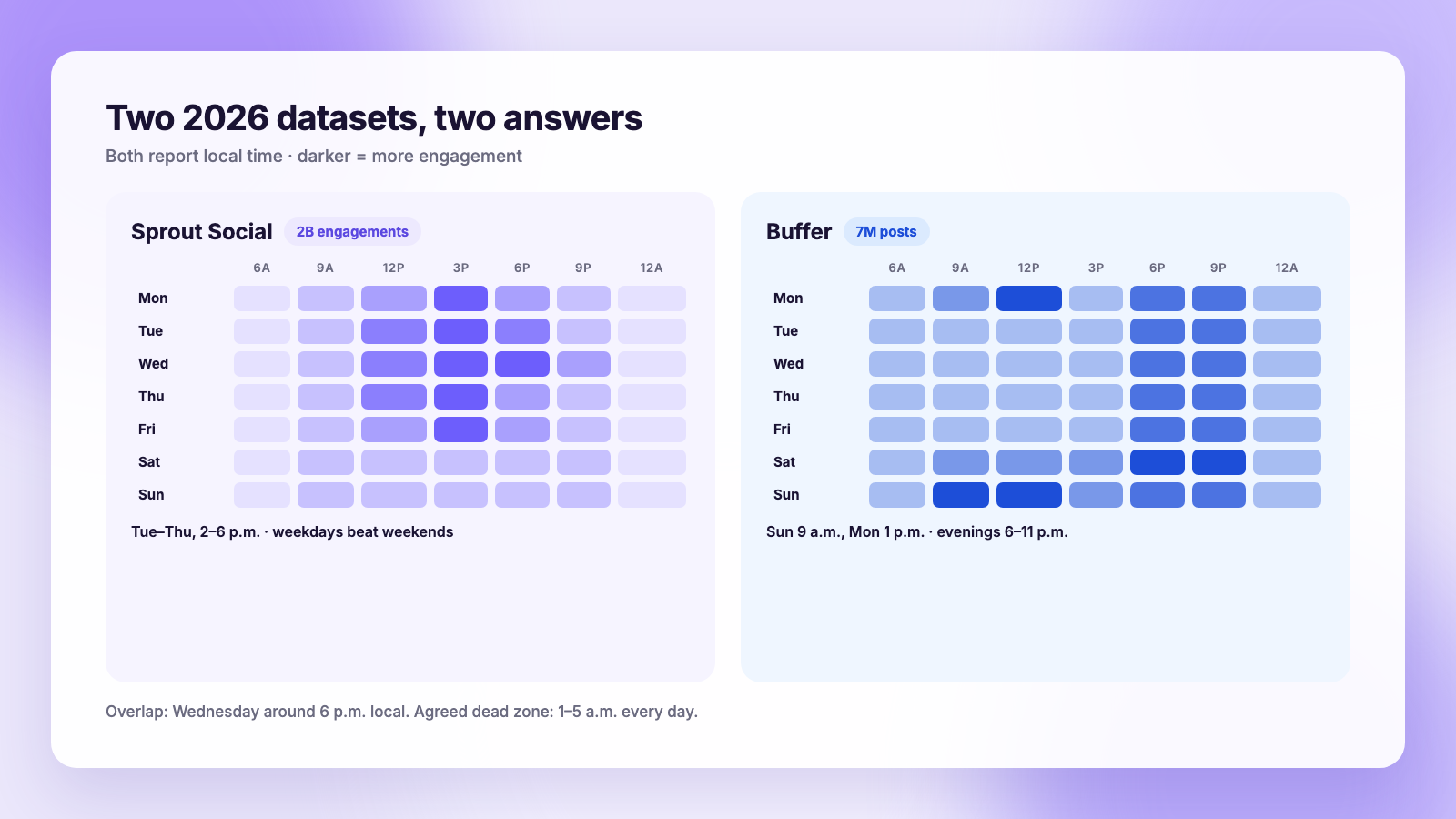
The short version for 2026: Sprout Social's analysis of 2 billion engagements puts the best TikTok window at Tuesday through Thursday, 2 p.m. to 6 p.m. local time, with weekdays beating weekends. Buffer's study of 7 million posts puts the single best slot at Sunday 9 a.m., followed by Monday 1 p.m. and Sunday 1 p.m., with evenings from 6 p.m. to 11 p.m. strong across the week. Use either as a starting grid, then replace it with the Followers tab in TikTok Studio Analytics, which shows the hours your followers are actually active. Schedule into those hours and stop guessing.
The two 2026 datasets
Sprout Social (published March 2026). Sprout analyzed roughly 2 billion engagements across 307,000 profiles belonging to about 30,000 of its customers, between November 27, 2025 and February 27, 2026. Its headline: the best times to post on TikTok are Tuesdays through Thursdays between 2 p.m. and 6 p.m. local time. Weekdays are the best days, weekends the worst. Per day, Sprout's windows are Monday 3 to 5 p.m., Tuesday 2 to 6 p.m., Wednesday 1 to 8 p.m., Thursday 1 to 5 p.m. and Friday 3 to 5 p.m.
Buffer (published September 2026). Buffer looked at 7 million TikTok posts, videos, carousels and text posts included, and ranked slots by engagement. Its top three are Sunday 9 a.m., Monday 1 p.m. and Sunday 1 p.m. Saturday is its best-performing day, with Monday and Sunday close behind. Engagement in Buffer's data rises in the evening, peaking between 6 p.m. and 11 p.m., and afternoons from noon to 5 p.m. are generally the quietest stretch.
Put those next to each other and the contradiction is obvious. Sprout says weekday afternoons are the peak. Buffer says weekday afternoons are the trough. Neither is wrong.
Why they disagree
Three differences explain most of the gap, and understanding them tells you which study is closer to your situation.
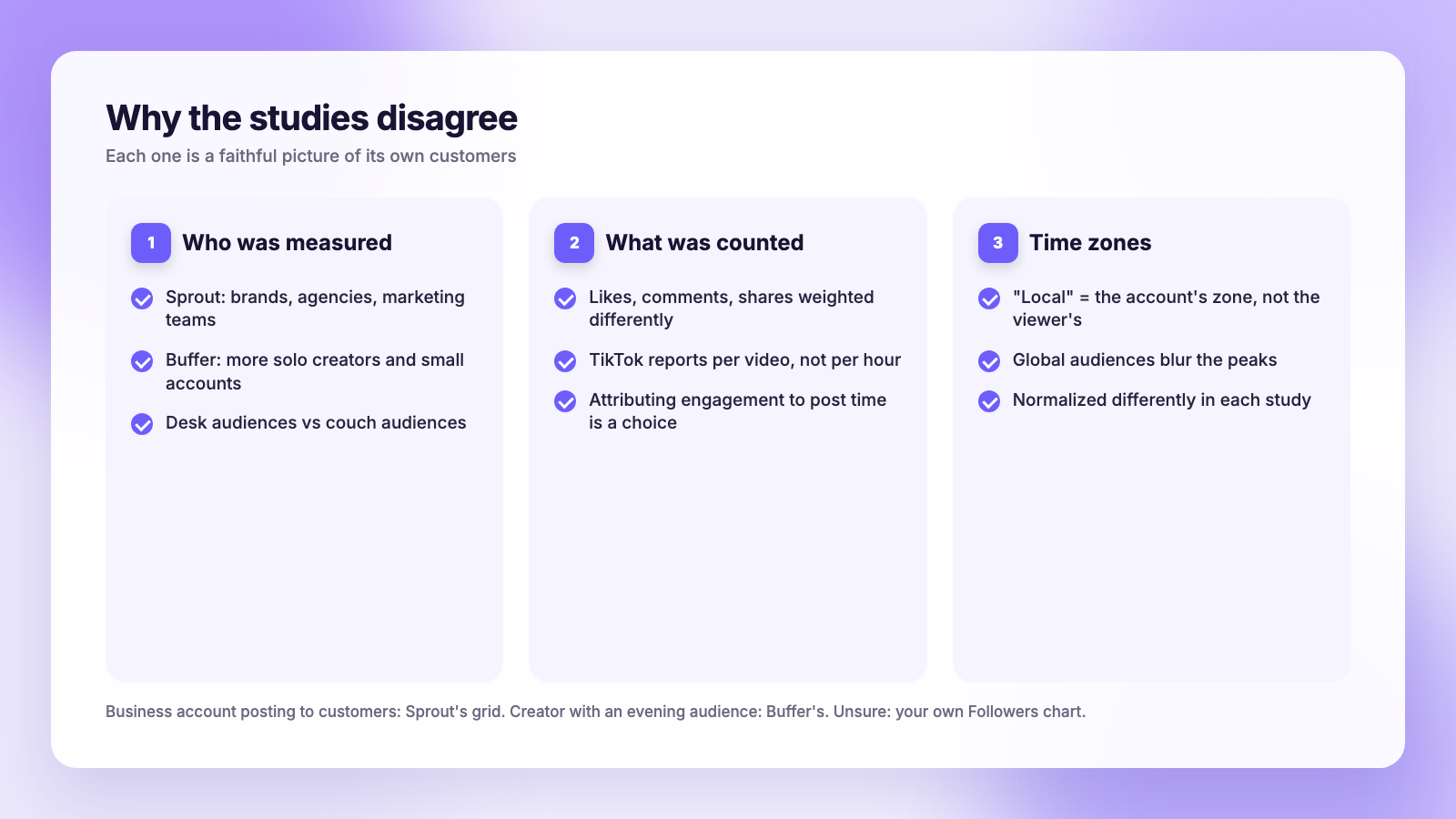
Who was measured. Sprout's customers skew toward businesses, agencies and brands with marketing teams, the kind of accounts that post on a weekday schedule and whose audiences engage from a desk. Buffer's user base includes far more solo creators and small accounts, whose audiences scroll in the evening and on weekends. Each study is a faithful picture of its own customers.
What was counted. "Engagement" is not one number. A study that weights likes and comments equally will favor different hours than one that leans on shares or follows, and TikTok's metrics are reported per video rather than per hour of posting, so each team has to decide how to attribute engagement back to the posting time. Different choices, different peaks.
How time zones were handled. Both report local time, but "local" means the account's time zone, not the viewer's. A US brand with a global audience posts at 3 p.m. Eastern and is measured at 3 p.m. even though most views arrive at midnight in Manila. Normalization smooths this out differently in each dataset.
The practical reading: if you are a business account posting on work days to customers, Sprout's grid is the closer fit. If you are a creator whose audience watches on the couch, Buffer's is. If you are not sure, you are about to find out from your own data.
Best time to post on TikTok by day (both datasets)
All times are local to your audience. For a US audience, that means scheduling in Eastern if most of your followers are on the East Coast, Central or Pacific if they are not, and we cover how to tell below.
| Day | Sprout Social window | Buffer best slots |
|---|---|---|
| Monday | 3 p.m. to 5 p.m. | 1 p.m., then evening 6 to 11 p.m. |
| Tuesday | 2 p.m. to 6 p.m. | Evening 6 to 11 p.m. |
| Wednesday | 1 p.m. to 8 p.m. | Evening 6 to 11 p.m. |
| Thursday | 1 p.m. to 5 p.m. | Evening 6 to 11 p.m. |
| Friday | 3 p.m. to 5 p.m. | Evening 6 to 11 p.m. |
| Saturday | Lower engagement overall | Best day in the dataset, evening strongest |
| Sunday | Lower engagement overall | 9 a.m. and 1 p.m., the two top slots |
Where the two overlap is worth noticing: Wednesday's long window in Sprout's data runs to 8 p.m., which reaches into Buffer's evening peak. If you can only test one slot, Wednesday around 6 p.m. local is the safest bet in both studies. Both also agree on the dead zone: 1 a.m. to 5 a.m. local produces the least engagement every day of the week.
Find your own best time in TikTok Studio
General studies are the starting grid. Your followers' habits are the finish line, and TikTok shows them to you for free.
- Open TikTok Studio on the web or in the Studio app and go to Analytics.
- Open the Followers tab. You need a creator or business account and at least 100 followers for this to populate.
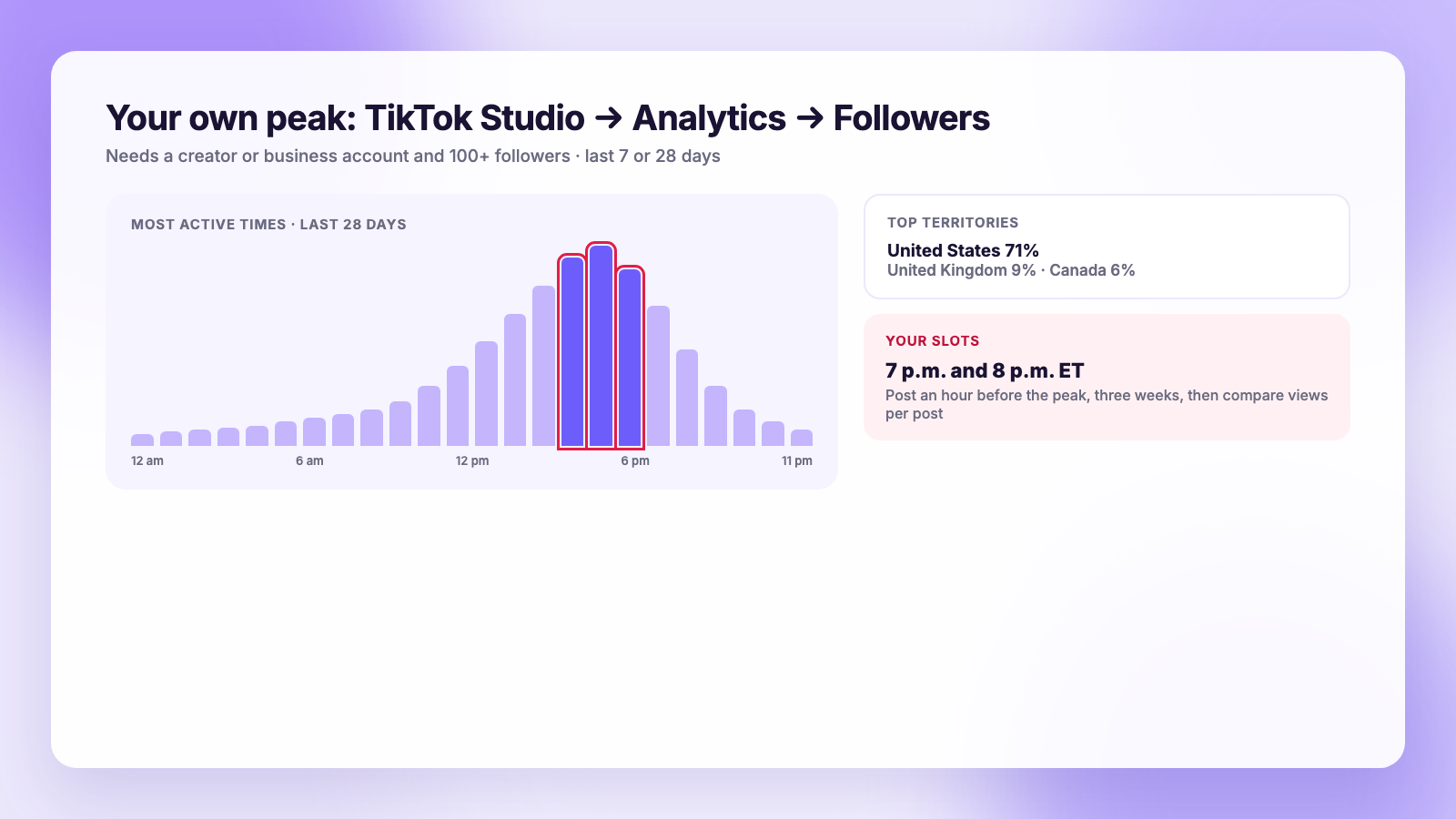
- Scroll to Most active times. TikTok shows a chart of the hours and days your followers were on the app over the last 7 or 28 days.
- Note the top two or three hours. Those are your slots, in the time zone TikTok shows at the top of the chart.
- Just above, check Top territories. If 70% of your followers are in the US, schedule in US time. If a third are in the UK, consider a second slot for them.
The chart measures when followers are online, not when non-followers see your video in the For You feed, so it is most useful for the initial push: your followers watching and sharing in the first hour is what tells TikTok to show the video more widely. Record the hours, post into them for three weeks, then compare average views per post against the three weeks before. That is a real test. Posting once at 9 a.m. on a Sunday is not.
US time zones without the headache
A national US audience spans four time zones, and 6 p.m. in New York is 3 p.m. in Los Angeles. Two ways to handle it:
- Anchor to your largest territory. If TikTok's Top territories shows your followers are mostly in the US, and your own content and comments lean East or West, schedule in that zone and accept the spread. A 6 p.m. Eastern post lands at 5 p.m. Central and 3 p.m. Pacific, all of which sit inside at least one of the two studies' windows.
- Split the week. Post Monday, Wednesday and Friday at 7 p.m. Eastern and Tuesday and Thursday at 7 p.m. Pacific. Over a month you learn which half of the country carries your account.
Whatever you choose, set the time zone in your scheduling tool once and leave it. The most common cause of a "scheduled at the wrong time" complaint is a laptop that switched zones on a trip.
One video, three platforms, three times
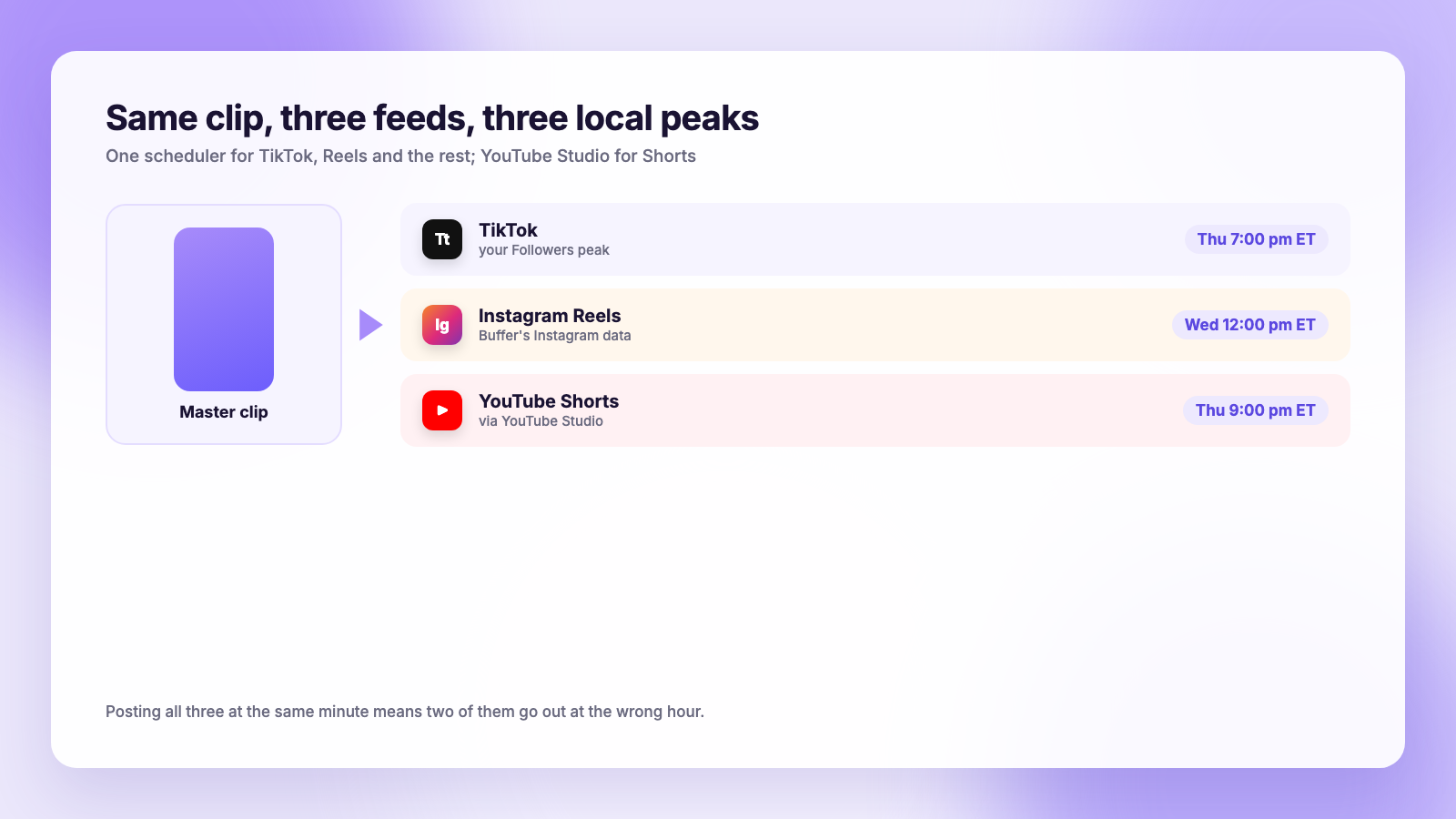
The same clip usually goes to Instagram Reels and YouTube Shorts too, and each of those has its own peak. Buffer's Instagram data points to Wednesday noon and 6 p.m. and Thursday 9 a.m., which we cover in best time to post on Instagram. YouTube's audience tends to arrive later in the evening. Posting all three at once means two of them go out at the wrong hour.
A scheduler with per-platform times fixes that. In Plumefy you upload the master clip once, write a caption for TikTok, Reels, Facebook, Threads, Bluesky and X, and set a separate publish time for each inside one post, so TikTok goes at 7 p.m. Eastern while Reels waits for Wednesday noon. YouTube Shorts you schedule in YouTube Studio, where the same per-platform logic applies. If you are comparing tools for this, our Buffer comparison and Publer comparison cover how each handles per-platform timing, and how to schedule TikTok posts walks through connecting TikTok in the first place. The cross-posting guide covers keeping the clip watermark-free on every feed.
Timing is the last 10%
A caveat the studies themselves make: posting time shifts results by a meaningful margin, but it does not rescue a video nobody wants to watch. Hook, watch time, and whether people share the video decide 90% of the outcome. Timing decides whether the first hundred viewers see it while they are awake. Get the first part right using our TikTok growth guide, then let the schedule handle the second part.
FAQ
What is the best time to post on TikTok in the US?
Sprout Social's 2026 data says Tuesday to Thursday, 2 to 6 p.m. local time. Buffer's 2026 data says Sunday 9 a.m. and weekday evenings from 6 to 11 p.m. Wednesday around 6 p.m. local sits inside both. Your own followers' active hours in TikTok Studio beat either.
Is it better to post on TikTok in the morning or at night?
It depends on whose data matches your audience. Business audiences engage on weekday afternoons in Sprout's study; creator audiences engage in the evening in Buffer's. Check Most active times in TikTok Studio Analytics and post an hour before the peak.
What is the worst time to post on TikTok?
Both studies agree: 1 a.m. to 5 a.m. local time, any day. Sprout also ranks weekends low; Buffer ranks weekday afternoons low. Avoid overnight and test the rest.
Does the best time change for TikTok carousels or text posts?
Buffer's study included carousels and text posts in its 7 million and found the same evening and Sunday pattern. Treat them like videos for timing and judge them on saves and shares.
Pick a grid, then let your data overrule it
Start with whichever study fits your account, schedule into those hours for three weeks, and compare the numbers against the Followers chart in TikTok Studio. Then set a per-platform time for each copy of the clip so Reels and Shorts get their own peaks too. Plumefy connects six accounts on the free plan, and the Creator plan adds the calendar with a separate time per platform.
Post everywhere, once.
Start on the free plan — no card needed, upgrade when you need scheduling.
Start free