YouTube's Clips Tool: Turn Podcast Episodes Into Shorts (2026)
YouTube Studio now cuts podcast episodes into vertical Shorts with captions and a link back. How to use it, ideal clip length, and posting to Reels and TikTok.
Part of our guide: How to Post to Multiple Social Media Platforms at Once. Related tool: Cross-posting tool.
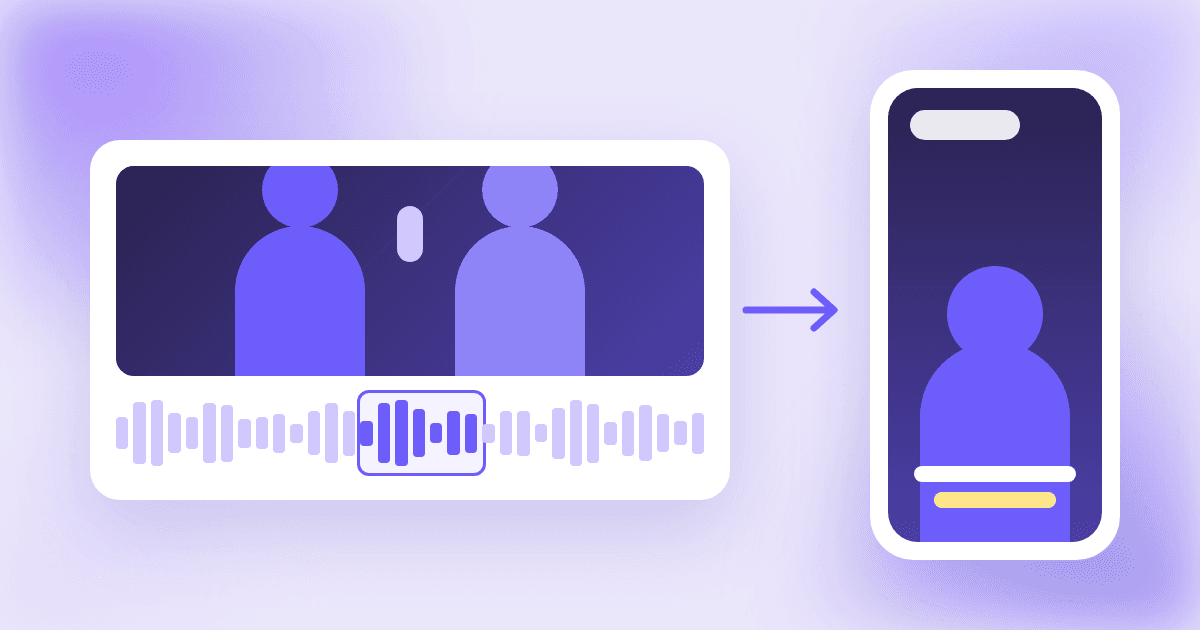
If you publish a video podcast on YouTube, you no longer need a separate editor to cut it into Shorts. On November 12, 2026, TeamYouTube announced that the video clips tool in YouTube Studio now makes Shorts: pick a moment from a widescreen episode, and YouTube turns it vertical, adds captions and links it back to the full episode.
This guide covers what the tool actually does, where its AI features work, whether clipping your own show is safe after YouTube's October crackdown on reposts, how to pick clips that travel, and how to send the same clips to Instagram Reels and TikTok.
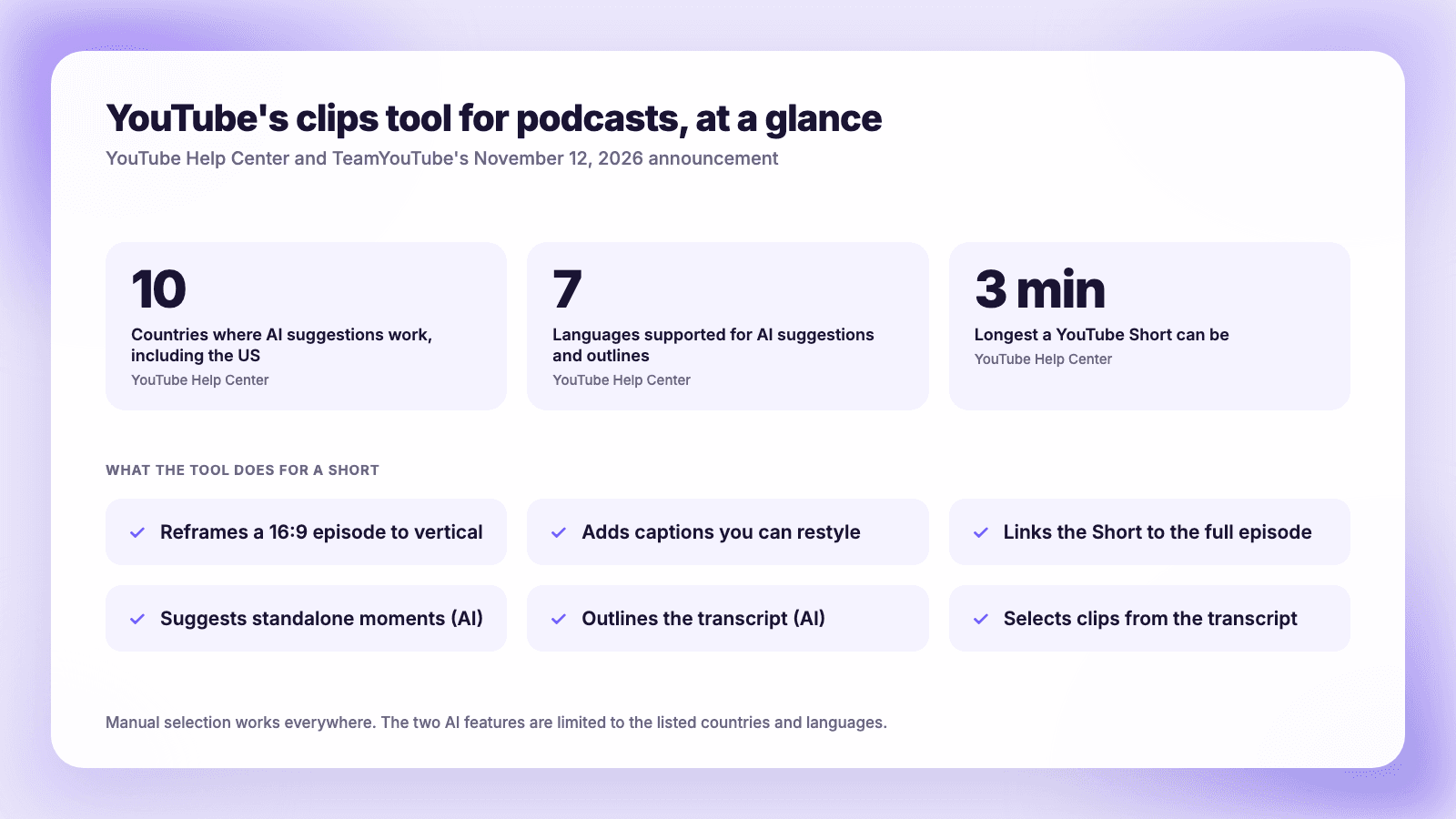
The short version: In YouTube Studio, open an episode, choose Clips and Shorts, then Create clip or Short and Short. Select a segment from the transcript or timeline, or pick one of YouTube's AI suggestions. YouTube reframes your 16:9 video to vertical, adds editable captions, and automatically adds the full episode as the Short's related video. The AI suggestions and outline work in 10 countries, including the US, and 7 languages. YouTube's help page says "You won't be penalized for using your content in a video clip or Short." Keep clips short enough to stand alone (Shorts can run up to three minutes), and if you also post to Reels and TikTok, export from your own editor at full resolution, because YouTube Studio downloads cap at 720p.
What the clips tool does
YouTube's help page for Video Clips and Shorts in YouTube Studio describes the tool as a way to "cut out engaging segments from your long-form videos on YouTube and instantly publish them as separate video clips or Shorts." It makes two kinds of output:
| Feature | Short | Video clip |
|---|---|---|
| Output | Vertical Short | Standard horizontal video |
| Select by transcript or timestamps | Yes | Yes |
| AI suggestions and outline | Where available | Where available |
| Reframing to vertical | Automatic | No |
| Auto captions | Yes, editable font, color, style and position | No |
| Link to the full episode | Added automatically as the related video | Add it to the description yourself |
| Intro or outro | No | Yes, from an eligible video |
The automatic link is the most useful part for podcasters. The help page says: "The source video will be automatically added as a related video to any Short you create with this tool, unless the Short is private, unlisted, or Made for Kids." Viewers see a clickable link under your channel handle. If you upload a Short made elsewhere, you have to add that link by hand, and YouTube's related video page says that option needs advanced feature access.
TeamYouTube's post explains the reframing: "For Shorts, your 16:9 podcast episode will be transformed into a verticalized video, keeping the most important parts of the video in the frame." The help page adds that the preview may show black bars for some scenes, but "the final version will display them as a blurred crop of the video."
Where the AI suggestions work
The manual route works for everyone. The AI parts, suggested clips and an AI outline of the transcript, are limited. The help page lists Brazil, Canada, France, Germany, India, Mexico, South Korea, Spain, the United Kingdom and the United States, in English, French, German, Hindi, Korean, Portuguese and Spanish. Search Engine Journal found that an April 2026 version of the page limited suggestions to English videos in a podcast playlist in the US and Canada, so the coverage has grown this year.
TeamYouTube describes how suggestions are picked: "We look for moments in your episode that can be watched independently and suggest them to you so you can review, edit, and publish them." If you use a suggestion without changing it, the help page says "you may get a suggested title."
Why YouTube is where podcast clips belong
YouTube is now the main podcast platform in the US, and the numbers behind that are recent.
- 1 billion. In February 2025, YouTube announced "more than 1 billion monthly active viewers of podcast content on YouTube."
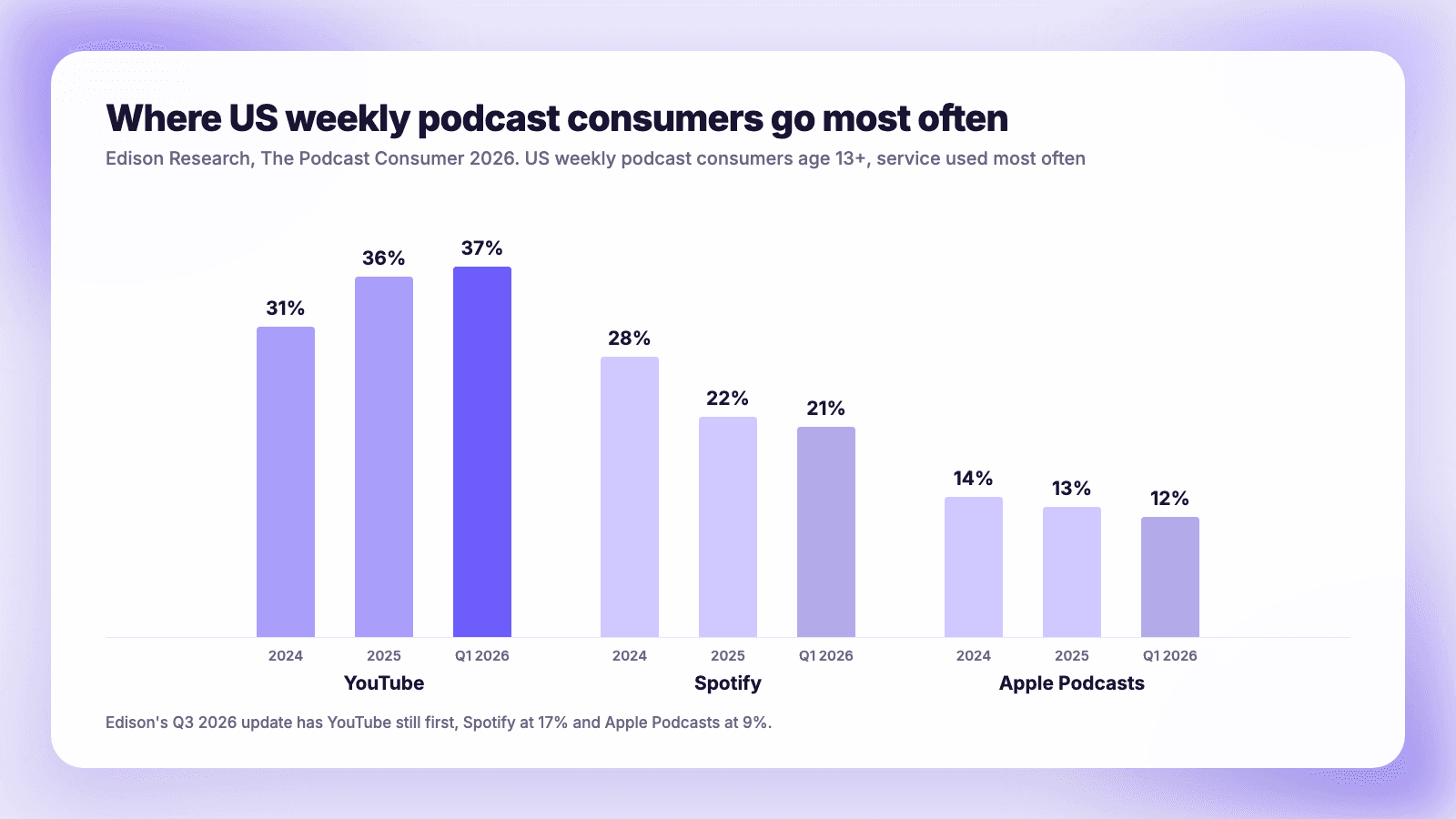
- 37%. Edison Research's Podcast Consumer 2026 found 37% of US weekly podcast consumers use YouTube most often for podcasts, up from 31% two years earlier. Spotify was at 21% and Apple Podcasts at 12% in the report's own chart. Edison's Q3 2026 update, reported by Radio Online, has YouTube still first and Spotify at 17%.
- 58%. Edison's Infinite Dial 2026 survey of 2,050 Americans found 58% of people 12 and older, about 167 million, listened to or watched a podcast in the past month.
- 700 million hours. YouTube said viewers watched over 700 million hours of podcasts on TV screens in October 2025, up from 400 million a year earlier.
Edison VP Megan Lazovick summed up the shift: "Audiences are finding video podcasts, and in some cases, new or formerly audio-only podcasts are finding video audiences." Shorts are how people who do not know your show yet find it. eMarketer forecasts 66.8 million US podcast viewers on YouTube in 2027 against 205.1 million US Shorts viewers, so the Shorts audience is about three times larger.
Will clipping your own episode hurt your reach?
This is the question many podcasters asked after October. On October 1, 2026, TeamYouTube said it was updating Shorts recommendations "to further prioritize original content and reduce the reach of content re-uploaded from other creators without adding anything of your own." It warned that "channels identified as primarily aggregating or re-uploading other creators' videos without significant changes will likely see less distribution within the Shorts feed."
The key words are "other creators." Android Authority's coverage concluded that "If you're a long-form creator who makes short-form clips to promote your videos, your reach shouldn't be affected." The clips tool help page goes further: "You won't be penalized for using your content in a video clip or Short."
One caution from Search Engine Journal: that note links to YouTube's monetization policies and "didn't address recommendations," which is what the October change was about. Clipping your own show is plainly allowed and is not the target of the change, but YouTube has not promised that every clip will be recommended. Clipping someone else's show is a different matter, and that is exactly what the change targets.
How to make a Short from an episode, step by step
These steps follow YouTube's help page.
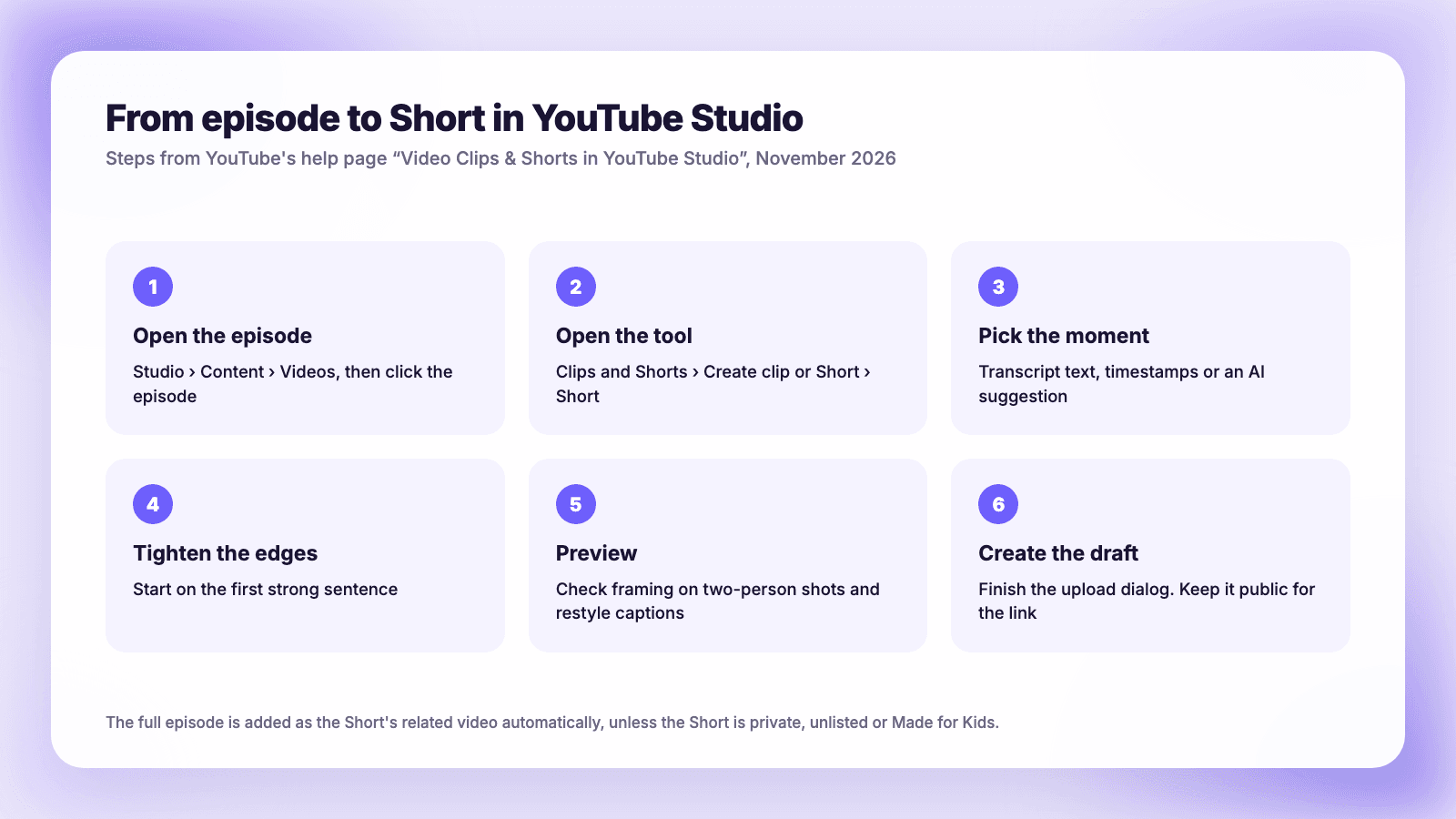
- Open the episode. In YouTube Studio, select Content, then Videos, and click the episode.
- Open the tool. In the left menu, select Clips and Shorts, click Create clip or Short, and choose Short.
- Pick the moment. Highlight text in the transcript and click Confirm selection, enter timestamps in the timeline editor, or choose an AI suggestion from the left panel. The AI outline helps you jump around a long episode.
- Tighten the edges. Adjust the start and end points in the transcript or timeline. Start on the first strong sentence, not on "so, yeah."
- Preview. Click Preview Short. Check the framing, especially when two people are on screen, and click Captions to restyle or turn them off.
- Create the draft. Click Create Draft, then finish the standard upload dialog: title, description and visibility. Leave it public if you want the automatic link to the full episode.
YouTube also recommends keeping "only full episodes" in your podcast playlist. Clips and Shorts show up in your Videos and Shorts tabs instead, so your podcast feed stays clean.
What makes a good podcast clip
The tool removes the editing work. It does not choose well for you, and podcasters who already use AI clippers say the same. "The results depend way more on the quality of the long-form content than the tool," u/No_Employer_5855 wrote on r/podcasting. "Most of the time we still do a quick tweak after, mainly adjusting the first couple seconds and tightening the cut."
Picking moments is also harder than it looks. A solo podcaster, u/Rosette_Simpson9090, described a clip "i was sure would hit get like 200 views Meanwhile a 30 second piece i almost skipped because it felt too casual ended up doing 40 thousand." In the same thread, u/Skithiryx said finding moments is "much easier to do with the transcript than actually listening, so Descript or Youtube Studio after uploading are helpful for this."
How long should a podcast Short be?
YouTube's Shorts length page allows Shorts "up to three minutes in length." Within that, the largest recent dataset is vidIQ's analysis of 331 million Shorts published over 90 days. Its findings:
- 15 to 29 seconds was the most common length (37% of uploads) and had the lowest average views of any length.
- 45 to 59 seconds had the highest average views and was about 70% more likely to reach a million views than 15 to 29 seconds (0.91% against 0.53%).
- Like rate rose with length, from 1.05% under 15 seconds to 2.79% at two to three minutes.
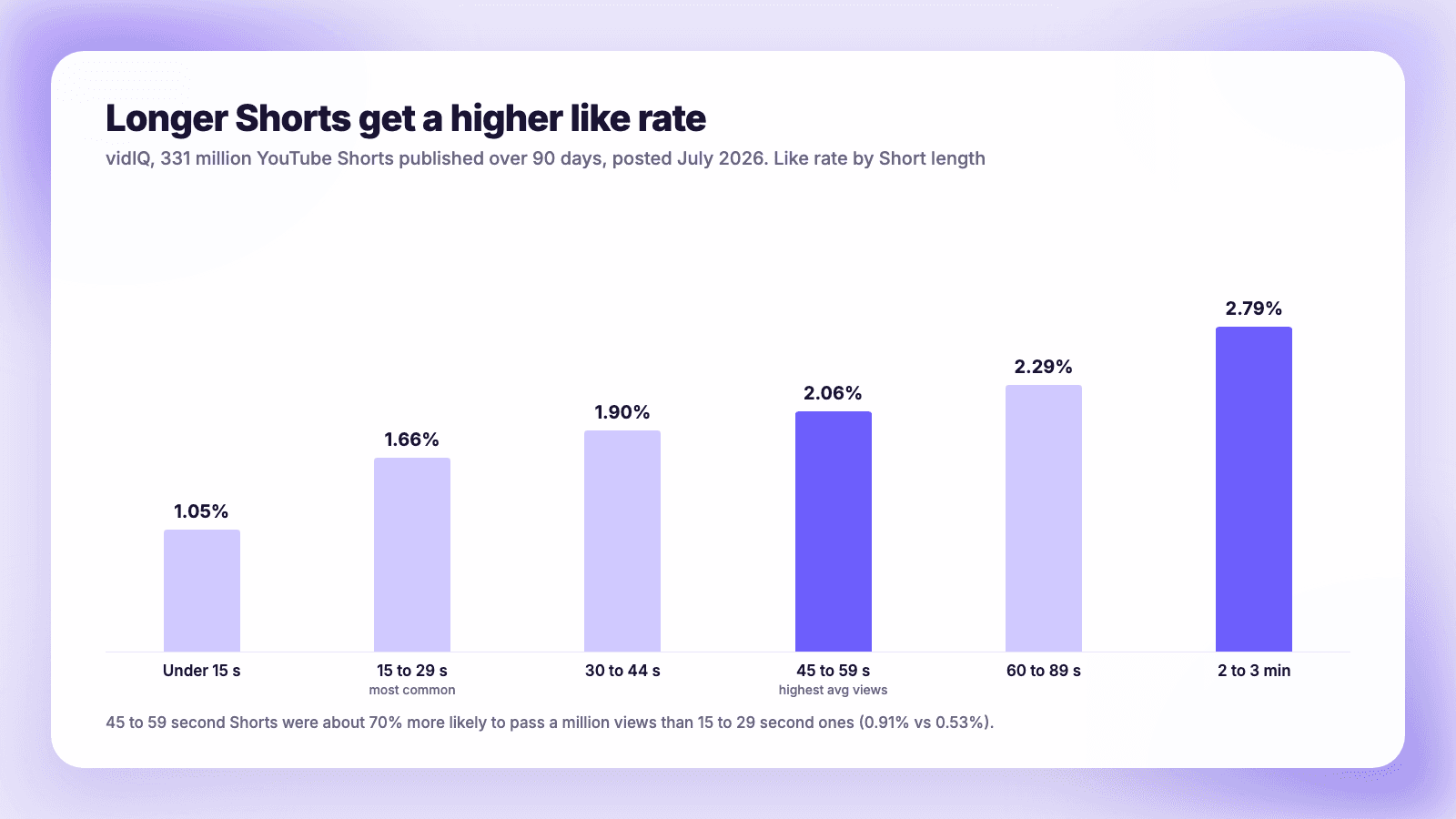
For podcasts that points to 45 seconds to two minutes: enough to set up a point and land it. A conversation needs more room than a visual gag. vidIQ's caveat applies: "Retention becomes much harder at that length, so every second has to earn its place."
A checklist for each clip
- It stands alone. Someone who has never heard the show should understand it without the previous ten minutes. That is the same test YouTube's suggestions use.
- It starts on the point. Cut the throat-clearing. The first sentence should be a claim, a question or a surprise. Our guide to the first three seconds covers openings.
- It has one idea. If the clip needs a second idea to make sense, split it into two.
- The framing works. Auto-reframing keeps "the most important parts" in frame, but check two-person shots in the preview.
- The captions are right. They come from the transcript, so fix names and jargon in the transcript first.
- It ends cleanly. End on the punchline or the takeaway, not halfway into the next sentence.
Our podcast clips guide has more on choosing and captioning clips across platforms.
Clips and the 2027 Shorts money rules
From February 1, 2027, YouTube's Partner Program changes say a channel must "maintain 10M qualified Shorts views over the last 90 days" to earn from the Shorts Creator Pool. Most podcasts will not reach that from clips. eMarketer's read is that "Podcasters below that bar will get value from clips mainly as traffic back to full episodes, which keep earning long-form ad revenues."
That is where the automatic related-video link earns its place. Podcast episodes also count toward YouTube's qualified watch hours, which come from "public long form videos (including podcasts)." A Short that sends people to a 60-minute episode can do more for your channel than the Short's own views.
Sending the same clips to Reels and TikTok
The clips tool only publishes to YouTube. To post the same clip elsewhere, you need the file.
YouTube Studio lets you download your own uploads, but only "in either 720p or 360p," and no more than five times a day per video. That is fine for a test but soft on a phone screen. Use YouTube's tool to find the moments and their timestamps, then cut the same segments from your original recording in your editor and export at 1080x1920.
| YouTube Shorts | Instagram Reels | TikTok | |
|---|---|---|---|
| Length that works for reach | Up to 3 minutes | Up to 3 minutes recommended to new audiences | Accepts at least 3 minutes |
| Link to the full episode | Automatic related video (clips tool) | Put the show name and where to find it in the caption | Put the show name and where to find it in the caption |
| Captions | Auto, editable | Burn in or add in app | Burn in or add in app |
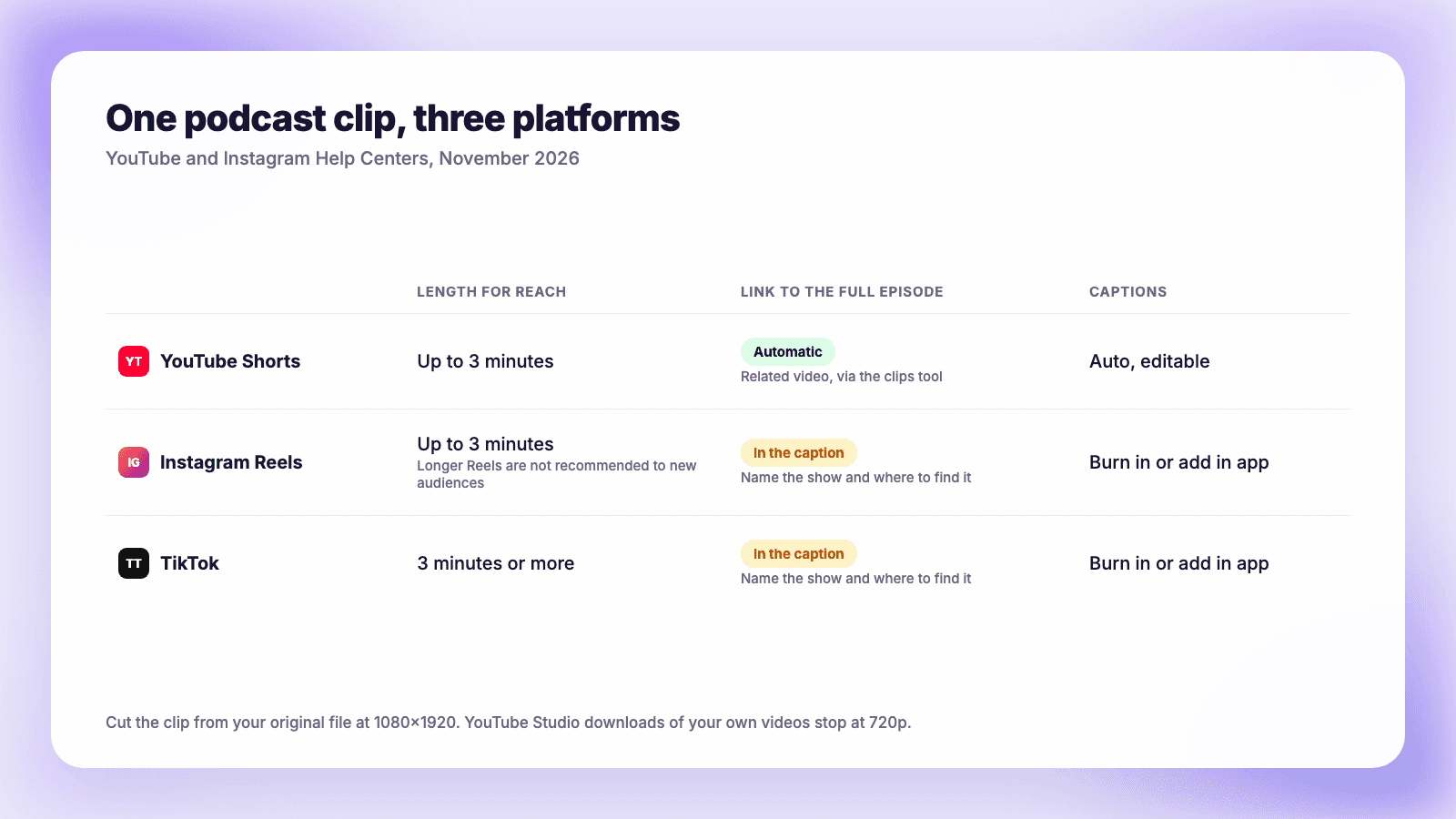
Instagram's help page allows Reels up to 20 minutes but says "Reels over 3 minutes won't be recommended to new audiences." A clip of three minutes or less fits all three apps unchanged. Post clean files without another app's watermark; our guide on cross-posting Reels to YouTube Shorts explains why.
This is the step Plumefy handles. Upload the clip once and it publishes to YouTube, Instagram, TikTok and the other networks you connect, with a caption written for each platform. You can also publish the clip to YouTube from Plumefy rather than through the Studio tool, though then you add the related-video link yourself. How to schedule YouTube Shorts covers timing, and turning one YouTube video into many posts covers the text and image posts you can pull from the same episode.
FAQ
How do I turn a podcast episode into a YouTube Short?
In YouTube Studio, go to Content, open the episode, select Clips and Shorts, click Create clip or Short and choose Short. Pick a segment from the transcript, the timeline or an AI suggestion, preview it, then click Create Draft and publish.
Will YouTube penalize Shorts made from my own podcast?
YouTube's help page says "You won't be penalized for using your content in a video clip or Short." The October 2026 originality change targets channels that re-upload other creators' videos without adding anything. For how Instagram and X draw the same line, see does cross-posting hurt your reach?
Are the AI clip suggestions available everywhere?
No. They work in Brazil, Canada, France, Germany, India, Mexico, South Korea, Spain, the UK and the US, in English, French, German, Hindi, Korean, Portuguese and Spanish. Manual selection works everywhere.
Should I add Shorts to my podcast playlist?
No. YouTube recommends keeping only full episodes in podcast playlists. Clips and Shorts appear in your Videos and Shorts tabs.
Can I download the Short to post on TikTok and Reels?
You can download your own uploads from YouTube Studio, but only at 720p or 360p. For better quality, cut the same moment from your original file and export it at full resolution.
Post everywhere, once.
Start on the free plan. No card needed; upgrade when you need scheduling.
Start free