How to See Who Unfollowed You on Bluesky in 2026
Bluesky's follower list is public, so you can track unfollowers without a password. Three safe methods, what the .car export does and doesn't include, and how to pick a tracker.
Bluesky is the one big social network where your follower list is genuinely public data. Anyone can read it, with or without an account, through the open AT Protocol that Bluesky runs on. That makes "who unfollowed me on Bluesky" a different question from the same one on Instagram or Threads: the answer is easier to get, and the tools that get it do not need your password.
What Bluesky still does not give you is history. The network knows who follows you right now. It keeps no record of who used to. So, as with every other platform, seeing unfollowers means taking a snapshot of your followers today and comparing it with a snapshot later. This guide shows the three ways to do that in 2026, what the data export does and does not contain, and how to pick a tracker that cannot hurt your account.
What Bluesky actually knows about your followers
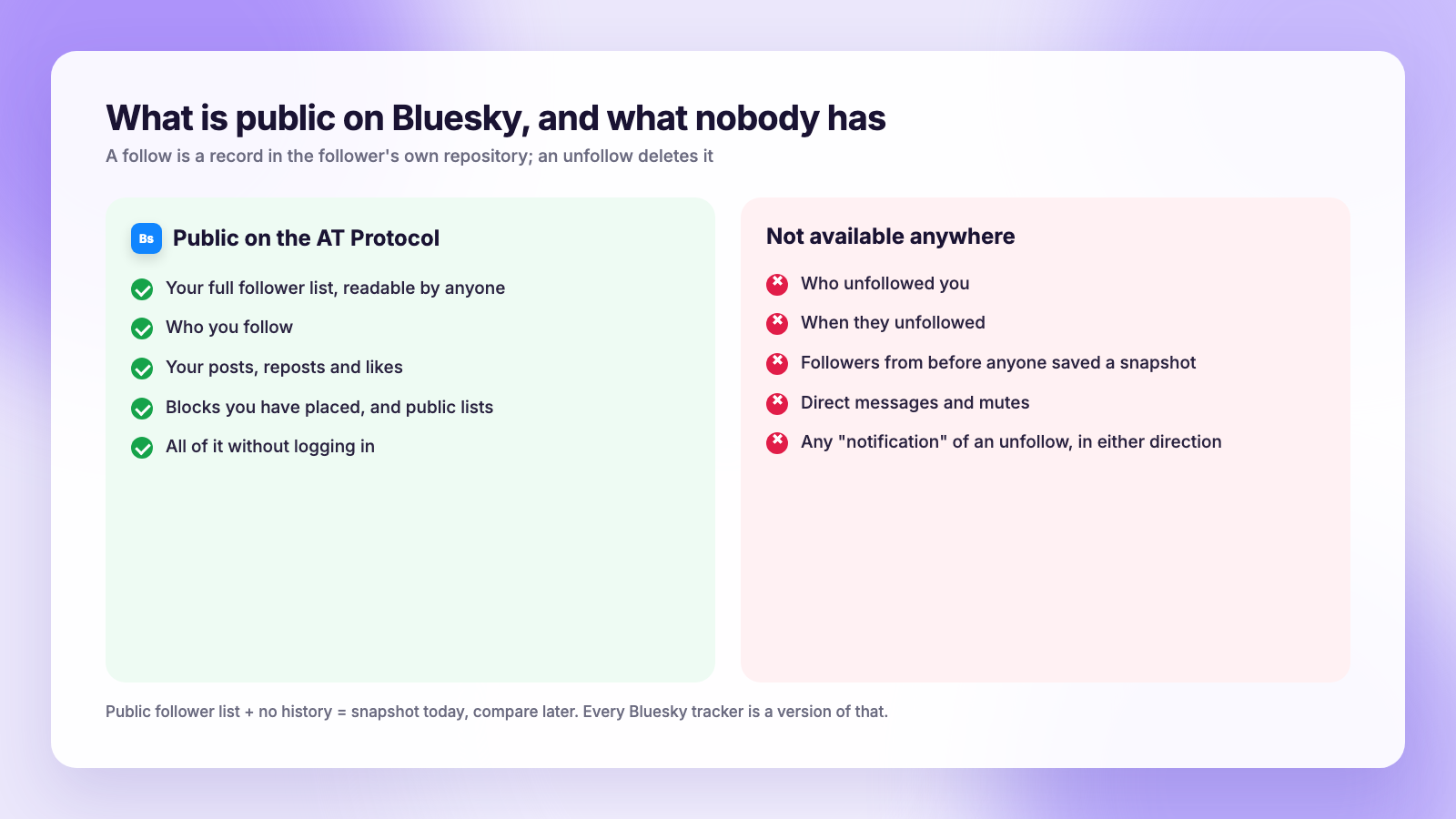
On Bluesky, a follow is a small record stored in the follower's own data repository. When someone follows you, they create a record. When they unfollow, they delete it. Nothing is written to your account at either moment. Two consequences follow from that:
- Your current follower list is public and readable by anyone. Bluesky's public API will list the followers of any handle, no login required. This is why Bluesky unfollower tools can work without ever asking for your password.
- There is no record of an unfollow. The record is simply gone. If nobody saved your follower list before someone left, that departure is unrecoverable.
So every method below is a version of snapshot-and-compare. The only differences are who takes the snapshot and how much work you do.
Method 1: Check by hand
Fine for small accounts, or when you want to know whether one specific person still follows you.
- Open your profile and tap your followers count.
- Scroll the list to the end and screenshot it, or copy handles into a note with today's date.
- A week or two later, do it again and look for names that have vanished.
For a single account, open their profile instead. If "Follows you" appears under their handle, they still do. If it is gone and you did not block each other, they unfollowed.
Method 2: Save snapshots of your public follower list
This is the Bluesky-specific trick. Because your followers are public, you can save a complete copy of the list without logging in, and without any app touching your account. Several free tools, including browser extensions and simple web pages, will produce a CSV of a handle's followers in seconds. You can also pull the list straight from Bluesky's public API if you are technical, which is what those tools do under the hood.
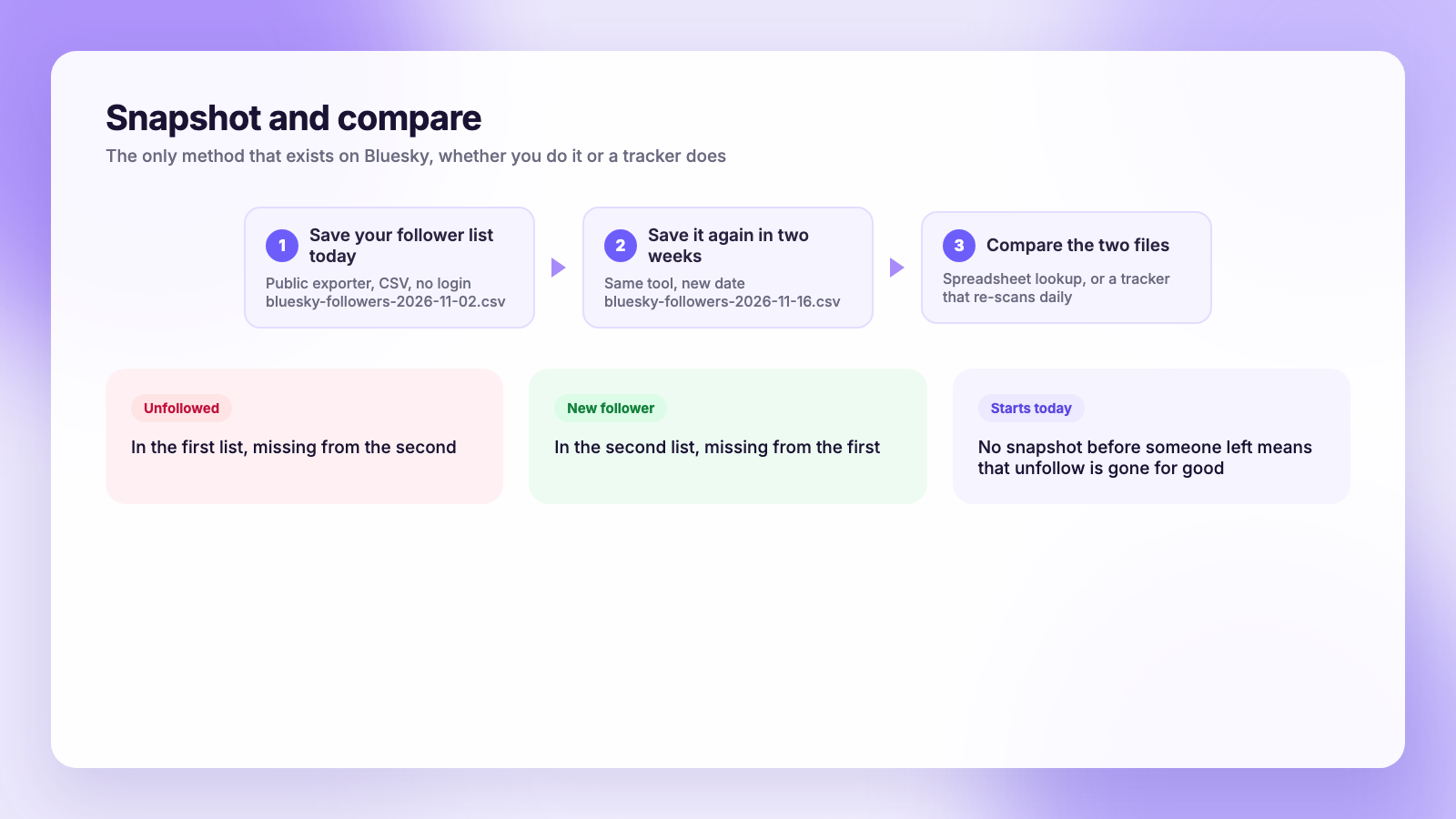
The workflow:
- Export your follower list to a CSV and name it with the date, for example
bluesky-followers-2026-11-02.csv. - Two weeks later, export it again.
- Compare the two files. In a spreadsheet, paste the old handles in column A and the new ones in column B, and flag anything in A that is missing from B. Those are your unfollowers. Anything only in B is a new follower.
The only requirement is that you remember to take the first snapshot. The export cannot reach back in time.
Method 3: Use a Bluesky unfollower tracker
A tracker automates method 2: it saves your follower list on a schedule, usually daily, and shows you who left and who joined since the last check. Because the data is public, a well-built tracker needs nothing more than your handle. Some ask you to sign in so they can also show who you follow that does not follow back, or so you can unfollow from inside the tool.
Two things to know before you connect one:
- It only sees forward. A tracker starts recording from the day you set it up. It cannot show you who unfollowed last month.
- If it asks you to sign in, use an app password. Bluesky lets you create a limited app password under Settings, then Privacy and security, then App passwords. It works for the tool, cannot change your main password or email, and can be revoked in one tap. Never type your main password into a third-party site.
Plumefy does not track Bluesky unfollowers. Our unfollower tracker reads your Instagram and TikTok data exports, which is the only safe way on those platforms, and we would rather say that plainly than stretch. What Plumefy does on Bluesky is publishing: write once, and the post goes to Bluesky, Threads, X, Instagram and the rest with captions adjusted to each network's limits, so your feed stays active while you keep an eye on the numbers. If you are comparing schedulers for that job, our Plumefy vs Buffer and Plumefy vs Publer pages lay out the differences.
Does the Bluesky data export show unfollowers?
Not on its own, and it is worth understanding why, because a lot of guides get this wrong.
Under Settings, then Account, then Export my data, Bluesky lets you download your whole repository as a .car file. It is a complete archive of the records you created: posts, likes, blocks, lists, and the accounts you follow.
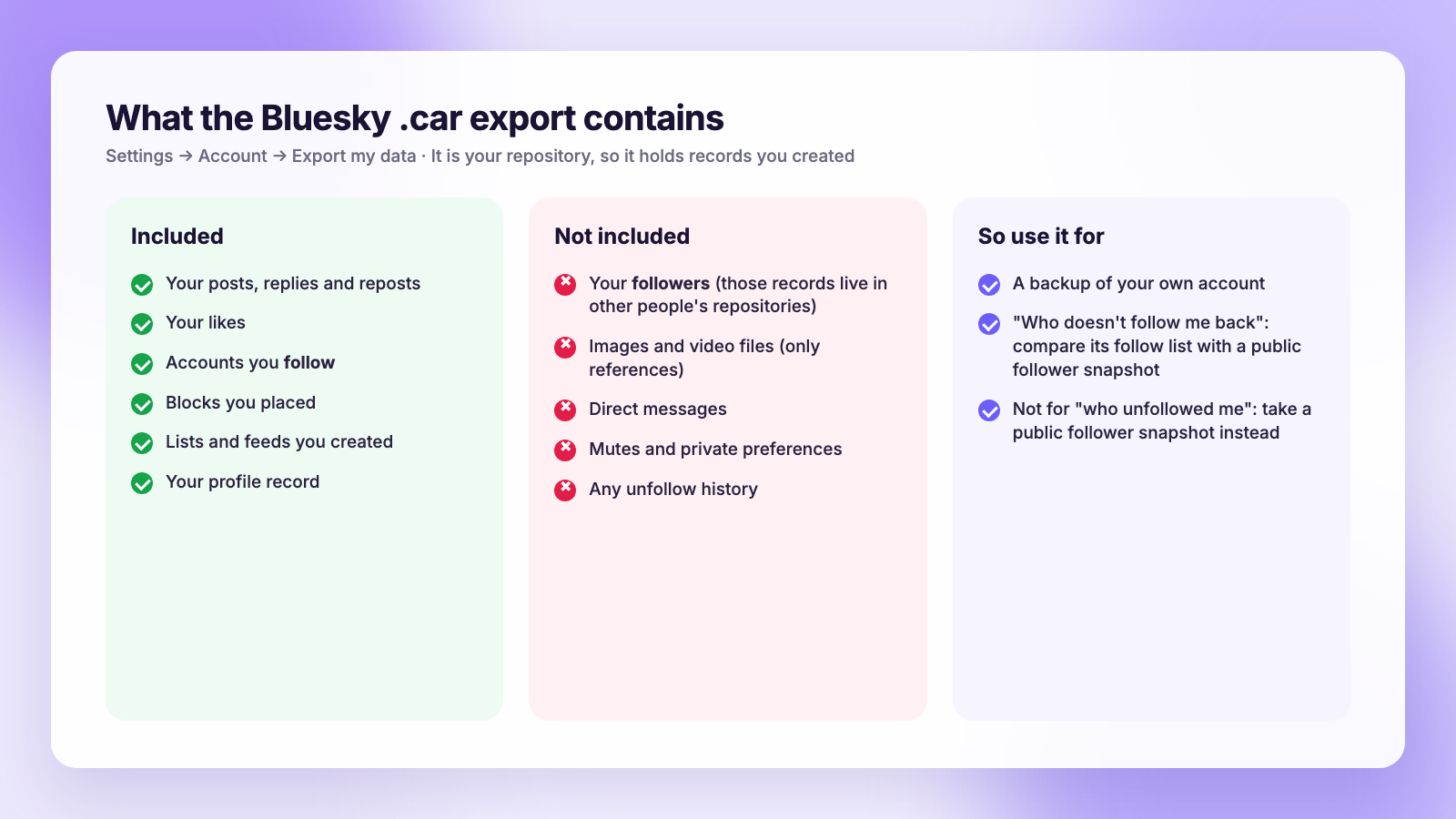
What it does not contain is your followers, because those records live in other people's repositories, not yours. So the export is the wrong tool for "who unfollowed me", but it is the right tool for two related questions:
- Who do I follow that does not follow me back? Take the follow list from your export and compare it with a public follower snapshot from method 2.
- A backup of your own account. Your posts and follows survive even if something happens to the account, which is exactly what the export was built for.
The .car format is not something a spreadsheet opens directly. Free converters exist that turn it into readable JSON or CSV, or you can skip the file entirely and use a public follow-list export, which gives you the same list in a friendlier format.
Reading the numbers without losing your mind
Bluesky's culture rewards real conversation and punishes broadcast-only feeds, so follower churn has a slightly different shape here. Some things to keep in mind:
- Early-adopter cleanups are common. Many accounts followed hundreds of people during the network's growth spurts and later prune heavily. Losing followers from those sweeps says nothing about your posts.
- Custom feeds drive discovery, not just followers. A follower who left can still see you in a feed they subscribe to. Reach on Bluesky is less follower-bound than on Instagram.
- Nobody is notified. Unfollowing is silent in both directions, so there is no social cost to tidying your own list either.
- Patterns beat single names. If a cluster of similar accounts left after one post, that is signal. One person leaving is noise.
If you are still finding your footing on the network, our Bluesky getting-started guide for creators covers handles, custom feeds and starter packs.
Safe versus risky Bluesky unfollower tools
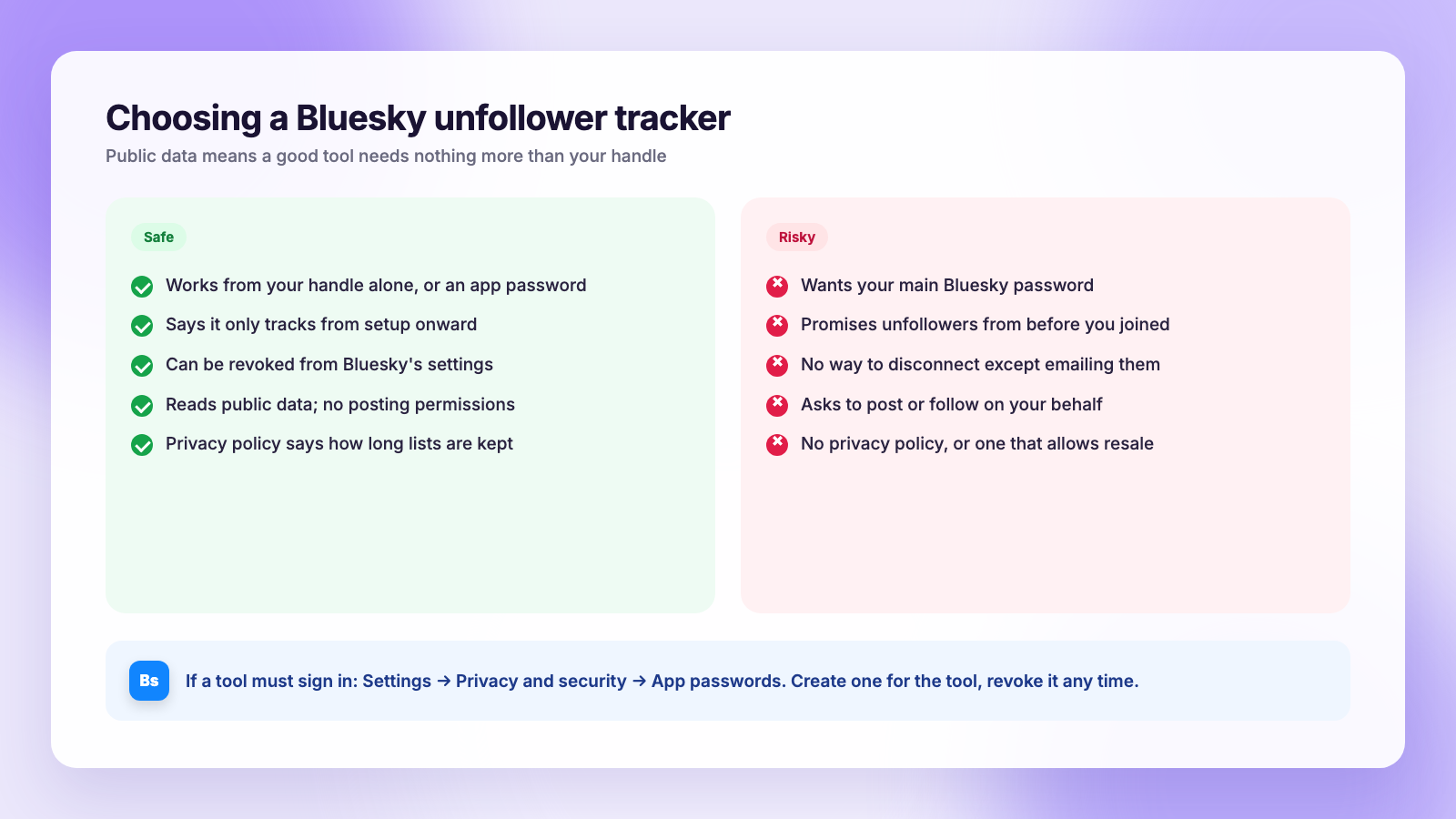
| Safe sign | Red flag |
|---|---|
| Works from your handle alone, or an app password | Wants your main Bluesky password |
| Says clearly that it only tracks from setup onward | Promises to show unfollowers from before you joined the tool |
| Lets you revoke access from Bluesky settings | No way to disconnect except emailing them |
| Reads public data; no posting permissions | Asks for permission to post or follow on your behalf |
| Has a privacy policy that says how long it keeps your lists | No policy, or one that allows reselling |
FAQ
Can I see who unfollowed me on Bluesky for free?
Yes. Your follower list is public, so you can save a copy today with a free exporter and compare it with a copy taken later. The difference is your unfollower list. Several free trackers will do the comparing for you.
Does Bluesky notify people when you unfollow them?
No. Unfollows are silent on Bluesky. Nobody is notified, and you will not be notified when someone unfollows you.
Does the Bluesky export include my followers?
No. The .car export contains records you created, including who you follow, but not who follows you. Use a public follower snapshot for that.
Do Bluesky unfollower trackers need my password?
They should not need your main password. Many work from your public handle alone. If one needs to sign in, create an app password in Bluesky's settings and use that instead, then revoke it whenever you like.
Can I see unfollowers from before I started tracking?
No. Bluesky keeps no history of unfollows, so a tracker can only report changes after its first snapshot. Take that first snapshot today if you think you will want the data later.
Does Plumefy track Bluesky unfollowers?
No. Plumefy's unfollower tracker works with Instagram and TikTok exports. Plumefy does publish and schedule to Bluesky, together with ten other networks, from one composer.
The honest answer to who unfollowed you on Bluesky is simpler than on any other network: the data is public, so save it now and compare it later, and let a tracker do the comparing if you want it automatic. Use an app password if a tool needs to sign in, ignore anything that promises history, and keep your posting steady while you watch. When you want to schedule Bluesky alongside everything else, and track Instagram and TikTok unfollowers the safe way, try Plumefy free.
Post everywhere, once.
Start on the free plan — no card needed, upgrade when you need scheduling.
Start free