Threads Advanced Search, Custom Likes and Gems: How to Grow in 2026
Threads added search filters on Nov 10, 2026. Use date and community filters to find live conversations, write for Gems, and treat custom likes as fun.
Threads shipped more creator-facing changes between September and November 2026 than in most of its first three years. Search finally got filters. A daily award called Gems started picking out standout posts. Custom like buttons went from a three-country test to a feature people are begging each other to try. Podcasters got their own toolkit.
Read together, they say a lot about how Threads decides what to show people. This guide covers what each feature does, in Meta's own words, and how to use it to grow.
The short version: On November 10, 2026 Threads rolled out advanced search, with filters for date range, community, post type and profile plus an exact-match option. Use it to find conversations from the last day on your topic and reply to them, which is still the fastest way to grow on Threads. Gems, tested since October, are awarded once a day to posts and direct replies that start real discussion, judged on perspective, discussion and originality, not follower count; Instagram crossposts and reposts are not eligible, and only US posts qualify for now. Custom likes let you swap the heart for an emoji, sticker or GIF; they are fun and good for brand personality, but there is no evidence they affect reach. All of this lands on an app Meta says has 500 million monthly users and, as of October 2026, more monthly users than X.
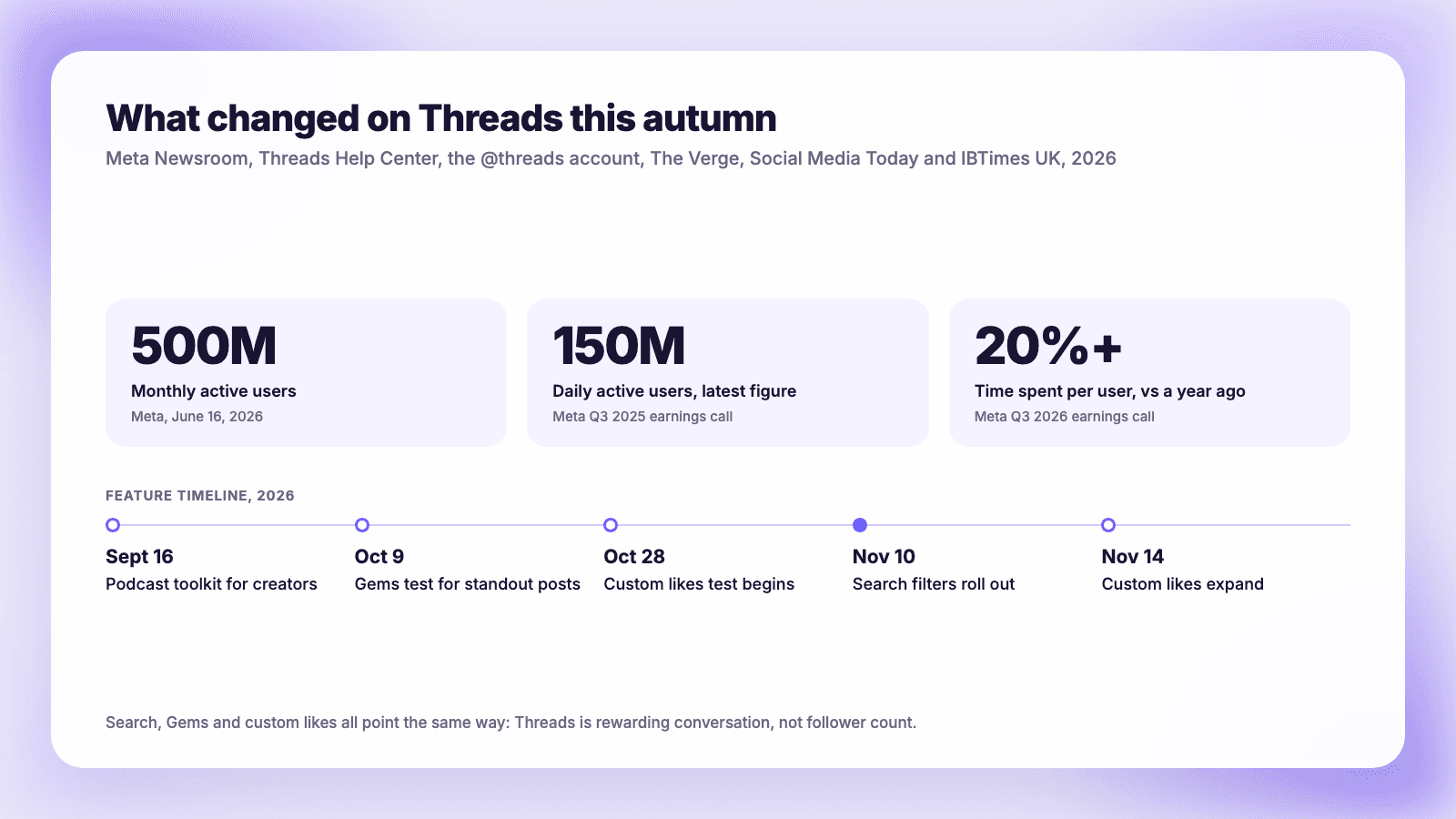
Why these updates matter: Threads by the numbers
Threads is no longer a side project. The figures below are all Meta's own, stated on earnings calls, in Threads posts by Adam Mosseri and Mark Zuckerberg, or in Meta's newsroom.
| Date | Monthly active users | Source |
|---|---|---|
| October 2023 | "Just under" 100 million | Zuckerberg, Q3 2023 earnings call, reported by The Verge |
| February 2024 | More than 130 million | Q4 2023 call, TechCrunch |
| July 2024 | More than 175 million | Zuckerberg on Threads, Reuters |
| August 2024 | 200 million | Mosseri, TechCrunch |
| December 2024 | 300 million monthly, 100 million daily | Mosseri on Threads |
| April 2025 | More than 350 million | Q1 2025 call, TechCrunch |
| August 2025 | More than 400 million | Mosseri, TechCrunch |
| October 2025 | 150 million daily | Q3 2025 call, Social Media Today |
| June 2026 | 500 million | Meta Newsroom |
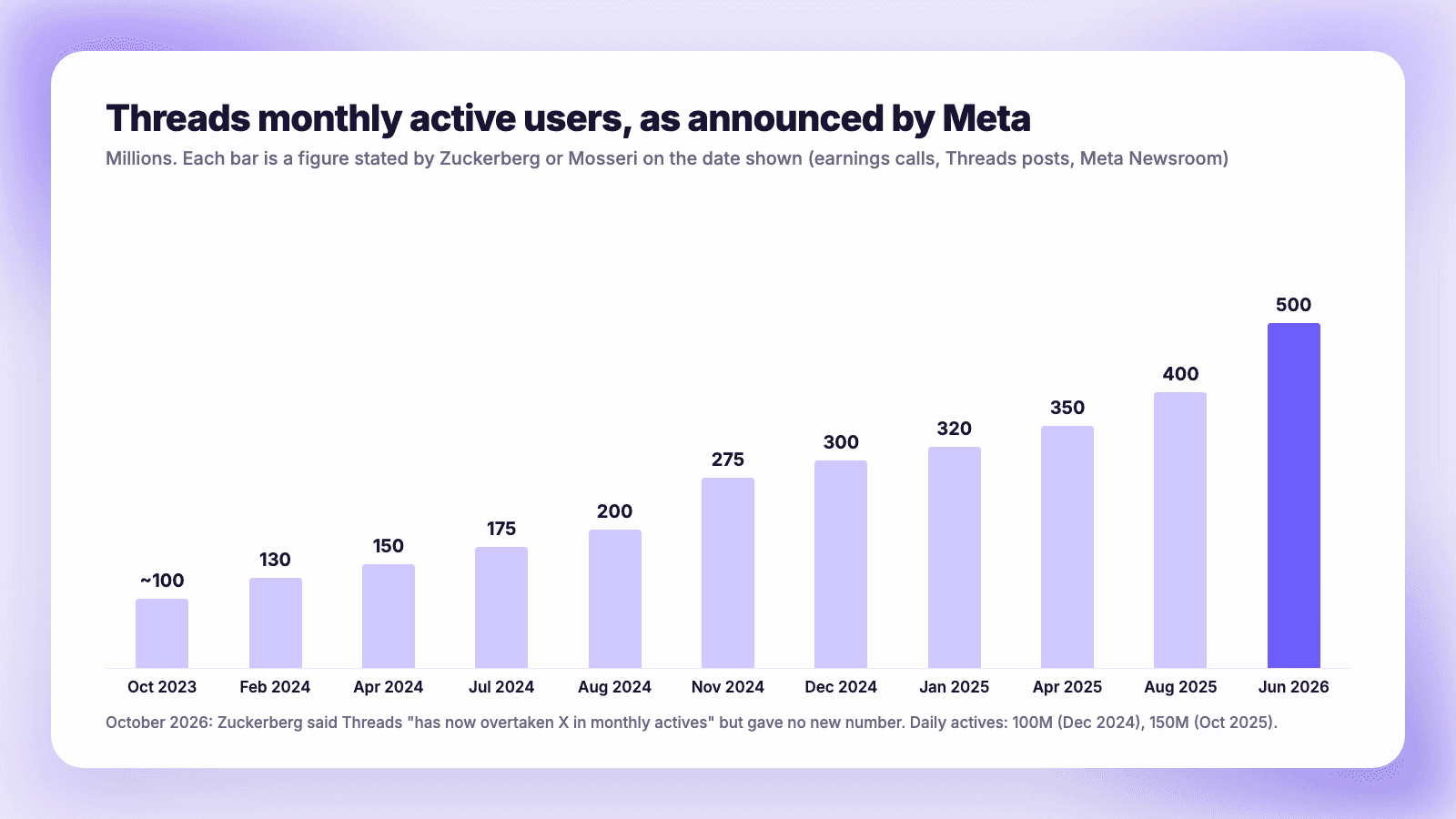
Two more things were said on Meta's Q3 2026 call on October 21. Zuckerberg said "Threads has now overtaken X in monthly actives," without giving a new number, and CFO Susan Li said Threads time spent per user grew "over 20% year-over-year." As 24/7 Wall St. pointed out, the X comparison came with no figure attached, so treat it as Meta's claim rather than a measured fact. These are company numbers, not audited ones.
The engagement side is less rosy. Buffer's 2026 engagement report, built from 52 million posts published through Buffer, puts Threads' median engagement rate at about 3.6% in 2025, down from about 4.4% in 2024. More people means more competition for each reader, and the features below are tools for getting found in a busier app.
Advanced search: what changed
Search on Threads has been a running complaint. In January 2025 u/TeaTinz posted on r/ThreadsApp: "i search for specific names, mostly one worded usernames, and i get nothing with that word in it... putting quotes around the word doesnt work either." In March 2026 u/melizivey wrote that searching a trending topic "got a bunch of results that had nothing to do with the topic."
On November 10, 2026 the official @threads account announced the fix: "In the search bar, select the filters menu on the right and you'll see options to refine by date range, community, post type and more. You can also choose to see just the exact matches." Social Media Today's write-up lists the filters as:
- Date posted
- Post type
- Community or topic
- Profile
- plus an exact match option for multi-word searches
It is rolling out, so if you do not see the filters icon yet, update the app.
How a creator uses it
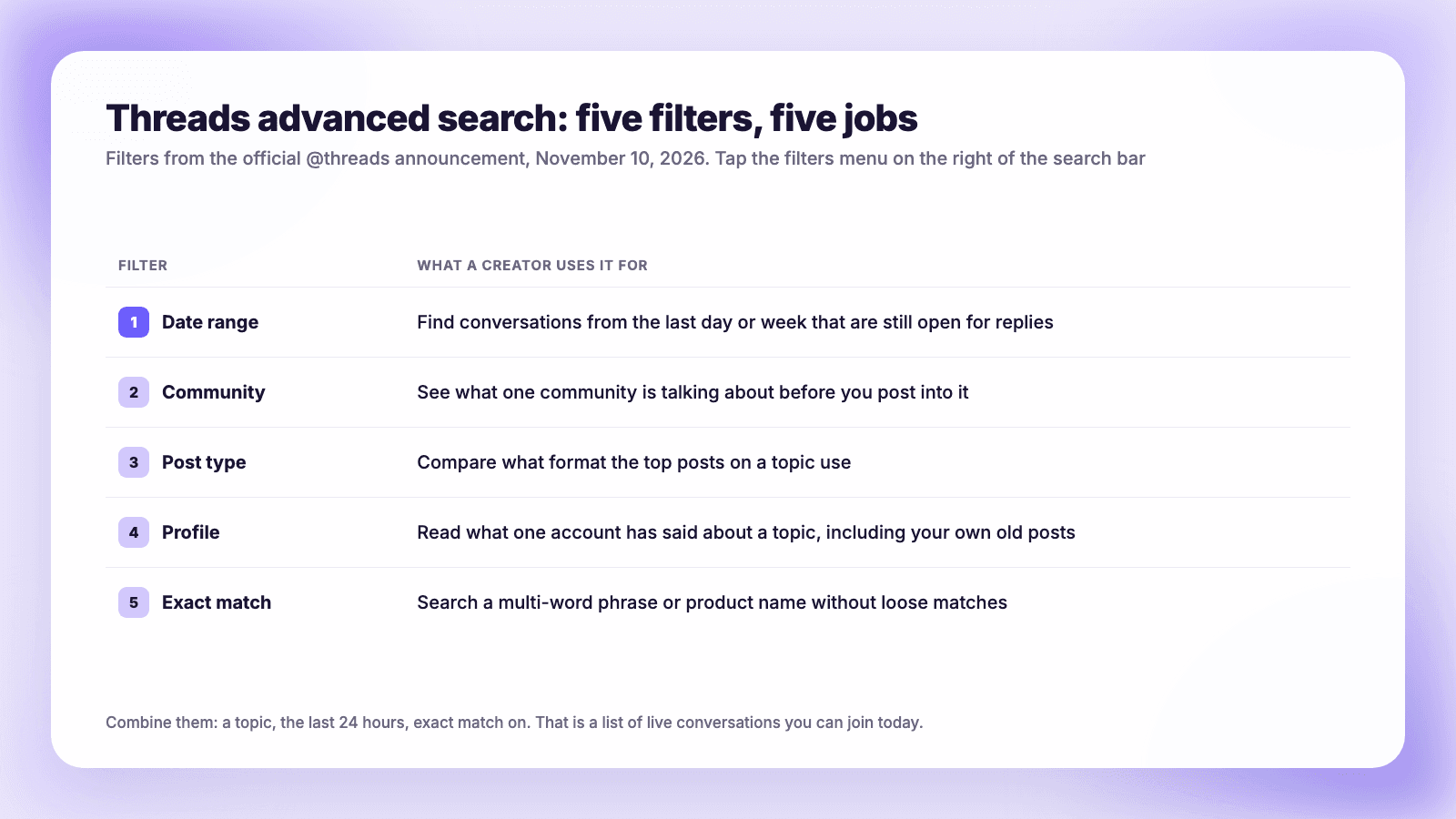
1. Find live conversations to join (date range). Search your core topic, set the date range to the last day, and turn on exact match for phrases like "email marketing" or "sourdough starter." What comes back is a list of posts that are still collecting replies. A thoughtful reply on a post from this morning puts your name in front of that author's audience. Our guide to growing on Threads explains why replies-first is still the core strategy; search just makes it much faster to find the right posts.
2. Learn a community before you post into it (community). Communities came out of beta in June 2026, when Meta said they were "one of the fastest-growing features on Threads." Filter by the community you want to join and read the last week of posts. Note the tone, the questions that get the most replies and the questions nobody has answered. Those unanswered questions are post ideas.
3. Check which formats win on a topic (post type). Filter a topic by post type and compare. It is a quick sanity check against your own habits. In Buffer's data, Threads posts with video had a median engagement rate of 5.55%, images 4.55%, text 2.79% and links 2.34%. Buffer adds that "a good text post can easily outperform a mediocre video," so use this to spot gaps, not to abandon text.
4. Research an account, including your own (profile). Before you pitch a collaborator or reply to a bigger creator, filter by their profile and your topic to see what they have already said. It also finds your own old posts.
5. Use timing as a signal, not a rule (date range again). Filter a topic to the last week and look at when the posts with the most replies went up. Compare that with your own Threads posting times. Buffer's 2026 timing analysis found higher-performing Threads posts clustered from 6 to 11 a.m. on weekdays, peaking Thursday at 9 a.m., but also said timing is "an amplifier" and that "when you post matters least" next to what and how often.
Gems: what earns one
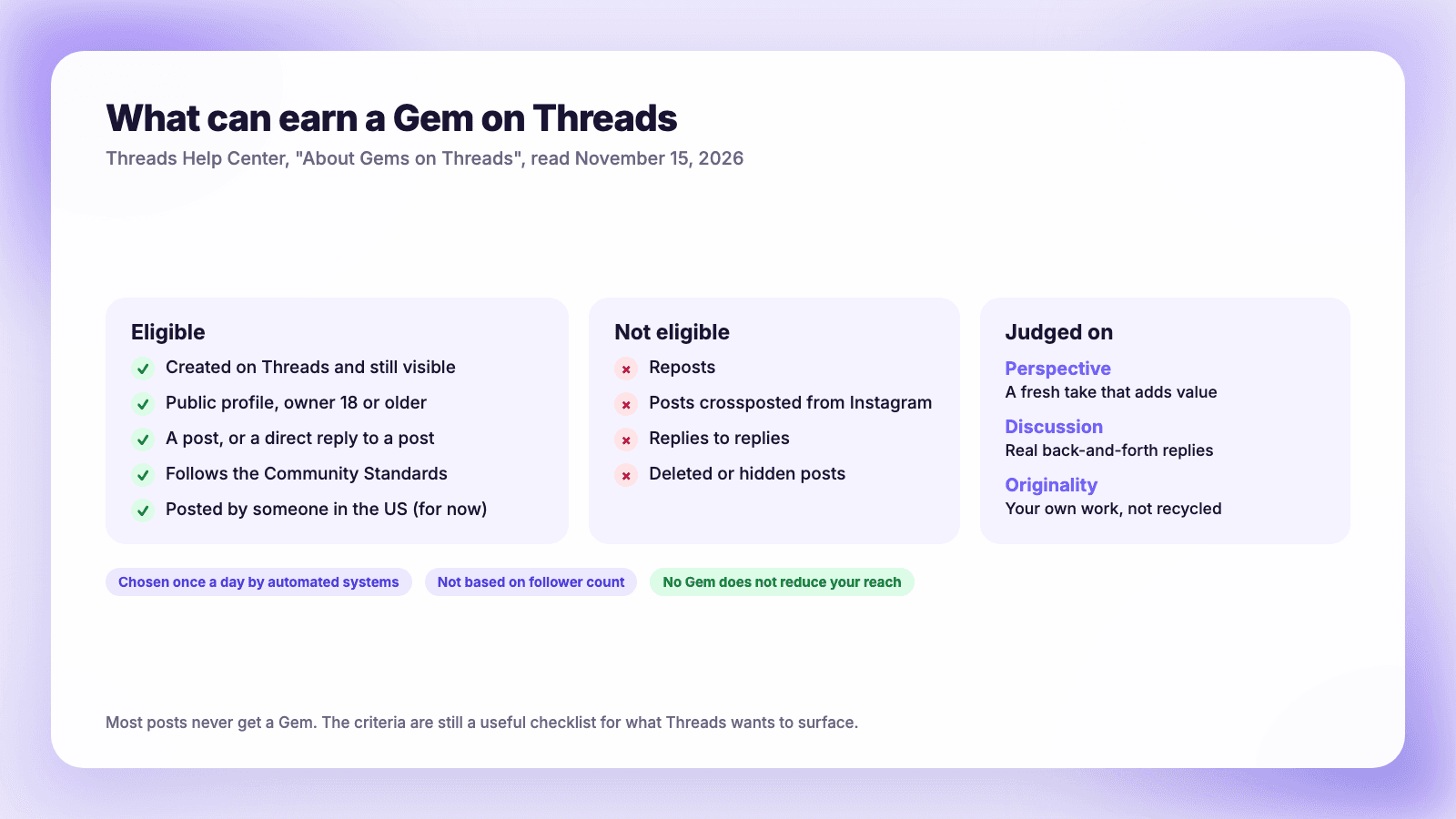
Gems started appearing in October 2026. The Verge reported on October 9 that Gems go to posts and replies "based on the conversation" they create, citing a support page. That page, About Gems on Threads, is the best description of what Threads wants to surface that Meta has published.
The essentials, in the Help Center's words:
- "Each day, we highlight some of the standout conversations on Threads. We give Gems to public posts and replies that started or continued these conversations."
- "Gems are based on the conversation a post or reply created or continued, not on how many followers a profile has."
- Selection is based on Perspective ("Brings a fresh take and unique value to the discussion"), Discussion ("Sparks real back-and-forth dialogue that keeps the conversation moving") and Originality ("Is your own work, not something recycled from elsewhere online").
- "Right now, only posts and replies from people in the US can get Gems."
The eligibility rules worth knowing
The Help Center lists a few exclusions that matter for how you post:
- Crossposts from Instagram are out. "If you create a post on Instagram and crosspost it to Threads, it can't get a Gem." Reposts are out too.
- Only direct replies count. A reply "must be a direct reply to a post (not a reply to a reply)."
- Adults with public profiles only. The profile must belong to someone 18 or older.
What Gems mean for reach
The help page is clear on this: "Most posts and replies don't get Gems. If you don't get a Gem, this doesn't affect your profile or change how many people see your posts and replies on Threads." So Gems are a bonus, not a penalty system.
The more useful takeaway is the criteria. A post that brings a fresh take and starts real back-and-forth is what Threads says it wants. Independent data points the same way. In Buffer's analysis of nearly 2 million posts from more than 220,000 accounts, posts where the author replied to comments earned about 42% more engagement on Threads, the largest lift of the six platforms studied. Buffer is careful to say this "doesn't mean replies cause engagement," but about two-thirds of Threads accounts did better on posts where they replied.
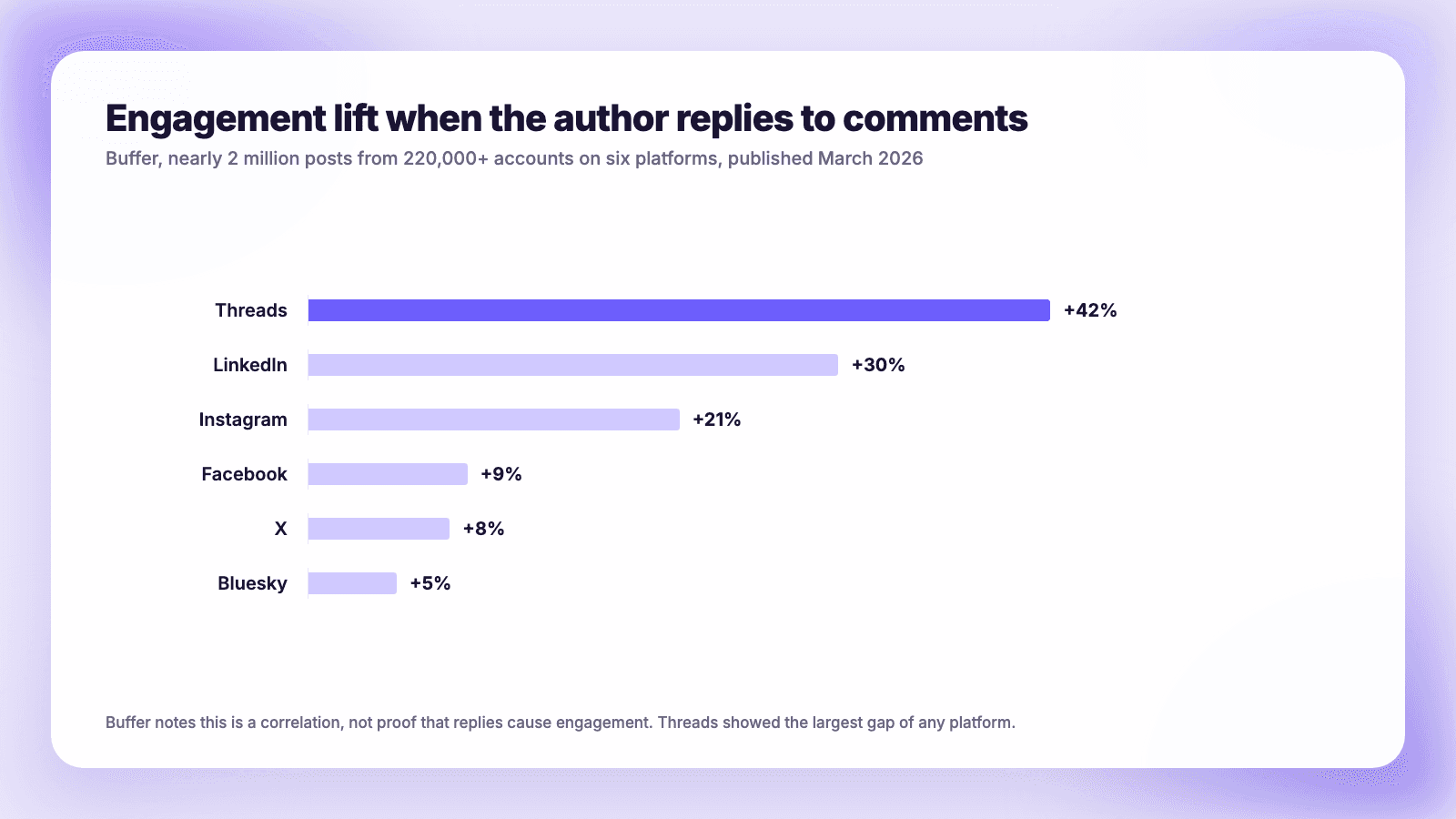
In practice: end posts with a real question, stay in the replies for the first hour, and answer the people who reply to you directly. That is the behavior Gems reward and the behavior Buffer's numbers favor.
Custom likes: fun, not a growth lever
Custom likes replace the heart that appears when someone likes your post with an emoji, sticker or GIF of your choice. Threads head Connor Hayes announced the test on October 28 for select users in South Korea, Brazil and Indonesia, according to Social Media Today. By November 14, IBTimes UK reported, access was expanding, and the feature had gone viral: one Pokémon-themed custom reaction drew about 344,000 likes, and a post asking "WHY CAN'T I CHANGE MY LIKE BUTTON!?" passed 15,000.
How to set one, per IBTimes UK: start a new post, look for the heart icon in the composer, pick an emoji, sticker or GIF, preview it, tap Done and publish. If there is no heart icon in your composer, you do not have the feature yet.
One detail is unsettled. Social Media Today's October report said the custom like was tied to your profile, not to each post. IBTimes UK's November report says it is chosen per post and has to be set again each time. The rollout may have changed between the two, so check what your app does.
What it means for reach: nothing Meta has said. No announcement ties custom likes to ranking, and the viral posts got likes because people wanted to see the effect, a novelty that fades. Use it for personality, such as a like animation that matches a launch or a season, as Social Media Today suggested. Do not build a strategy on it.
The podcast toolkit
If you host a podcast, the September 16 update is the most practical of the lot. Meta listed these features:
- Banners across your profile and posts so listeners can find your show
- An episode picker to feature a favorite episode, with podcast links shown as a tappable card
- Transcript, video and guest card posts for "standout moments and featured guests"
- An opt-in reminder to share each new episode
- Insights showing "the reach and engagement Threads is driving for a podcast, including clicks and saves"
The insights are the part to use: they show whether Threads is sending listeners, not just likes.
Other Threads changes this year
HeyOrca's monthly Threads roundup and Meta's own posts cover the rest. The ones that affect creators:
| When | Change |
|---|---|
| February 2026 | Dear Algo lets readers ask the feed for more or less of a topic |
| June 2026 | Communities leave beta; Your Algo in the US, Canada, UK, Australia and New Zealand |
| September 2026 | Advertisers no longer need an Instagram account; bio stickers |
| October 2026 | Gems; tests of more visual quote posts; more live chat options |
| November 2026 | Advanced search; custom likes expand |
The pattern: communities and conversation are becoming the main ways to get discovered.
A weekly Threads routine using the new tools
- Monday, 20 minutes: search your two or three core topics with the date range set to the past week. Save the questions that got many replies and the ones that got none.
- Write three to five original posts from those questions. Write them for Threads, not as copies of an Instagram caption: crossposts from Instagram cannot earn Gems, and a question that invites disagreement does better than an announcement.
- Every weekday, 15 minutes: search your topic for the last 24 hours with exact match on, and leave a few direct replies that add a real point. Direct replies, not replies to replies, are the ones eligible for Gems.
- Stay in your own replies for the first hour after each post goes out.
- Friday: filter search by your own profile to see which posts drew conversation, and check whether you are gaining or losing followers after the posts that did.
If writing and timing posts is the part you never get to, a scheduler helps with step 2. Plumefy can schedule Threads posts on its paid plans (Creator is $26 a month) and writes a separate AI caption for each network, so the Threads version can be a question instead of a copy of your Instagram caption. One honest caveat: the Gems page rules out Instagram crossposts but says nothing either way about posts published through scheduling tools, so we cannot promise a scheduled post is Gem-eligible. The replies in steps 3 and 4 have to be you, in the app, anyway.
Still deciding where Threads fits? See Threads vs X for creators and Threads vs Bluesky.
FAQ
How do I use advanced search on Threads?
Type a search, then tap the filters menu on the right of the search bar. You can filter by date range, community, post type and profile, and turn on exact match. The feature began rolling out on November 10, 2026, so update the app if you do not see it.
What are Gems on Threads?
Gems are a daily highlight Threads gives to public posts and direct replies that started or continued standout conversations. They are chosen once a day by automated systems based on perspective, discussion and originality, not follower count. For now only posts from people in the US can get one.
Does not getting a Gem hurt my reach?
No. The Threads Help Center says that if you don't get a Gem, "this doesn't affect your profile or change how many people see your posts and replies on Threads."
Why can't I change my like button on Threads?
Custom likes are still rolling out. They were first tested in South Korea, Brazil and Indonesia from October 28, 2026 and began expanding in mid-November. If there is no heart icon in your post composer, the feature has not reached your account yet.
How many people use Threads in 2026?
Meta announced 500 million monthly active users on June 16, 2026. Its latest daily figure is 150 million, from October 2025. In October 2026 Zuckerberg said Threads had overtaken X in monthly users but did not give a new number.
Post everywhere, once.
Start on the free plan. No card needed; upgrade when you need scheduling.
Start free