Instagram Edits on Desktop vs CapCut: Which to Use (2026)
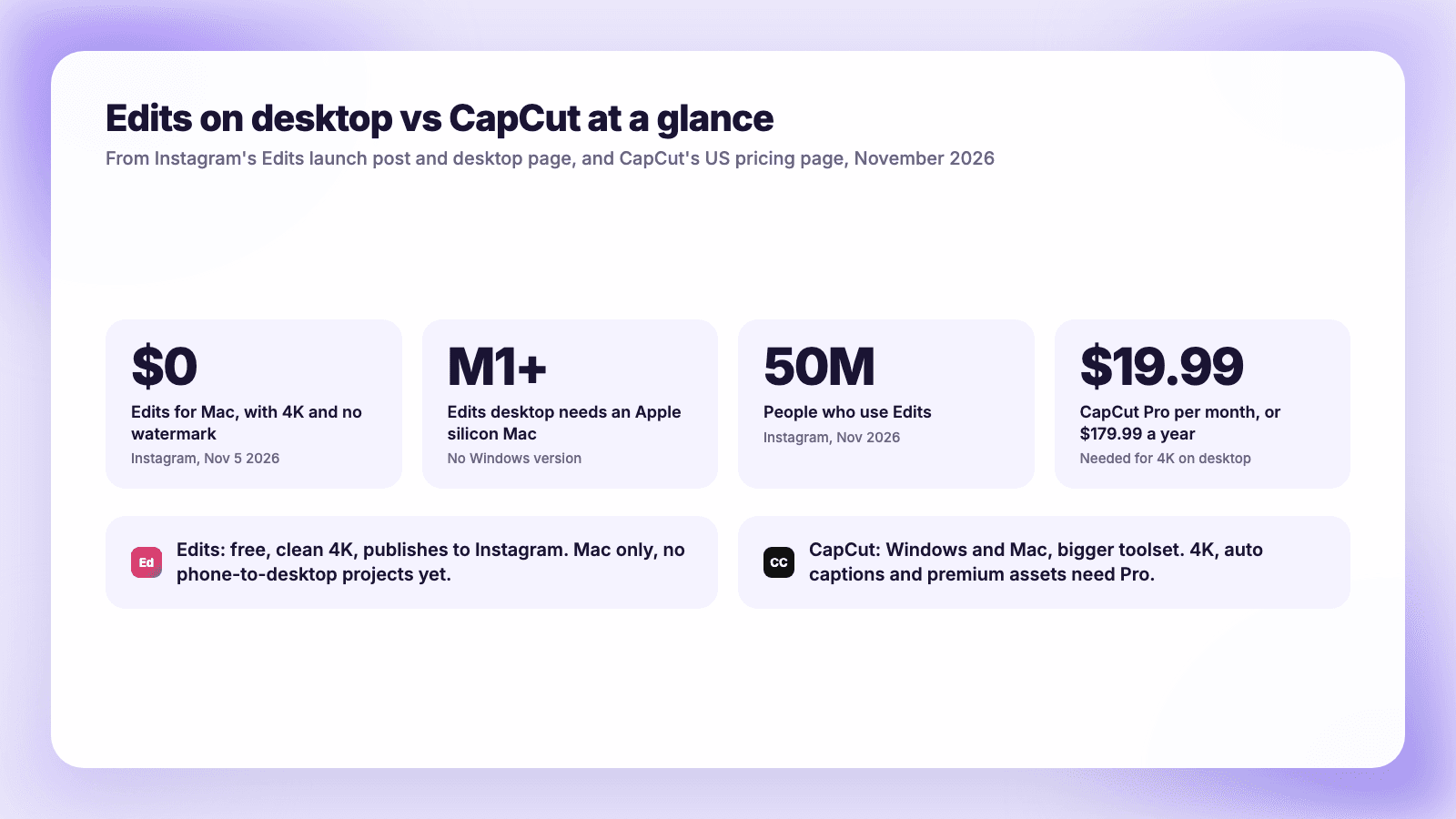
Edits for Mac is free with watermark-free 4K but needs an M1 Mac. CapCut runs on Windows too, but 4K and auto captions need Pro at $19.99 a month.
On November 5, 2026, Instagram released Edits for Mac, a free desktop version of the video editor it launched on phones in April 2025. The pitch is aimed squarely at CapCut: a multi-track timeline, keyframes, color grading, Instagram's music library and 4K exports with no watermark, without a subscription.
CapCut has been on Windows and Mac since 2021 and is still the default editor for a lot of short-form creators. But its Pro plan now costs $19.99 a month, and several things that used to be free are behind it. If you edit Reels on a computer, here is how the two compare today, feature by feature, and which one makes sense for the way you work.
The short version: Edits for Mac is free, exports in 4K with no watermark, and publishes straight to Instagram, but it only runs on Macs with Apple silicon (M1 or later). There is no Windows version, and you cannot yet move a project between your phone and your Mac. CapCut runs on Windows and Mac and has a larger toolset, but 4K export, auto captions and premium assets need CapCut Pro at $19.99 a month or $179.99 a year. If you have an M-series Mac and mostly make Reels, start with Edits. If you are on Windows, rely on templates and AI tools, or need one project on phone and desktop, CapCut is still the practical choice.
What Edits on desktop can do
Instagram's launch post, written by Edits lead Brett Westervelt, describes the reason for it: "A lot of creators have described the same moment to us: a project gets too big for your phone. You've got a dozen clips going, you're trying to land a cut on the exact beat, and your thumb covers the part of the timeline you need to see."
The first desktop version includes:
- A full multi-track timeline with keyframes for transitions and audio waveforms for cutting on the beat.
- Color tools: color wheels, curves, log conversions, and import of your own LUTs.
- Instagram's audio: the licensed and royalty-free music libraries, plus "hundreds of sound and video effects."
- Unlimited automatic captions in multiple languages.
- Your own fonts and keyboard shortcuts, including shortcuts "carried over from another editor."
- Direct publishing to Instagram with tagging, location and trial Reels built in.
- Horizontal and vertical formats, with "4K watermark-free export, so you can easily share to any platform."
- An MCP connection for AI agents. Matthew Simari, head of product management for Edits, told The Verge you can "use any agent you want" to make a rough cut, then open the project in Edits and keep editing by hand.
Your saved audio and text styles from the phone app carry over. Instagram says it will ship updates every week.
A few days later Instagram added Effect Builder, a web tool in Edits that builds Stories effects from a text description. It is useful for effects, not for editing Reels, so it does not change this comparison.
The limits
The Edits desktop page is direct about them:
- "Edits on desktop is only available on macOS." It needs "a Mac with Apple silicon (M1 or later)," so Intel Macs are out.
- You sign in with Instagram.
- A project cannot move between phone and desktop yet. The launch post says creators asked for this during testing and "We're working on that now."
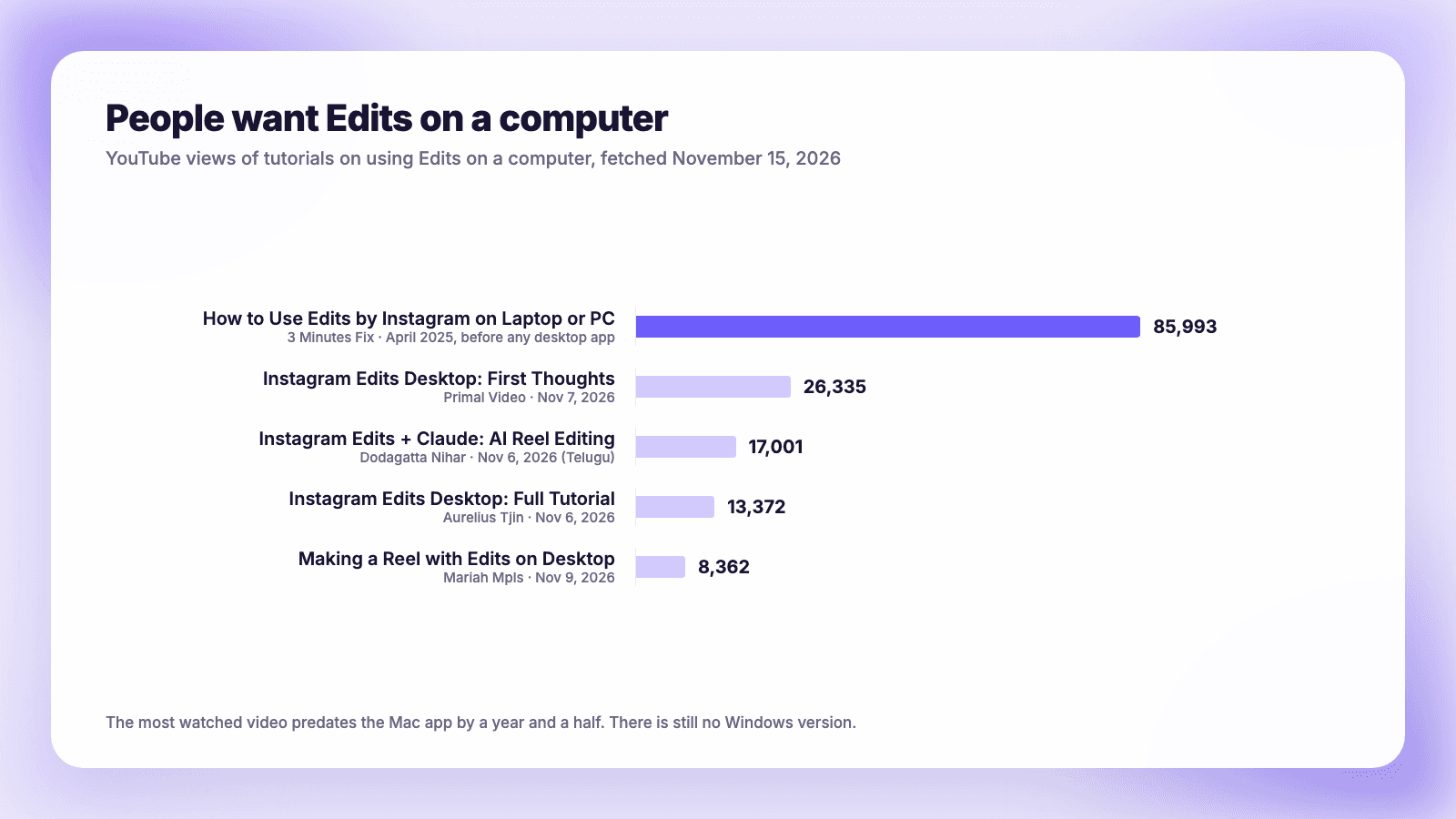
The Windows gap matters. The most watched video we found on the topic is How to Use Edits by Instagram on Laptop or PC, with 85,993 views, posted in April 2025, long before any desktop version existed. People have been looking for Edits on a computer for about a year and a half, and Windows users still do not have it.
What CapCut costs now
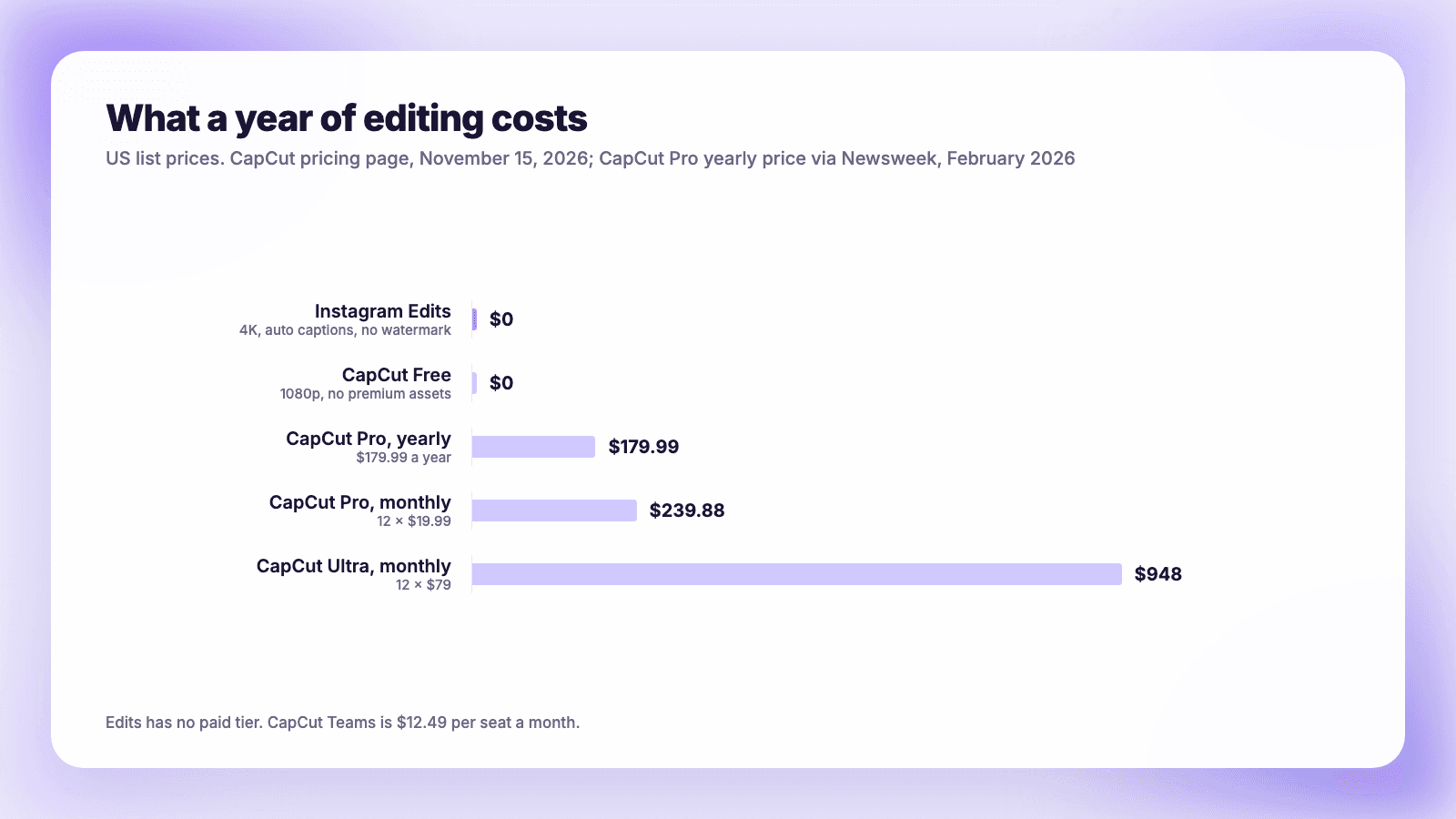
CapCut's pricing page lists four plans in the US:
| Plan | Price | What it adds |
|---|---|---|
| Free | $0 | Free templates and basic editing tools |
| Pro | $19.99 a month | AI features, premium templates and Pro features, 1,200 AI credits a month, 1 TB storage |
| Ultra | $79 a month | Everything in Pro plus exclusive AI features and 8,645 AI credits a month |
| Teams | $12.49 per seat a month | Pro features for every seat, plus a brand kit |
Pro is $179.99 a year if paid annually. Newsweek reported in February 2026 that this was up from about $77, a jump of more than 100%, and that CapCut rolled it out without a formal announcement. There is also a cheaper Standard plan sold in the phone app, but CapCut's help center says it is "primarily focused on mobile devices," so it does not help a desktop editor.
The more important question is what still works for free on a computer:
- 4K and 60fps. CapCut's help page on Pro prompts at export says that on desktop, options like "4K", "60fps", or "No Watermark" "appear grayed out or locked if you're not a Pro user."
- Watermarks. CapCut says you can export without a watermark if you edit your own footage manually, delete the ending clip that some projects add, and avoid premium templates, stickers, transitions and filters, which "add a watermark when used in the free version."
- Auto captions. CapCut lists "camera tracking, auto captions, AI avatars, and AI-generated images and videos" among the advanced AI tools that Pro "unlocks."
So a free CapCut user editing their own clips can export a clean 1080p video. Anything with premium assets, 4K or CapCut's auto captions needs Pro.
Feature by feature
| Edits (desktop) | CapCut (desktop) | |
|---|---|---|
| Price | Free | Free, or Pro at $19.99 a month / $179.99 a year |
| Computers | Mac with M1 or later only | Windows and Mac |
| Phones | iPhone and Android | iPhone and Android |
| Timeline and keyframes | Multi-track, keyframes, waveforms | Yes |
| 4K export | Free | Pro |
| Watermark | Never | None on your own footage; premium assets add one on Free |
| Auto captions | Unlimited, free, multiple languages | Pro |
| Color | Wheels, curves, log conversion, LUT import | Premium LUTs and transitions need Pro |
| Music | Instagram's licensed and royalty-free library | CapCut's library |
| Publish directly | To Instagram, with tags, location, trial Reels | Export a file |
| Same project on phone and desktop | Not yet | Yes, with Pro |
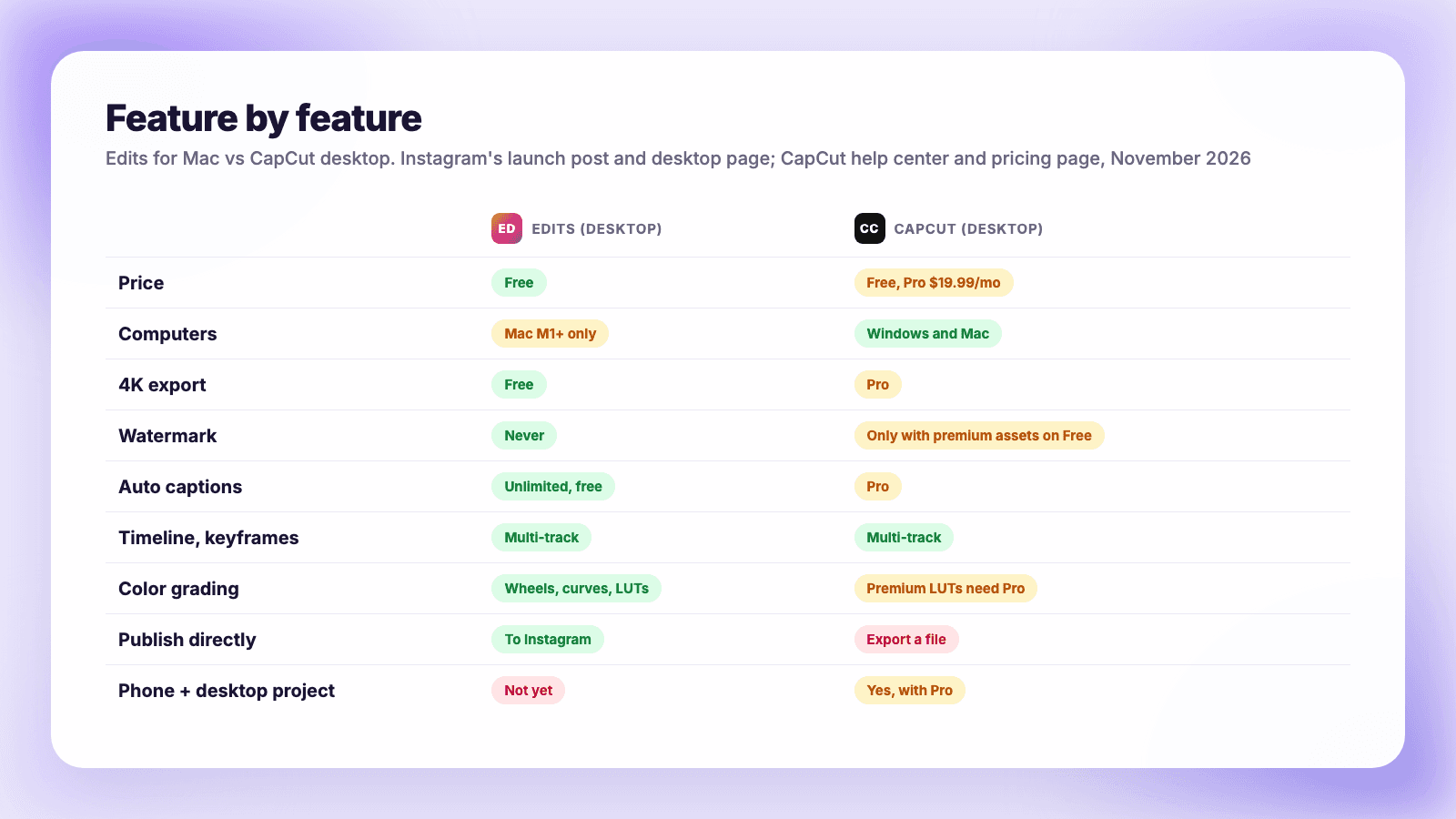
On raw editing, the two are close for short-form work. CapCut's lead is in breadth: templates, effects and AI generation tools built up over five years on desktop. Edits wins on price, on clean 4K output, and on anything that ends on Instagram, since its music and publishing tie straight into your account.
Who owns CapCut now, and the terms question
CapCut is made by ByteDance. When TikTok's US business moved into a new company in January 2026, the TikTok USDS Joint Venture announcement said: "The safeguards provided by the Joint Venture will also cover CapCut, and Lemon8, and a portfolio of other apps and websites in the U.S." ByteDance keeps 19.9% of the joint venture. CapCut went dark in the US alongside TikTok for a short time in January 2025; the BBC reported that its US future "now appears to be secured."
The other worry creators raise is CapCut's terms of service. In June 2025, a terms update prompted reports such as TechRadar's that CapCut could use creators' faces and voices without paying them. CapCut responded that "There have been no changes to your rights in the 'User-generated Content' section" and that the license language exists to provide services like shared templates. TechRadar added CapCut's statement to its article. Read the terms yourself if you edit client or unreleased work. Edits has its own catch: you sign in with Instagram, and one Edits user on r/InstagramEmpire pointed out in August 2026 that "if you get your Instagram account disabled... you can't access all your content in edits."
How creators are using them
Edits has grown fast on phones. It was downloaded 7.1 million times in its first week in April 2025, according to Appfigures, and Instagram now says 50 million people use it. CapCut remains much larger, with 1.22 billion downloads outside China by that point, and Appfigures estimated that CapCut's monthly US downloads fell 22% in the months after Edits launched.
Creator comments line up with the pricing story. In a July 2026 thread on r/CreatorsAdvice, u/Marliemakesmagic wrote: "I started using it when capcut started charging per month!" In the r/InstagramEmpire thread, u/psinguine gave a fair summary: "It's missing some things (you can't keyframe light filters, for example) but it's pretty capable." Back in March 2025, a post on r/CapCut titled Greed has consumed CapCut complained: "Wanna Export without watermark? How about you pay me first."
Justin Brown of Primal Video posted his first thoughts on the Mac app two days after launch, and it had 26,335 views when we checked. Interest is real, but it is early: the desktop app is a first version with weekly updates still coming.
Which one should you use?
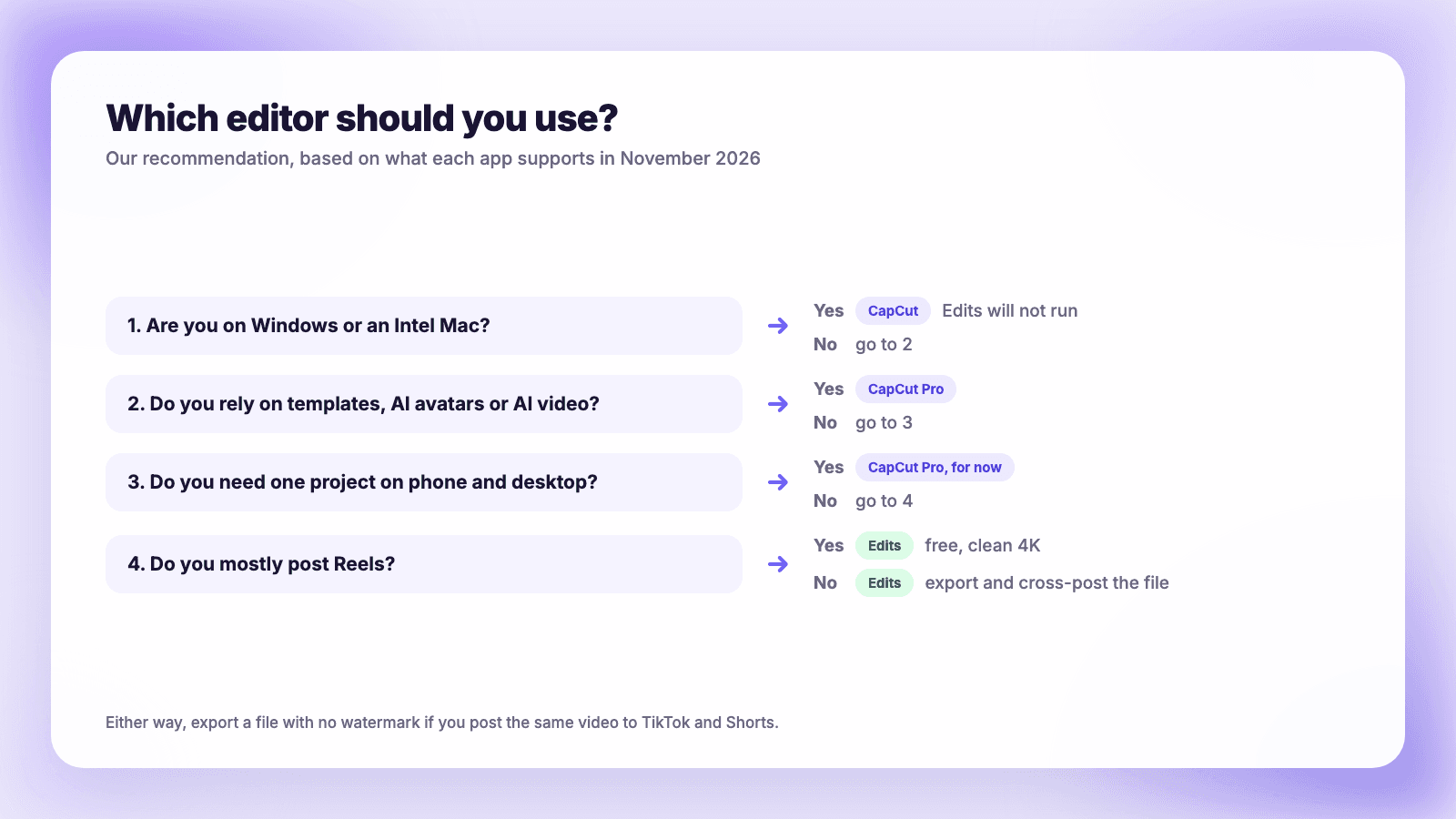
- You are on Windows or an Intel Mac. CapCut. Edits does not run on your computer.
- You have an M-series Mac and mostly post Reels. Edits. It is free, exports clean 4K files and publishes to Instagram with tags and location.
- You lean on templates, AI avatars or AI video generation. CapCut Pro. Edits does not try to compete there.
- You start edits on your phone and finish on a computer. CapCut Pro, for now. Edits says cross-device projects are coming.
- You are a business using music. Check the license for wherever you post. Edits uses Instagram's library, which is built for Instagram.
You can also use both. Many creators rough-cut in one and finish in the other, and there is no cost to keeping Edits installed.
The watermark question for cross-posting
If you post the same video to Reels, TikTok and YouTube Shorts, the file you export matters more than the editor. A clean export, with no editor logo burned in and no ending clip, is what you want to upload everywhere. Edits never adds a watermark. CapCut does not either, as long as you avoid premium assets on the Free plan or pay for Pro. Our guide to cross-posting Reels, TikToks and Shorts without watermarks covers why this matters and how to check a file.
Edits can only publish directly to Instagram. To get the same file to TikTok, YouTube and the rest, you export it and upload it elsewhere. Plumefy is built for that step: upload the file once and publish or schedule it to Instagram, TikTok, YouTube Shorts and eight other networks, with the caption rewritten for each. The free plan covers six connected accounts and 20 posts a day. If you batch your editing, how to schedule Instagram Reels and batch-filming a month of short video show how to set up the week, and these Reels ideas can fill the calendar.
FAQ
Is Instagram Edits available on Windows?
No. Instagram's desktop page says "Edits on desktop is only available on macOS," and it requires a Mac with Apple silicon (M1 or later). Instagram has not announced a Windows version.
Is Edits on desktop free?
Yes. The Mac app is a free download, and the phone app is free on iPhone and Android. There is no paid tier.
Does Edits add a watermark?
No. Instagram says Edits exports in 4K "with no watermark," so you can post the file on any platform.
How much is CapCut Pro in 2026?
$19.99 a month or $179.99 a year in the US, according to CapCut's pricing page and Newsweek's reporting. Ultra is $79 a month, and Teams is $12.49 per seat a month.
Can Edits replace CapCut?
For editing Reels on an M-series Mac, mostly yes. It cannot yet match CapCut's template and AI generation library, does not run on Windows, and cannot move one project between phone and desktop.
Post everywhere, once.
Start on the free plan. No card needed; upgrade when you need scheduling.
Start free