Best AI Image Generators for Social Media in 2026
Seven AI image generators compared for social media: real prices, blind-test rankings, labeling rules on Instagram and TikTok, and what users say.
Related tool: AI caption generator.
Every list of the best AI image generators crowns a different winner, and most were written before the models they rank were replaced. This one is built from things you can check: each vendor's own pricing page, two public leaderboards where people vote on blind comparisons, the platforms' labeling rules, and what designers and social media managers say after using the tools for real work. Everything was checked on November 13, 2026.
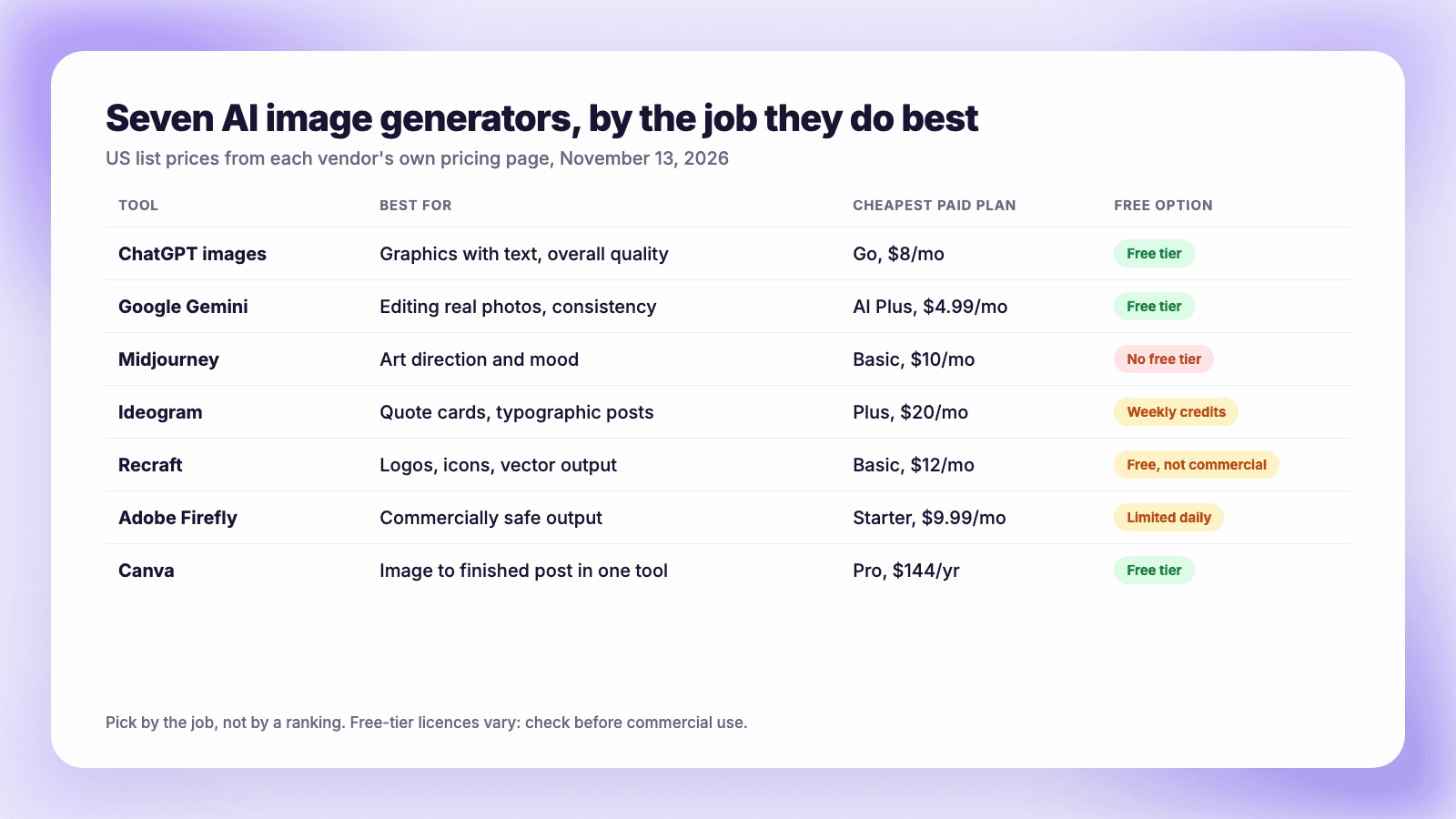
The short version: for most social media work, start with ChatGPT's image generation for graphics with text in them, or Google's Gemini (Nano Banana) for editing a real photo and keeping a face or product consistent. Midjourney is still the pick for a distinctive look. Recraft is the one for logos and vector graphics, Adobe Firefly for the lowest legal risk, and Canva when you want to go from image to finished, resized post in one place. Whatever you choose, realistic AI images must be labeled on TikTok, and about half of consumers say AI content makes them less likely to buy.
How we picked
Three questions matter for social content, and they are not the ones that win benchmark charts:
- Can it put readable text in an image? Quote cards, sale graphics and thumbnails all need it.
- Can it keep something consistent? The same product, mascot or face across a month of posts.
- What does it cost, and are you allowed to use the result commercially?
Prices below are US list prices from each vendor's own page. Model versions change every few months, so treat the names as a snapshot.
The shortlist
| Tool | Best for | Cheapest paid plan | Free option |
|---|---|---|---|
| ChatGPT images | Graphics with text, overall quality | Go, $8/mo | Yes, limited |
| Google Gemini (Nano Banana) | Editing real photos, consistency | AI Plus, $4.99/mo | Yes |
| Midjourney | Art direction and mood | Basic, $10/mo | No |
| Ideogram | Quote cards and typographic posts | Plus, $20/mo | Weekly credits |
| Recraft | Logos, icons, vector output | Basic, $12/mo | Yes, not for commercial use |
| Adobe Firefly | Commercially safe output | Starter, $9.99/mo | Limited daily |
| Canva | Image to finished post in one tool | Pro, $144/yr | Yes |
ChatGPT images
OpenAI's current image models, GPT Image 2.5 and 2.6, sit at the top of both public leaderboards we checked. On ChatGPT's pricing page the Free plan includes "limited image creation," Go is $8 a month and Plus is $20. OpenAI publishes no exact image caps. It is the strongest all-rounder for graphics that carry words, and its main costs are speed and price: it is among the slowest of the major models and the most expensive per image.
Google Gemini (Nano Banana)
Google's image models go by Nano Banana. Google describes the newest, Nano Banana 2.1, as having "multi-turn character consistency, accurate text rendering, and search-grounded generation." It is the practical choice when you start from a real photo: change the background, swap a product color, keep the same person across a series. The Gemini app has a free tier, and Google AI Plus is $4.99 a month. Through the API it costs roughly a sixth of what OpenAI's top model does.
Midjourney
Midjourney is on V8.2, the default since July 2026, and it remains the tool people choose for a look rather than for accuracy. There is no free tier: plans start at $10 a month for Basic, and $30 for Standard with unlimited slower generations. Images are public unless you pay for Pro or Mega. It does not appear on either leaderboard, so judge it by eye.
Ideogram
Ideogram built its reputation on typography and is priced for it: Plus is $20 a month, or $15 billed yearly, and paid plans include unlimited slower generations. Two cautions. Images are public by default unless you are on a paid plan, and it no longer leads the text benchmarks, where several larger models have caught up.
Recraft
Recraft is the specialist for brand assets: logos, icons and true vector files that scale. Read the terms before using the free plan, because Recraft's pricing page says "Images generated on the Free plan are owned by Recraft" and are not licensed for commercial use. Paid plans, from $12 a month, grant full ownership.
Adobe Firefly
Firefly is the conservative choice. Adobe says "outputs from Adobe Firefly AI models are safe for commercial use," attaches Content Credentials automatically, and offers IP indemnification to eligible enterprise customers. Plans start at $9.99 a month for 2,000 credits. Note the limit: Firefly also hosts other companies' models, and Adobe says you are responsible for deciding whether those are appropriate for your project.
Canva
Canva's image generation is not the best in this list, but nothing else takes you from a blank prompt to a branded, resized graphic as quickly. Pro is $144 a year. Canva's AI terms say "you own your Output" and prohibit removing the AI metadata it embeds.
Also worth knowing: FLUX from Black Forest Labs is the cheapest good-quality option for developers generating in bulk, from under a cent per image. Meta AI is free inside Meta's apps and its model ranks respectably. Stable Diffusion's newest release is still 3.5 and now ranks near the bottom, so it is mainly for people who want to run a model themselves.
What the blind tests say
Two public leaderboards rank image models by showing people two unlabeled images for the same prompt and asking which is better. Arena's text-to-image board had 6.9 million votes across 85 models when we read it on November 12, 2026. Artificial Analysis runs a similar test across 112 models.
Both agree on the order at the top: OpenAI's GPT Image models first, then a tight group made up of Microsoft's MAI-Image, Google's Nano Banana 2.1 and xAI's Grok Imagine. Midjourney, Firefly and Canva are not on either board, which is a gap rather than a verdict.
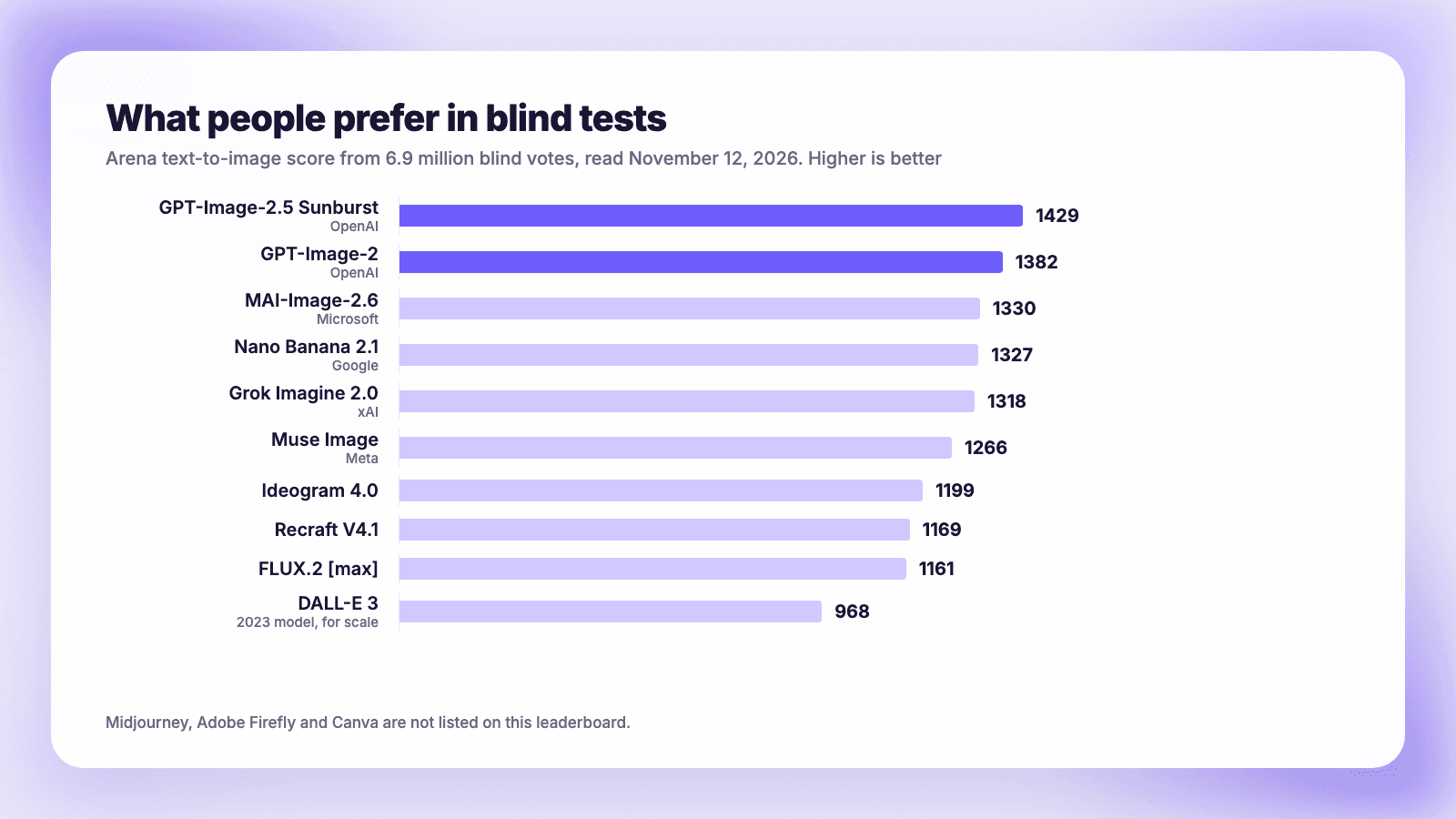
A higher score does not mean better for your job. A text-heavy design benchmark from IMG.LY, still labeled a pilot, weights text accuracy at 40% and puts Meta's Muse Image and a small FLUX model near the top, ahead of far more expensive ones. Most current models now render short text correctly, and price no longer predicts which ones do.
What an image actually costs
If you generate through an app subscription, the per-image cost is hidden. Through the API it is not, and the spread is wide. Artificial Analysis lists these prices per 1,024-pixel image:
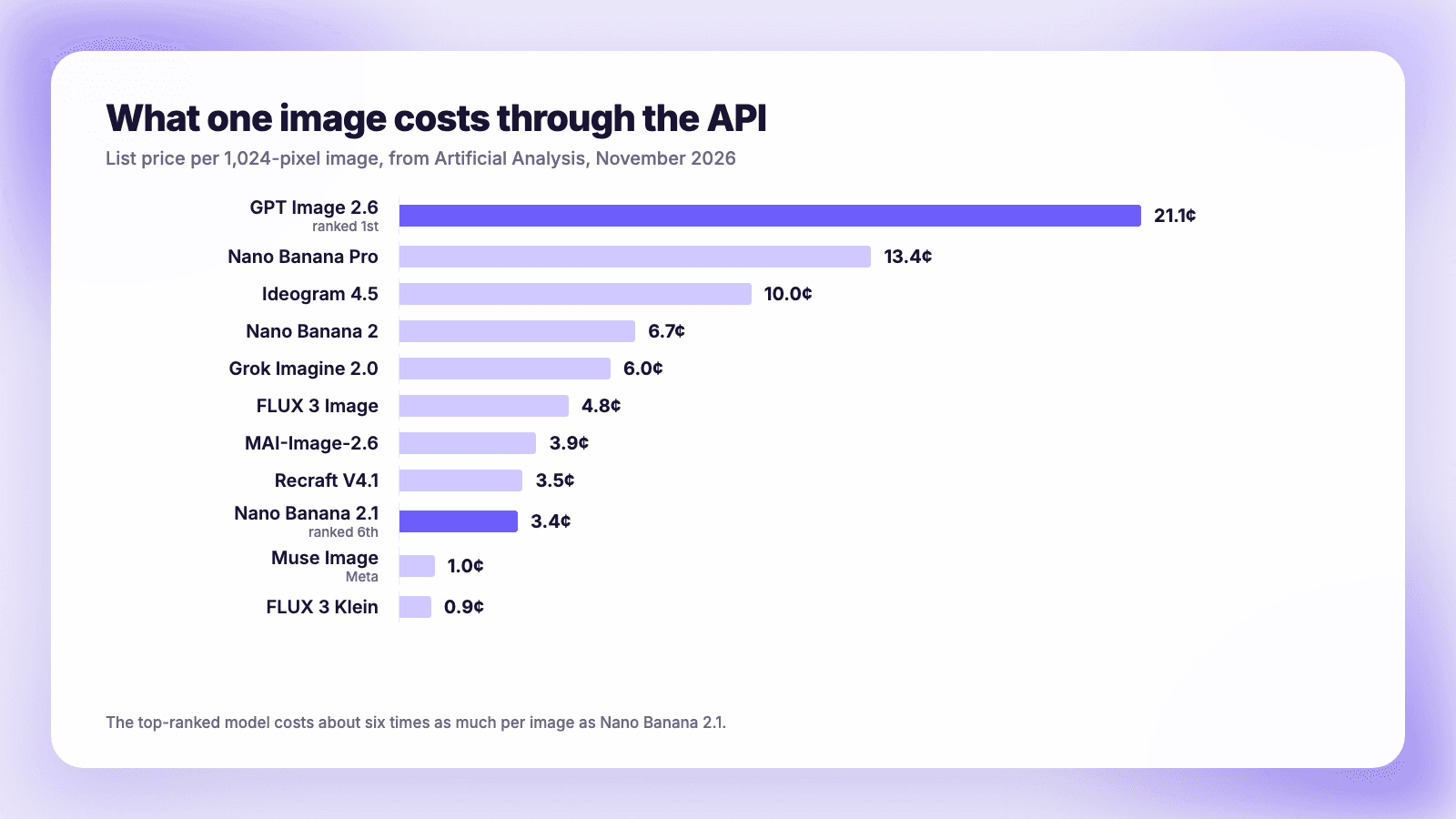
The top-ranked model costs about six times as much per image as Nano Banana 2.1, which ranks a few places below it. For a social account producing a handful of images a week, none of this matters and a $10 to $20 subscription covers it. For anyone generating hundreds of variations, it decides the tool.
What people who use them say
Benchmarks measure a single image. Daily use is messier.
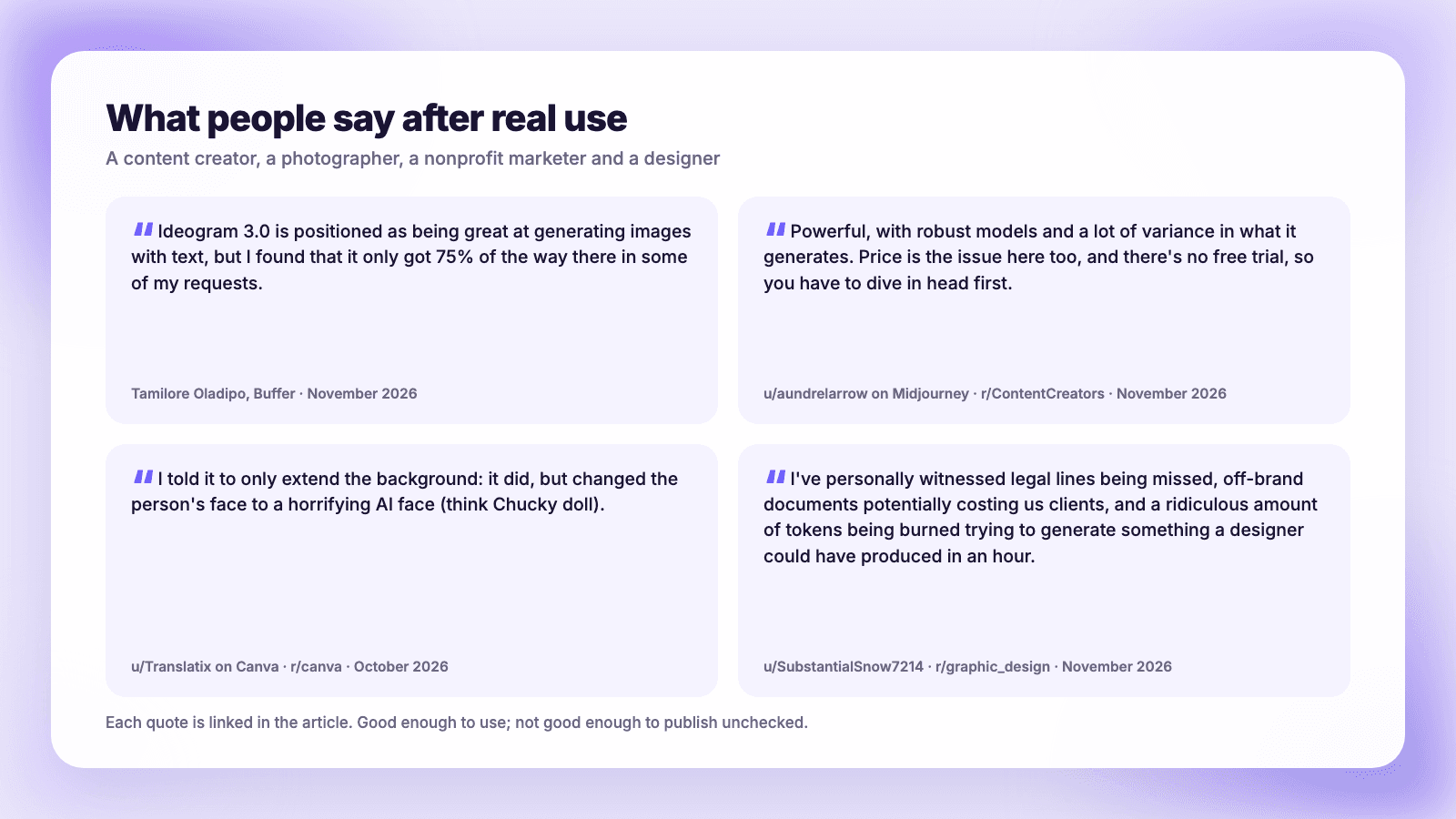
Tamilore Oladipo, a senior content creator at Buffer, tested the field in November 2026 and wrote: "Ideogram 3.0 is positioned as being great at generating images with text, but I found that it only got 75% of the way there in some of my requests." Her overall finding: "Nano Banana 2 was the most consistent across all three, and Seedream and Ideogram 3.0 were the most reliable with text."
A working photographer on r/ContentCreators compared four tools and summed up Midjourney as "Powerful, with robust models and a lot of variance in what it generates. Price is the issue here too, and there's no free trial, so you have to dive in head first." Of Canva's generator: "the output was repetitive and lacked polish."
Editing is where things go wrong. A marketer for a nonprofit orchestra described asking Canva to extend a photo's background: "I told it to only extend the background: it did, but changed the person's face to a horrifying AI face (think Chucky doll)."
And a designer on r/graphic_design, in a thread with nearly 300 upvotes, described the cost of skipping review: "I've personally witnessed legal lines being missed, off-brand documents potentially costing us clients, and a ridiculous amount of tokens being burned trying to generate something a designer could have produced in an hour."
The pattern across all of them: the tools are good enough to use and not good enough to publish unchecked. Look closely at hands, faces, logos and any text before it goes out.
The labeling rules, platform by platform
This is the part most tool roundups leave out, and it is where accounts get into trouble.
| Platform | The rule for images | Auto-labeling |
|---|---|---|
| Instagram, Facebook, Threads | The label requirement covers realistic video and audio. "This requirement does not apply to images." | Yes. Images "may still receive a label if the systems detect that they were AI-generated" |
| TikTok | Creators must "label all AI-generated content that contains realistic images, audio, and video" | Yes, including from Content Credentials. An automatic label cannot be removed |
| YouTube | Creators must "disclose AI-generated or altered content that seems realistic" | Yes, from its own tools, C2PA metadata or detection |
Sources: Meta's help center, TikTok support and YouTube help.
Two practical points. First, many generators embed Content Credentials in the file, and all three platforms read them, so an image can be labeled as AI whether or not you tick a box. Second, both TikTok and YouTube say a label on its own does not reduce distribution. TikTok: "Turning on the AI-generated content setting won't affect the distribution of your video as long as it doesn't violate our Community Guidelines." We cover this in more depth in do platforms penalize AI content.
How audiences react
The tools have improved faster than people's comfort with them.
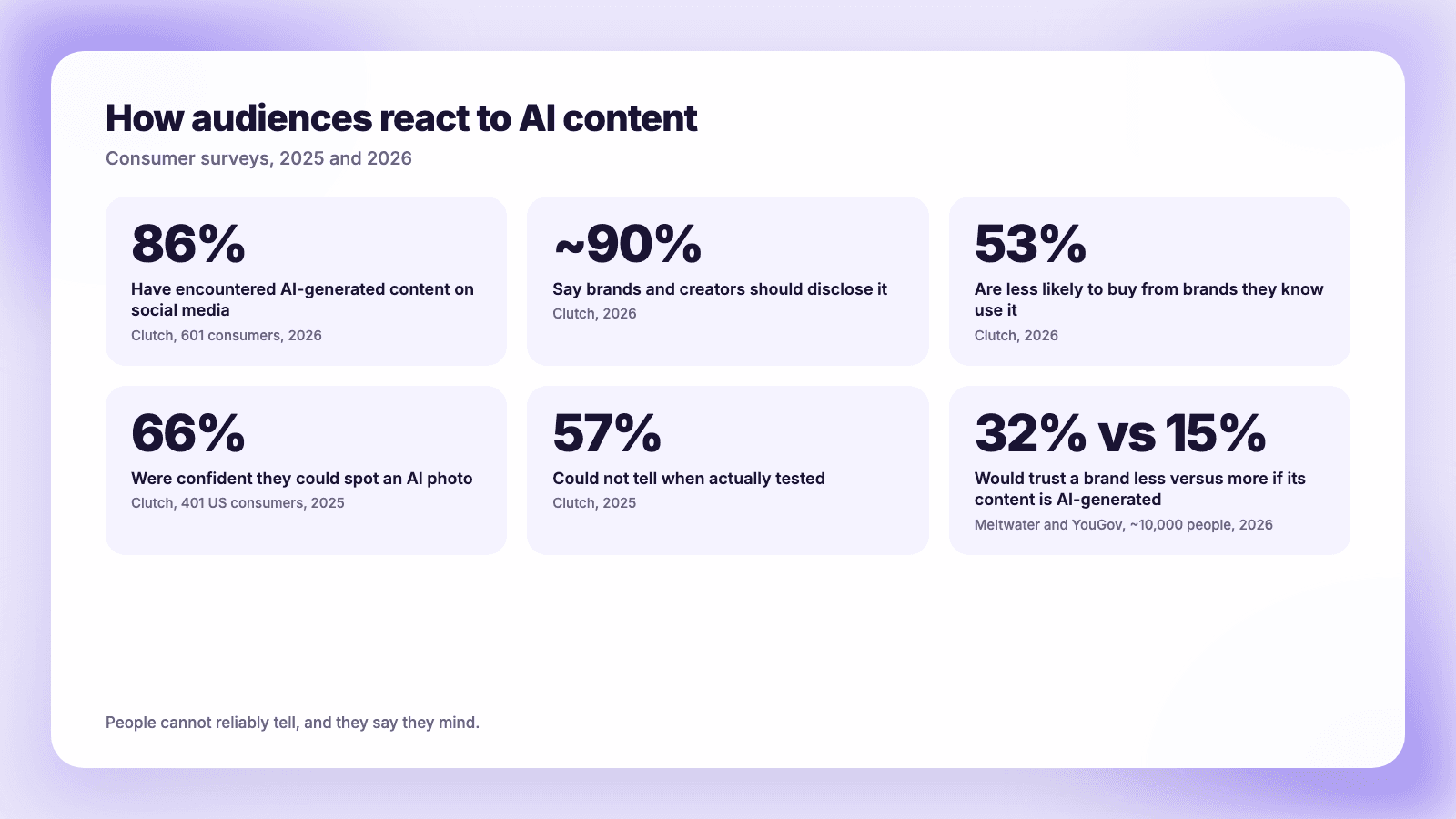
- In a Clutch survey of 601 consumers published in September 2026, 86% had encountered AI-generated content, 53% said they are "less likely to purchase from brands they know use AI in social media content," and nearly 90% said brands and creators should disclose it.
- In an earlier Clutch study of 401 US consumers, 66% were confident they could spot an AI photo. When tested, 57% on average could not.
- A Meltwater and YouGov survey of nearly 10,000 people in seven markets found 32% would trust a brand less if its content was AI-generated, against 15% who would trust it more.
People cannot reliably tell, and they say they mind. The honest reading is that AI images are safest where nobody expects a photograph: illustrations, backgrounds, concept graphics, quote cards. They carry the most risk where the image is a claim about reality, such as a product, a place, a result, or a person.
Who owns what you generate
Two separate questions get mixed up here.
Can you use it commercially? Usually yes, on a paid plan. Midjourney's terms say "You own all Assets You create with the Services to the fullest extent possible under applicable law." Ideogram, Canva and Recraft's paid plans say similar. Check the free tiers, which are often more restrictive.
Can you copyright it? That is different. The US Copyright Office's January 2025 report says AI outputs can be protected only where a human author has determined sufficient expressive elements, which can include how you arrange or modify the output "but not the mere provision of prompts." A prompt alone does not make you the author.
Indemnification, where the vendor covers you if an output infringes, exists only on enterprise and API plans from Adobe, OpenAI and Google. None of the consumer or small-business plans we checked includes it.
A workflow that holds up
- Pick the tool by job, not by ranking. Text-heavy graphic: ChatGPT or Ideogram. Editing a real photo: Gemini. A signature look: Midjourney. A logo: Recraft.
- Generate at the shape you post. Vertical for Reels and TikTok covers, portrait for the Instagram feed, square where it still fits. Confirm the tool can output each before you commit to it.
- Check every image like an editor. Text, hands, faces, brand marks, and anything that implies a real event.
- Label realistic images on TikTok and YouTube, and assume Instagram may label them for you.
- Publish once to every network. This is the part Plumefy does. It does not generate images. You upload the finished file once and it goes to each platform with its own crop and caption, so the square version is not what lands on a vertical feed. If you want help with the words rather than the picture, the AI caption generator writes a caption fitted to each network.
For the rest of the stack, see which AI tools actually help creators and how to keep your brand voice with AI.
FAQ
What is the best AI image generator for social media?
For most accounts, ChatGPT's image generation for graphics with text, or Google's Gemini for editing photos and keeping a subject consistent. Both have free tiers and paid plans under $10 a month. Midjourney is the better choice if a distinctive visual style matters more than accuracy.
Is there a free AI image generator that is good enough?
Yes. ChatGPT, Gemini, Canva and Meta AI all generate images for free with limits. Check the license before using free output commercially: Recraft's free plan, for example, does not grant commercial rights.
Do I have to label AI images on Instagram?
Meta's label requirement covers realistic video and audio, and its help page says it "does not apply to images." Instagram may still label an image automatically if it detects AI metadata. TikTok and YouTube do require you to label realistic AI content.
Which AI image generator is best for text in images?
ChatGPT's current models lead the blind-test leaderboards and handle text-heavy layouts well. Ideogram is the lower-cost specialist. In current benchmarks most leading models render short text correctly, so test your own typical graphic before choosing.
Can I use AI-generated images commercially?
On paid plans, generally yes: Midjourney, Ideogram, Canva, Recraft and Adobe all grant commercial use. Copyright is a separate matter. In the US, an image made from a prompt alone is not protected by copyright unless a human contributed enough creative expression.
The takeaway
The quality gap between the leading generators is now smaller than the gap between using one carefully and using one carelessly. Choose by the job, check every image before it goes out, label what is realistic, and be straightforward with your audience about what is AI. Half of them say it changes whether they buy.
Post everywhere, once.
Start on the free plan. No card needed; upgrade when you need scheduling.
Start free