Why Social Media Schedulers Feel Overpriced (2026 Price Check)
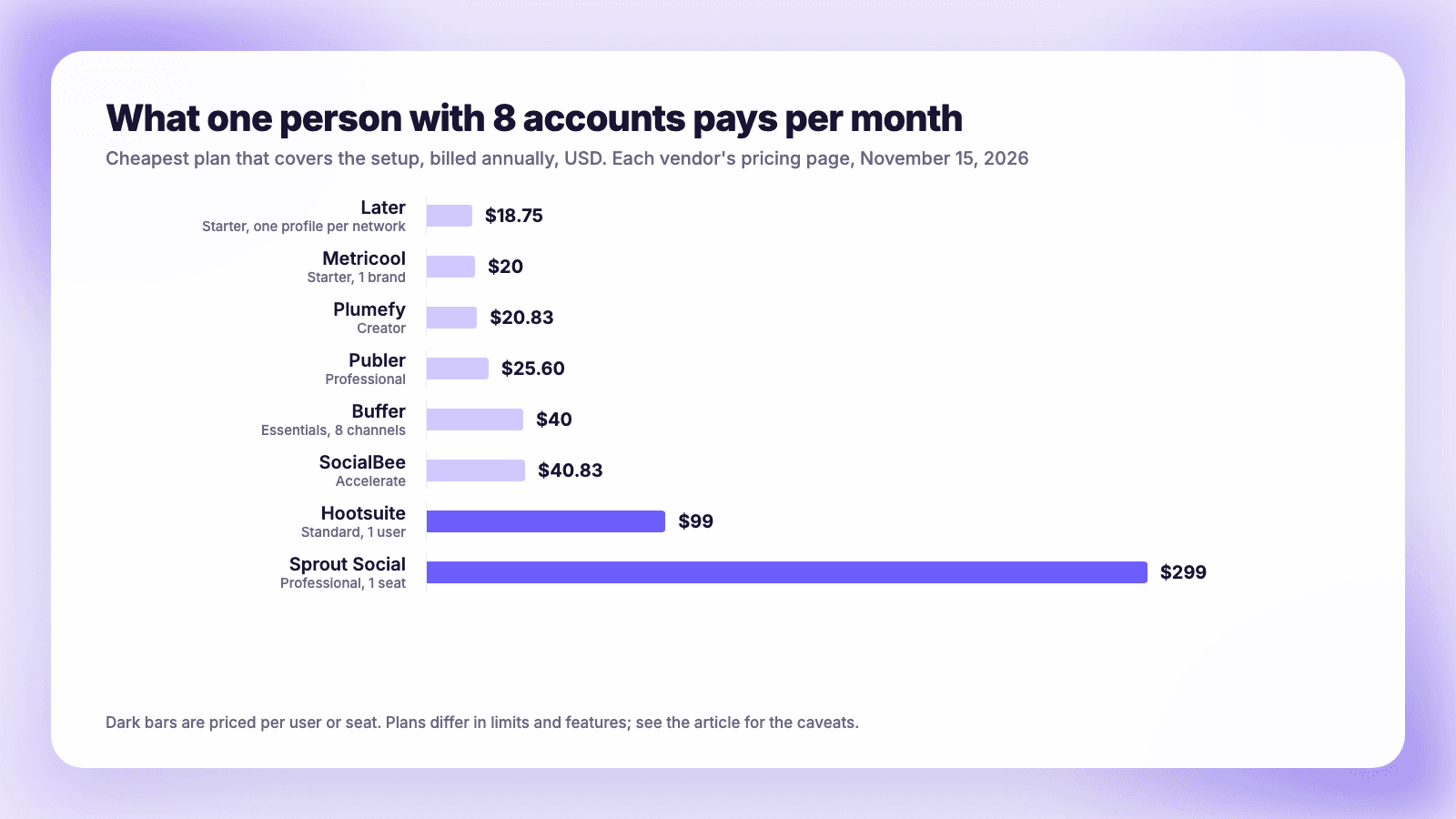
We priced 8 schedulers: one person with 8 accounts pays $18.75 to $299 a month, a 3-person team $32 to $897. Per-seat pricing is what makes it expensive.

Related tool: Compare Plumefy with other tools.
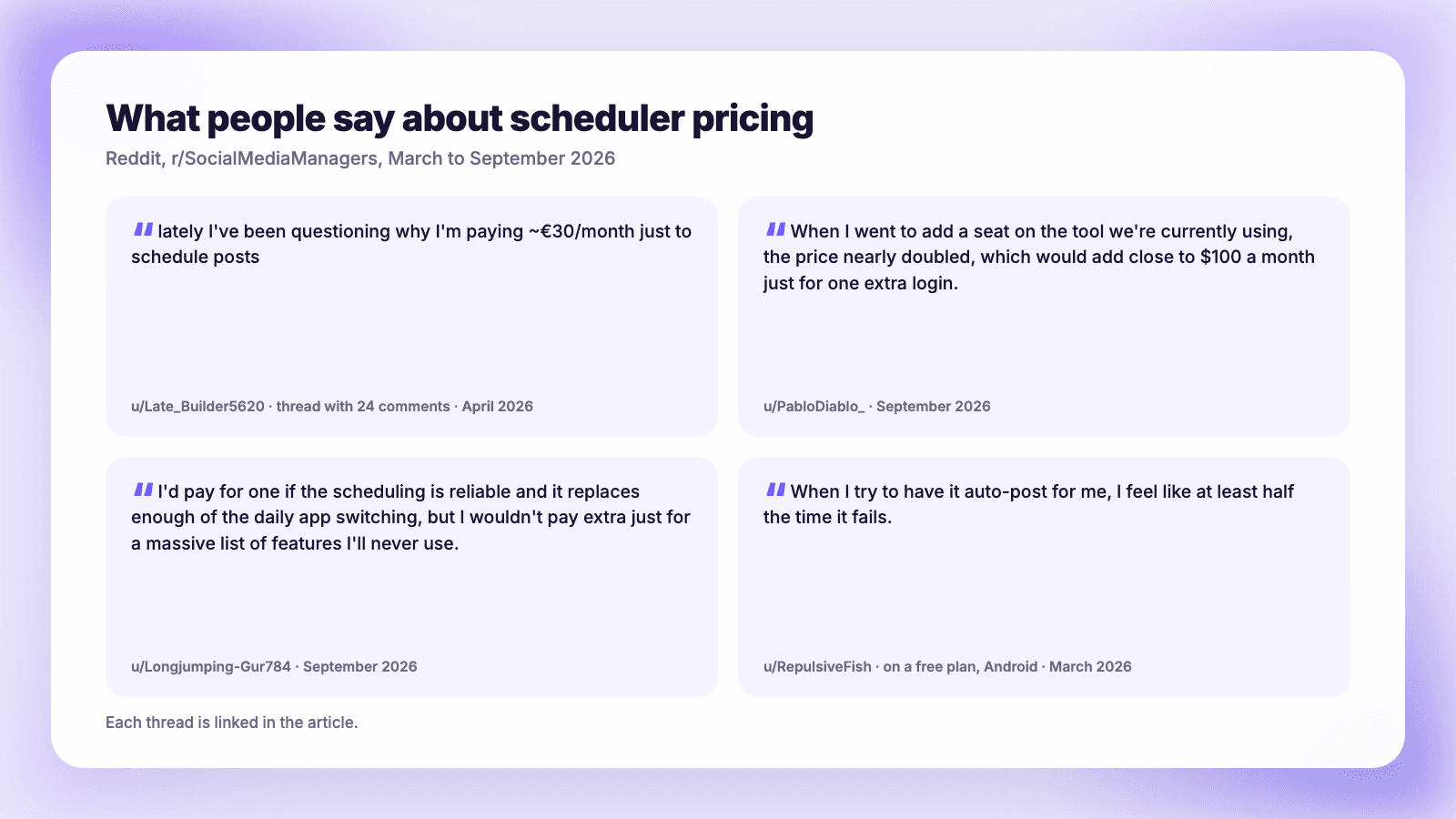
A developer on r/SocialMediaManagers opened a thread in April 2026 with "lately I've been questioning why I'm paying ~€30/month just to schedule posts." They had added up servers, APIs and upkeep for ten accounts and got about €3 a month. A few months later, a small business owner in the same subreddit tried to add one teammate to their tool and watched the bill nearly double.
Both are describing the same thing from different ends. Scheduling a post is cheap to run. What makes a scheduler expensive is how it is priced: per user, per channel, or per "brand", with the useful features spread across tiers. We collected the current published price of eight schedulers on November 15, 2026, priced two realistic setups, and sorted the features into ones worth paying for and ones most people never use.
The short version: schedulers feel overpriced because most are priced for teams and agencies, then sold to one person. Billed annually, a solo creator with eight accounts would pay between $18.75 and $299 a month for the same basic job, depending on the tool. A three-person team with ten accounts would pay between $32 and $897. The top of both ranges comes from per-seat pricing (Sprout Social and Hootsuite), not from better scheduling. Pay for reliable publishing to the networks you use, per-network editing, and seats for the people who actually post. Skip listening, competitor benchmarking and big AI bundles unless someone is asking you for those reports.
A note before the numbers: Plumefy publishes this blog and is one of the eight tools. Every price below comes from the vendor's own pricing page, so you can check each one.
What people are actually annoyed about
Four Reddit threads from 2026 cover most of the complaints. Many replies in them come from people building or selling schedulers, which says something about the market too.
Price that does not match the job. The April thread that opened this article was titled "Anyone else feel like social media schedulers are way overpriced?" One reply pushed back on the €3 estimate: the real cost is "the ongoing API maintenance tax. Every time Meta or LinkedIn or TikTok changes their auth flow or deprecates an endpoint, someone has to drop everything and fix it." Both are true. Running the servers is cheap. Keeping posts landing on eleven moving targets is not.
The second seat. In September, u/PabloDiablo_ asked for an affordable tool for a small team: "When I went to add a seat on the tool we're currently using, the price nearly doubled, which would add close to $100 a month just for one extra login." In another September thread with 14 upvotes and 28 comments, the original poster said "The pricing on some of these also gets crazy once you start adding more accounts."
Bloat. Asked "What is the most annoying thing about social media scheduling tools?" in May, u/BrilliantLeg6209 named "the tendency of most scheduling tools to bloat over time," with simple workflows hidden "behind excessive dashboards and features." Another user in the September thread put the buying rule simply: "I'd pay for one if the scheduling is reliable and it replaces enough of the daily app switching, but I wouldn't pay extra just for a massive list of features I'll never use."
Posts that do not go out. A wedding photographer on Buffer's free plan wrote in March: "When I try to have it auto-post for me, I feel like at least half the time it fails." That is one user on Android, not a measured failure rate, but it is the complaint that matters most. A cheap scheduler that misses posts is expensive.
Previews and small-account analytics. In the May thread, u/heymae13 wrote that "the biggest headache for me is when the preview window doesnt match how it actually looks on the platform." In the "What's one thing you wish your scheduling tool did better?" thread, a small baker said "The analytics are also pretty useless for smaller accounts," and another reply noted "Most tools are designed for agencies managing 20+ accounts."
Three ways schedulers charge you
Most of the price differences come from which number the bill is tied to. Once you know a tool's model, you can predict whether it will get expensive for you.
| Model | Who uses it | What raises your bill | Cheap for | Expensive for |
|---|---|---|---|---|
| Per user (seat) | Hootsuite, Sprout Social | Every person who logs in | One person with many accounts (on Hootsuite) | Any team |
| Per channel or account | Buffer, Publer | Every profile you connect | A few accounts | Many accounts or many clients |
| Bundles of profiles | Later (social sets), Metricool (brands), SocialBee and Plumefy (tiers) | Crossing a tier limit | Setups that fit inside a tier | Setups just over a limit |
Some details that change the math:
- Hootsuite sells "per user (or 'seat')". Standard is $99 per user a month billed annually and covers up to 10 social accounts. Approval workflows start on Advanced at $399 per user. Our Hootsuite pricing explainer goes through the tiers.
- Sprout Social is $79 per seat (Essentials) or $199 (Standard) billed annually, but both connect only 5 social profiles. Unlimited profiles start at Professional, $299 per seat annually or $399 billed monthly.
- Buffer charges per channel: Essentials is $5 a channel a month billed yearly ($6 monthly) with one user. The Team plan, $10 a channel yearly, adds "Unlimited team members" and approvals.
- Publer charges per social account plus per extra member, and "For every 9 social accounts, the 10th one is free." Its own calculator gave $25.60 a month for 8 accounts on Professional, billed yearly, and each extra member added $1.60.
- Later sells "social sets", each with one profile on each of its 8 supported networks. Starter is one set and one user for $18.75 a month billed yearly, with 30 posts per profile a month. Its list of supported networks does not include X or Bluesky.
- Metricool prices by "brand", one profile per network. Starter covers up to 5 brands for $20 a month billed annually; team and role management, and post approvals, start on Advanced at $53. X is an add-on.
- SocialBee tiers by profile count: Bootstrap (5 profiles, $290 a year), Accelerate (10 profiles, $490 a year), Pro (25 profiles and 3 users per workspace, $990 a year).
- Plumefy has a Free plan (6 accounts, 20 posts a day, publishing now only) and two paid tiers: Creator at $26 a month or $250 a year with 15 accounts and one user, and Pro at $45 a month or $432 a year with unlimited accounts and team seats.
What a realistic setup costs
We priced two setups on each vendor's page, using the cheapest plan that covers them, at annual billing (the price most vendors show first).
- Solo: one person, 8 accounts (for example Instagram, TikTok, YouTube, Facebook, LinkedIn, Threads, Pinterest and one more).
- Small team: three people, 10 accounts, everyone with their own login.
| Tool | Plan for solo, 8 accounts | Per month | Plan for 3 people, 10 accounts | Per month |
|---|---|---|---|---|
| Later | Starter (one profile per network) | $18.75 | Growth, plus 1 extra user | $41.25 |
| Metricool | Starter (1 brand) | $20.00 | Advanced | $53.00 |
| Plumefy | Creator | $20.83 | Pro | $36.00 |
| Publer | Professional | $25.60 | Professional, 2 extra members | $32.00 |
| Buffer | Essentials, 8 channels | $40.00 | Team, 10 channels | $100.00 |
| SocialBee | Accelerate | $40.83 | Pro | $82.50 |
| Hootsuite | Standard, 1 user | $99.00 | Standard, 3 users | $297.00 |
| Sprout Social | Professional, 1 seat | $299.00 | Professional, 3 seats | $897.00 |
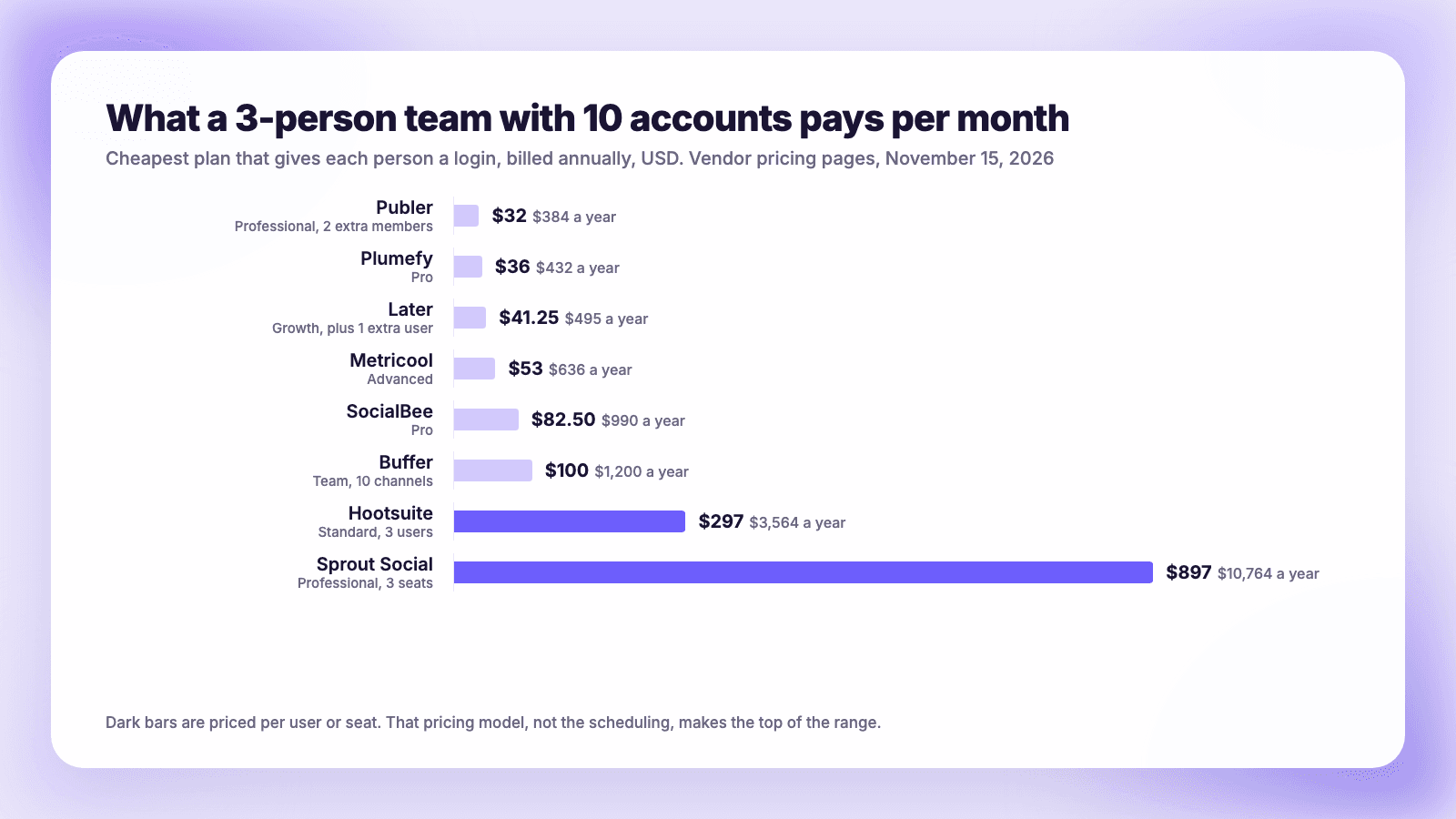
Over a year, the team setup costs $384 on Publer, $432 on Plumefy, $1,200 on Buffer, $3,564 on Hootsuite and $10,764 on Sprout Social. These are not like-for-like products. Sprout and Hootsuite include listening, an inbox and reporting that the cheaper tools do not. But if what your team does all day is plan and publish posts, you are paying for features you do not use.
Three caveats keep the table honest:
- Plans are not identical. Later's Starter only fits 8 accounts if they are on 8 different networks, and caps posts at 30 per profile a month. Hootsuite's Standard has no approval workflow. Metricool needs an add-on for X. Plumefy's Free plan does not schedule, so the table uses Creator.
- Monthly billing costs more. Sprout's Professional is $399 billed monthly against $299 billed yearly. Later advertises "25% off" for yearly, Publer and Buffer "2 months free", Metricool "save up to 24%", and Plumefy Creator is $26 monthly against $250 a year.
- Prices change. Everything here was read on November 15, 2026. Check the vendor's page before you buy.
The price of a second person
The single number that best predicts whether a tool will feel overpriced is what it charges when one more person needs a login. Here is the monthly increase, at annual billing, for going from the solo setup above to two people.
| Tool | What changes | Added per month |
|---|---|---|
| Publer | One extra member | $1.60 |
| Plumefy | Creator to Pro | $15.17 |
| Later | Starter to Growth (2 users included) | $18.75 |
| Metricool | Starter to Advanced | $33.00 |
| Buffer | Essentials to Team, 8 channels | $40.00 |
| SocialBee | Accelerate to Pro | $41.67 |
| Hootsuite | One more user on Standard | $99.00 |
| Sprout Social | One more seat on Professional | $299.00 |
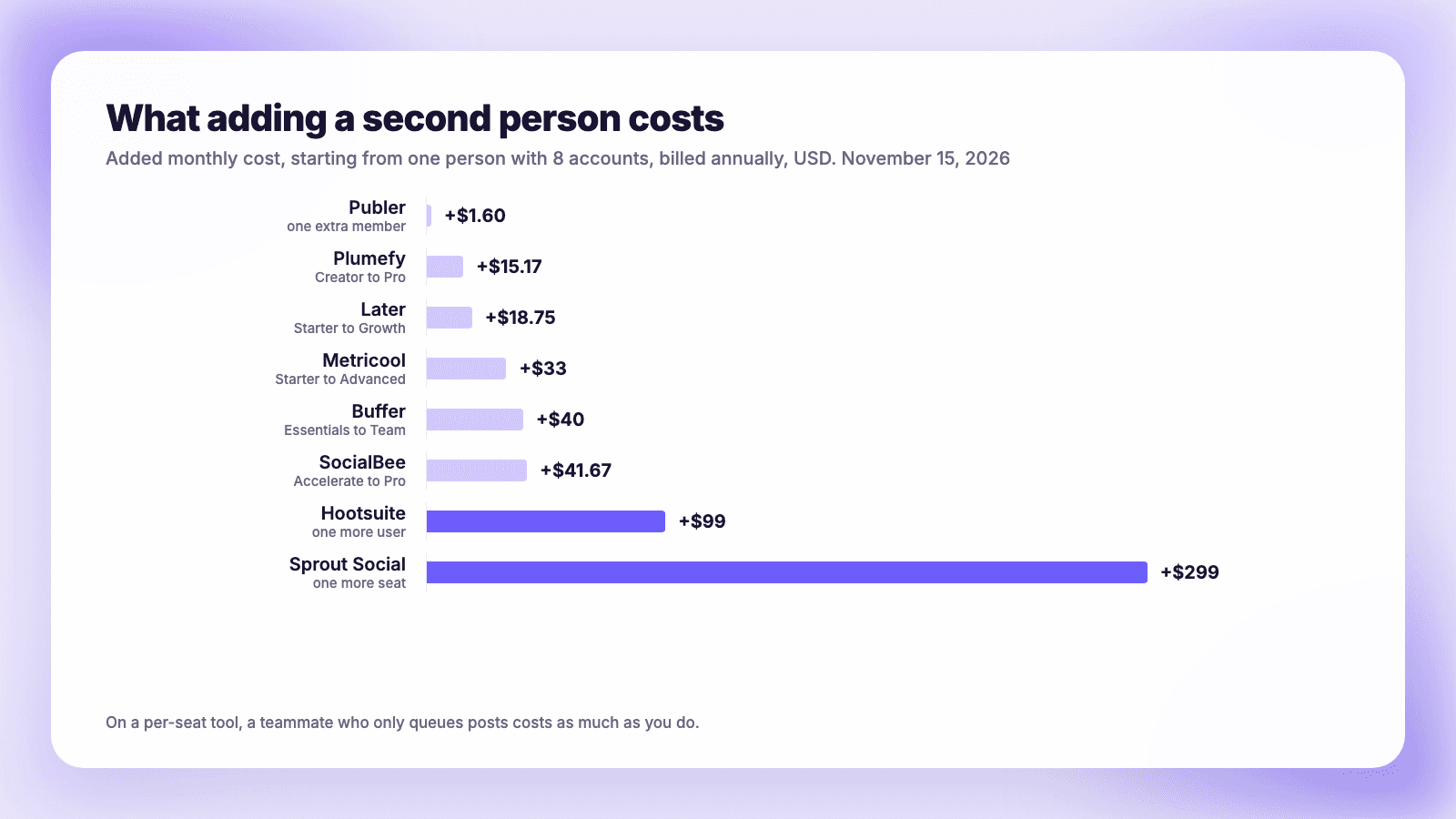
This is what u/PabloDiablo_ ran into. On a per-seat tool, a teammate who only needs to queue posts costs as much as you do. If you expect to add people, look at this number before the headline price.
What is worth paying for
Most small accounts need a short list of things done well. Here is how we would sort the feature lists.
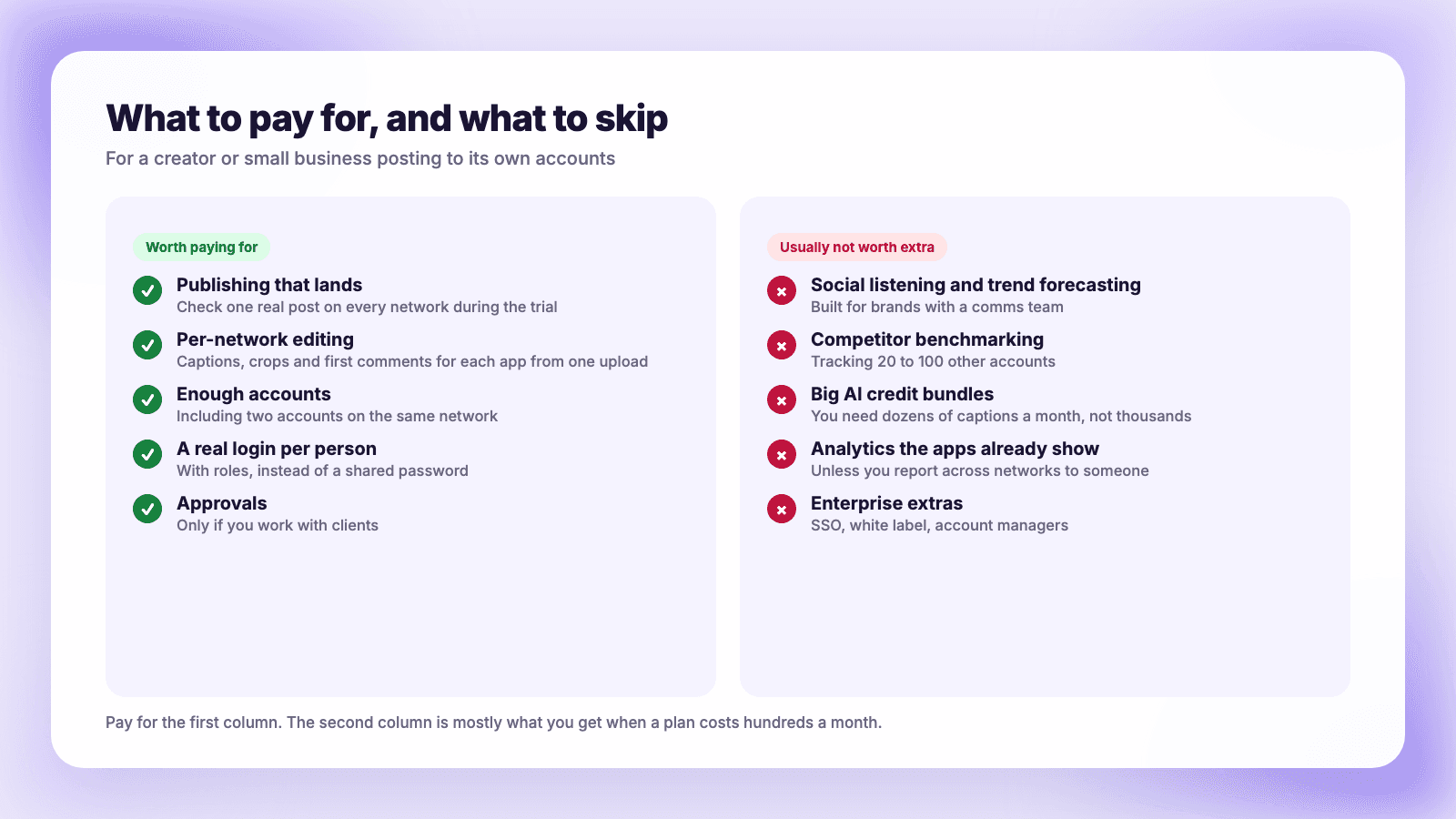
Worth paying for:
- Publishing that actually lands. This is the whole product. One reply in the September thread, from someone who builds a scheduler, suggested a trial test: "publish one real thing to each network, then go check it on the network itself, not in the tool's dashboard." They also warned that "TikTok direct posting needs an audit, or your posts land as private drafts nobody sees."
- Per-network editing. Different caption lengths, crops and first comments for each network, from one upload. It also fixes the "preview doesn't match" complaint, and it is what keeps the same post from reading like a copy on every app. Our guide on free vs paid schedulers covers where free plans stop.
- Enough accounts for your real setup, including two of the same network. Several tools count a second Instagram account as a new set, brand or channel.
- Real logins for each person, with roles, once anyone else touches your accounts. Sharing a password is a security problem, not a saving.
- Approvals, if you work with clients. "Approval workflows that don't scale. Works fine solo, breaks the moment you add a client or a second person," as one Reddit user put it.
Usually not worth paying extra for, for a small account:
- Social listening and trend forecasting. Useful for brands with a comms team. Not for a bakery.
- Competitor benchmarking against 20 or 100 accounts.
- Large AI credit bundles. Captions help, but you need dozens a month, not thousands.
- Analytics you could read in the app. Native Instagram and TikTok insights are free. Pay for analytics only if you report across networks to someone else.
- Enterprise extras like SSO, white label and dedicated managers.
Where Plumefy fits
Plumefy is built for the solo and small-team setups in the table. It publishes or schedules one upload to 11 networks, including TikTok, Instagram, YouTube, X, LinkedIn, Threads, Bluesky and Google Business, with a caption tuned for each network by AI that you can edit before posting. Pricing is a flat tier rather than per seat or per channel: Creator covers 15 accounts for $26 a month, and Pro adds unlimited accounts and team seats for $45. It does not list social listening, competitor benchmarking or a comment inbox, so if those are on your must-have list, the tools above that include them are the better fit. You can see the plans on the pricing page and side-by-side comparisons on /compare.
If you are still choosing, our roundup of the best social media scheduling tools goes deeper on features, and Buffer vs Publer vs Metricool compares the three cheapest per-account options head to head.
FAQ
Why are social media schedulers so expensive?
Most are priced per user or per channel and designed for teams, so one person pays for collaboration, listening and reporting features they may not use. Running the scheduling itself is cheap; keeping up with each network's API changes and approvals is the real ongoing cost.
What is the cheapest social media scheduler for multiple accounts?
For one person with 8 accounts, billed annually, the cheapest published prices we found on November 15, 2026 were Later at $18.75, Metricool at $20, Plumefy at $20.83 and Publer at $25.60 a month. Check each plan's limits, since Later and Metricool count one profile per network.
Is Hootsuite or Sprout Social worth it for a small business?
Only if you need what they add beyond scheduling, such as listening, a shared inbox and detailed reports. For three people they cost $297 and $897 a month on annual billing, against $32 to $100 for most per-account tools.
Should I pay monthly or yearly for a scheduler?
Yearly is roughly 17% to 25% cheaper on most of these tools, but only pay yearly after a trial month in which every post landed on every network you use.
What should I check before paying for a scheduler?
Publish one real post to each network during the trial and check it on the network itself. Then price the plan with the number of people and accounts you expect in a year, not today.
Post everywhere, once.
Start on the free plan. No card needed; upgrade when you need scheduling.
Start free